

 IridiumIO
Strange visual glitch with folder sizes before and after compression
I've encountered a strange visual glitch while compressing a folder. It showed the after compression size as higher. Judging from the folder's size, it looks like it compressed normally, going from 14.6 GB to 6.63 GB, so I'm not sure why this glitch happened. I tried decompressing the folder and then compressing it again but the glitch still happens.
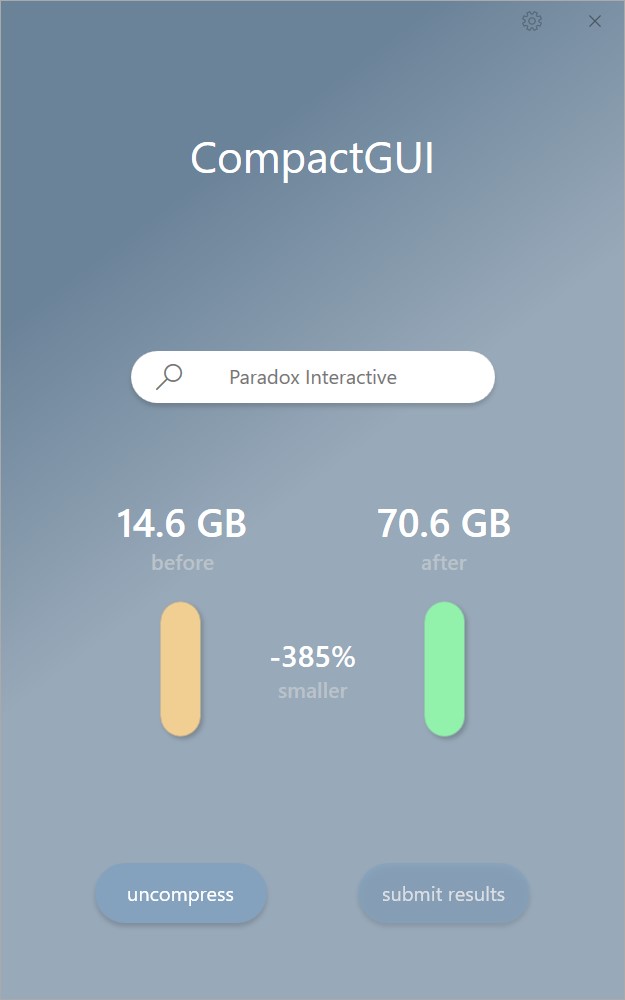

It's interesting that this happened to you, I've had it happen exactly once and no matter what I tried I couldn't get it to happen again.
Is it just for this particular folder??

Yes, this is the only folder it's happened on. I've compressed 24 folders so far since getting this tool and this is the only one where this glitch happened.
The Paradox Interactive folder holds configuration files, saves, and mods for Paradox games, but not the games themselves. This folder has files for Crusader Kings 2, Crusader Kings 3, Europa Universalis 4, and Hearts of Iron 4. I compressed it because the saves and mods take up a lot of space on my SSD
Just wanted to give a heads up on this if it means anything: I just uncompressed and re-compressed the Paradox Interactive folder using the latest version of CompactGUI and the visual glitch did not happen this time around. Not sure if it made a difference, but I was running CompactGUI in admin mode this time. I can try it normal mode and see if the visual glitch happens.
Definitely strange, if you go back to normal mode and just analyse it (not compress), does it then show the glitch as well or is it completely fine after compressing with admin mode?
I just checked and it doesn't show the glitch when analyzed on normal mode.