
PlotSquared

PlotSquared copied to clipboard
 IntellectualSites
/p done requirements are missing and incorrect
Server Implementation
Paper
Server Version
1.19.3
Describe the bug
Given someone wants to add requirements to use the /p done command.
Firstly no settings are loaded from the config for done requirements. The Settings.AUTO_CLEAR config never has done entry
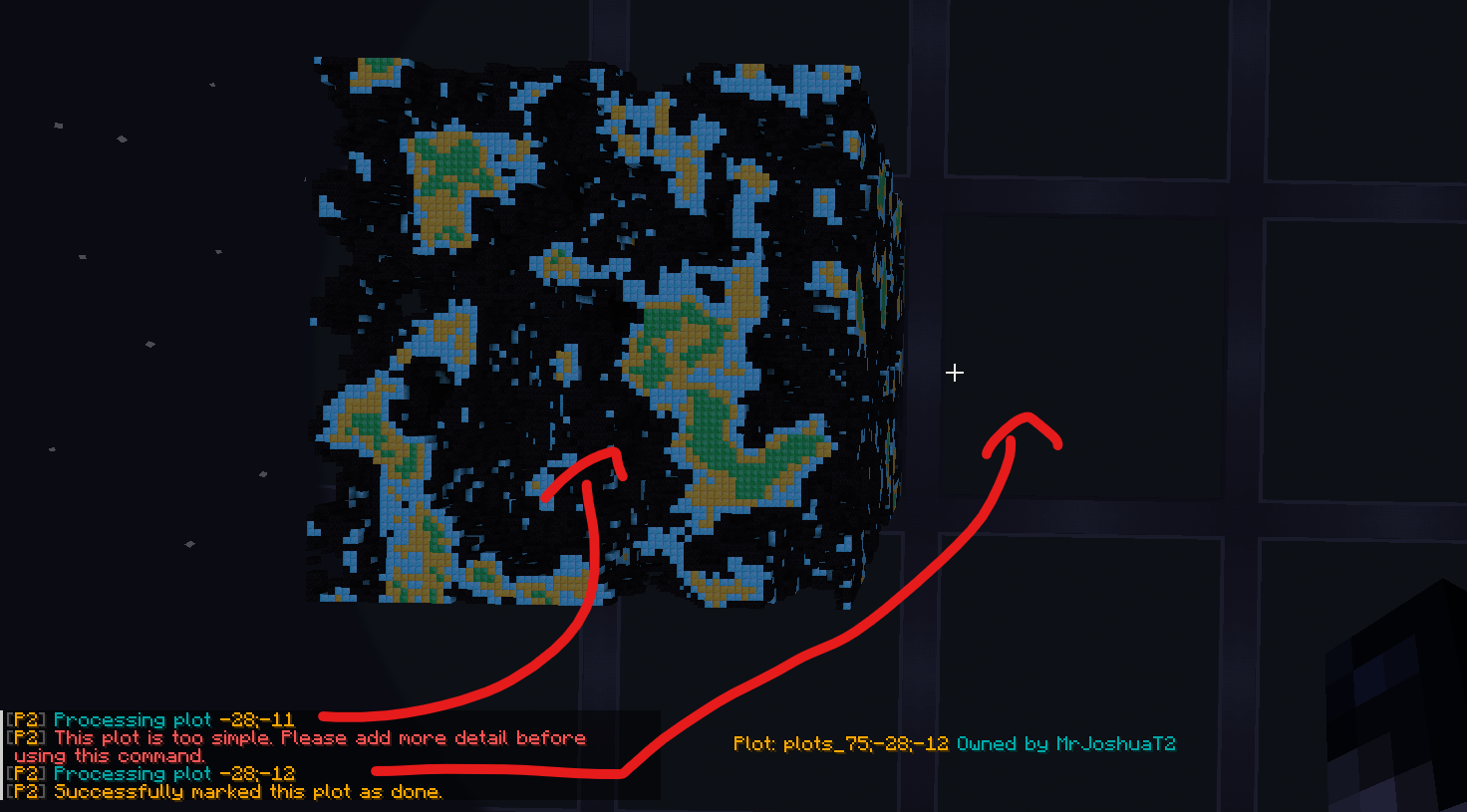
If a plugin adds the done requirements to the settings. When someone uses /p done, the threshold is incorrectly used. A simple empty plot can be marked as done and a complex plot reports as too simple. As shown in the picture
To Reproduce
My done requirements, loaded via a custom plugin
- Load "done" requirements into Settings.AUTO_CLEAR. This is not done via the Settings.class, I made a plugin do this.
- Select the whole plot with the wand and run
//set #perlin[10][emerald_block,gold_block,diamond_block,coal_block,air]or any similar command to generate a lot of variety. - Run
/p doneon the complex plot, the response is "This plot is too simple. ...". Run/p doneon a fresh claimed plot, the response is "Successfully marked this plot as done"
done:
  days: 1
  threshold: 1
  calibration:
    changes: 0
    faces: 0
    data: 0
    air: 0
    variety: 0
    changes_sd: 1
    data_sd: 0
    air_sd: 0
    variety_sd: 0
Expected behaviour
A simple plot does not get set as done. A complex plot should be able to be marked as done
Screenshots / Videos
Error log (if applicable)
No response
Plot Debugpaste
https://athion.net/ISPaster/paste/view/60719e8dc66447c491cb9f09aa907450
PlotSquared Version
6.11.1-Premium
Checklist
- [X] I have included a Plot debugpaste.
- [X] I am using the newest build from https://www.spigotmc.org/resources/77506/ and the issue still persists.
Anything else?
No response
