

 IntelRealSense
RGB camera not working

| librealsense | 2.50.0 RELEASE |
| OS | Linux |
| Name | Intel RealSense D435I |
| Serial Number | 941322071971 |
| Firmware Version | 05.13.00.50 |
| Advanced Mode | YES |
| Camera Locked | YES |
| Usb Type Descriptor | 3.2 |
| Product Line | D400 |
| Asic Serial Number | 944223050586 |
| Firmware Update Id | 944223050586 |
Please provide a description of the problem
When I connect the camera RGB camera doesn't show anything, It does have some warning. I have used the original cables provided in the box, I have changed other cables and PC. But all having same issues. Please support to solve this issue.

Hi @sreejithsreeni It looks as though the RGB sensor of the camera has been detected, otherwise the camera's firmware driver would have identified the camera name as D430i instead of D435i.
Have you enabled Stereo Module, RGB and Motion Module simultaneously at any time? There is a known issue with the RealSense Viewer tool for some RealSense users where enabling these three streams can cause the RGB stream to disappear and display the message No Frames Received in the white RGB panel.
If this problem occurs then only rebooting the computer can correct it, and there is not a fix for it in the Viewer except for only enabling two stream types if enabling the Motion Module as one of those two streams.
Does RGB appear if you only enable Stereo Module and RGB after launching the Viewer after a computer reboot?

After reboot, I enabled the stereo module and then the RGB module. All the possibilities I have tried. But the same issue exists.
Which kernel version are you using, please? If the RealSense SDK was built from Debian packages then the newer kernel supported is 5.4. if the SDK was built from source code and then patched, the most recent kernels supported in SDK version 2.50.0 are 5.8 and 5.11.
An unofficial test patch was recently released at https://github.com/IntelRealSense/librealsense/issues/10439#issuecomment-1171965106 that provides 5.13 and 5.15 kernel support though.
The SDK can work with newer kernels than those that are supported, though there may be unpredictable consequences in regards to stability.
If the SDK is built from source code with the RSUSB backend installation method then the SDK bypasses the kernel, so it is not dependent on Linux versions of kernel versions and does not require patching.
5.15.0-41-generic is my kernel version in linux. But Please note that RGB camera not working in windows Realsense viewer also.
Thank you for the information. Has the RGB camera worked previously and then stopped functioning or has it not worked since the time that the camera was purchased?
It was working before, for long time we don't use it. After that recently we tested it shows the USB error, we changed the USB,but it have the issues in RGB data.
If a RealSense camera has been in storage for weeks or months then in a very small number of cases it may no longer be able to display a stream from the first time that it is taken out of storage. In those minority of cases, the problem sometimes corrected itself after a few weeks. For example, one camera was shipped back to Intel from India and was working again by the time that it arrived in California. This could suggest that the problem is related to condensation inside the camera that built up during storage.
Thanks for the tip. I keep the realsense viewer for about 1 hour continuously, then RGB is working, but if I turn off then turn on after few minutes it have same issues. The RGB data also not good as there is many noise is in output( attaching the image). I want to use this camera in a product. How to proceed to get a stable data when I started the node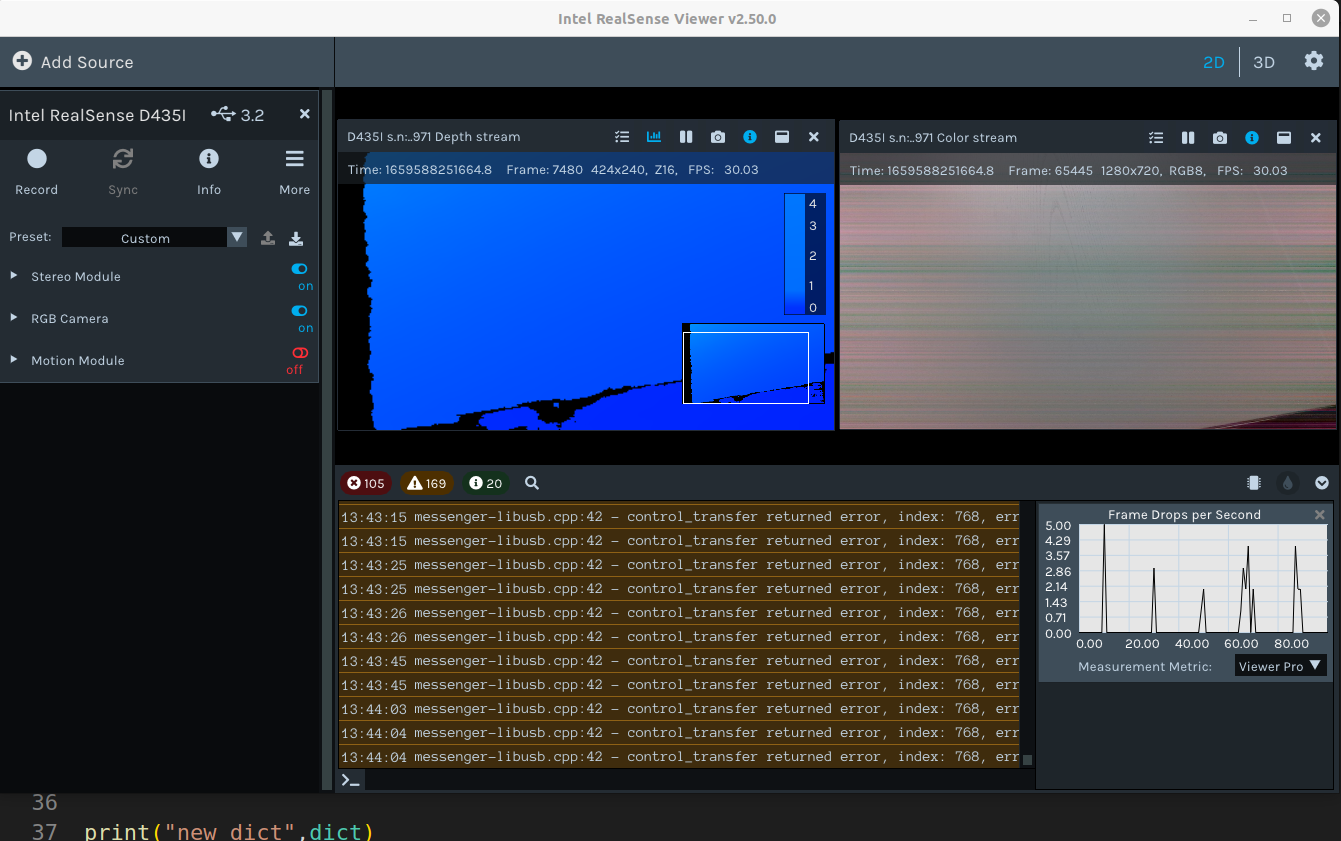
A continuously generating control_transfer returned error in the log indicates that there is a communication problem with the device. Does the RGB correct if you go to the More option near the top of the Viewer's options side-panel and select Reset Hardware from its drop-down menu?
After Hardware reset also it shows the same warning, and RGB have no data.
If RGB becomes available after a few minutes, internal heat from the camera's operation may be counteracting the problem that developed after the camera's prolonged storage period but the problem returns when streaming is stopped and the camera cools again.
It may be worth running the camera for a longer period than an hour to see if the camera is able to stream immediately again afterwards.
Hi @sreejithsreeni Has the performance of the RGB of your camera improved since your last message, please? Thanks!
I run the camera for long hours. But unfortunately, the problem still exists. It doesn't turn on the RGB after turned off and on.
At this point I would advise to stop testing the camera.
How long has it been since the D435i camera was purchased, please?
I will consult with my Intel RealSense colleagues about your problem over the coming days and feed back to you. Thanks again for your patience!
okay. camera purchased about 1 year ago. Please check as I need this camera to make an application. Thank you.
The camera will be out of warranty unfortunately if it was purchased a year ago as the sales warranty of a RealSense camera is for one year.
If the RGB camera eventually cannot be corrected then an alternative may be to obtain a small inexpensive USB webcam, attach it to the casing of the D435i and use the webcam as the RGB source instead by adding it to the RealSense Viewer with the Add Source > Platform Camera option at the top of the Viewer's side-panel.
okay, thank you for the suggestions and help. I will use another Realsense camera for my application.
Thanks very much @sreejithsreeni for the update and I wish you the best of luck.