

 IntelRealSense
Connecting to Pi Zero 2W - opencv works, but not realsense
-
Before opening a new issue, we wanted to provide you with some useful suggestions (Click "Preview" above for a better view):
- Consider checking out SDK examples.
- Have you looked in our documentations?
- Is you question a frequently asked one?
- Try searching our GitHub Issues (open and closed) for a similar issue.
-
All users are welcomed to report bugs, ask questions, suggest or request enhancements and generally feel free to open new issue, even if they haven't followed any of the suggestions above :)
| Required Info | |
|---|---|
| Camera Model | D435i |
| Firmware Version | (2.50) |
| Operating System & Version | Linux Raspian Bullseye |
| Kernel Version (Linux Only) | Linux scatbot-zero 5.15.32-v7+ #1538 SMP Thu Mar 31 19:38:48 BST 2022 armv7l GNU/Linux |
| Platform | Raspberry PI Zero 2W |
| SDK Version | { 2.50 } |
| Language | {python } |
| Segment | {Robot } |
Issue Description
I am connecting the Realsense D435i to a Raspberry PI Zero 2W (headless) using the USB-C cable that came with the camera and the Raspberry OTG host cable adapter.
I can see the USB device:
bee@scatbot-zero:~/scatbot $ lsusb
Bus 001 Device 003: ID 8086:0b3a Intel Corp. Intel(R) RealSense(TM) Depth Camera 435i
Bus 001 Device 001: ID 1d6b:0002 Linux Foundation 2.0 root hub
But when I try to enumerate:
bee@scatbot-zero:~/scatbot $ rs-enumerate-devices
No device detected. Is it plugged in?
I get a similar error trying to access the camera through the pyrealsense lib when I start the pipeline with rs.stream.depth stream enabled.
I can record video from the camera using opencv + V4L2 and see both the RGB stream at channel 4 and the polka-dot stream on channel 2:
import sys
import time
import cv2

video_channel = 4
if len(sys.argv) > 1:
    video_channel = int(sys.argv[1])


# Create an object to read
# from camera
video = cv2.VideoCapture(video_channel)

# We need to check if camera
# is opened previously or not
if (video.isOpened() == False):
    print("Error reading video file")

# We need to set resolutions.
# so, convert them from float to integer.
frame_width = int(video.get(3))
frame_height = int(video.get(4))

size = (frame_width, frame_height)

print(f"starting VideoWriter video_channel={video_channel} size={size}", )

# Below VideoWriter object will create
# a frame of above defined The output
# is stored in 'filename.avi' file.
writer = cv2.VideoWriter('camera_test_output.avi',
                         cv2.VideoWriter_fourcc(*'MJPG'),
                         10, size)

print("recording 30 secs of video...")
start = time.time()
num_frames = 0
while(True):
    ret, frame = video.read()

    if ret == True:
        # Write the frame into the
        # file 'filename.avi'
        writer.write(frame)
        num_frames += 1

    # Break the loop
    else:
        break

    # runs for 15
    if time.time() - start >= 30:
        break

# When everything done, release
# the video capture and video
# write objects
video.release()
writer.release()
print("The video was successfully saved.")

Hi @littlebee Very small 'computer on a stick' computing devices with OTG connections like yours may sometimes not be able to detect RealSense cameras because the OTG connection is supplying insufficient power to the camera to enable it to act as a full RealSense depth sensing camera instead of an ordinary video webcam. The issue has occurred on other brands of computing device of this 'candy bar' size that connect USB devices via a micro-USB OTG port.
When the camera is attached directly to a computing device's USB port instead of using a USB hub, the camera will be drawing its power from the power supply of the computing device. Attaching the camera to a mains electricity powered USB hub can therefore be a solution for this power issue, though I appreciate that a hub joined to a mains socket may not be a viable solution for a project where space-saving and / or mobility is required.

It will also be worth eliminating the possibility that the camera is not being detected by RealSense because of an SDK installation issue. Which method did you use to install librealsense on Raspbian (Raspberry Pi OS) Bullseye, please?
@MartyG-RealSense, I installed the SDK like so,
sudo apt-get update -y
sudo apt-get upgrade -y
sudo apt-get dist-upgrade -y

sudo apt install -y \
git \
cmake \
libssl-dev \
libx11-dev \
xorg-dev \
libglu1-mesa-dev \
libusb-1.0-0-dev

# 32 bit only
# sudo apt-get install gcc-7 g++-7
# sudo update-alternatives --install /usr/bin/gcc gcc /usr/bin/gcc-7 60 --slave /usr/bin/g++ g++ /usr/bin/g++-7
# sudo update-alternatives --set gcc "/usr/bin/gcc-7"

# backup swapfile settings and script
TMPDIR=/tmp/scatbot-setup
if [ ! -d $TMPDIR ]; then
  # only if we've never been run
  mkdir -p $TMPDIR/etc
  sudo cp /etc/dphys-swapfile $TMPDIR/etc
fi

# enlarge the swap file for building
sudo cp sbin/pizero-setup/files/etc/dphys-swapfile /etc
sudo /etc/init.d/dphys-swapfile restart swapon -s

git clone https://github.com/IntelRealSense/librealsense.git

cd librealsense/
mkdir build && cd build
# 32 bit
cmake \
-DCMAKE_BUILD_TYPE=RELEASE \
-DBUILD_SHARED_LIBS=false \
-DBUILD_PYTHON_BINDINGS=true \
-DPYTHON_INCLUDE_DIR=/usr/include/python3.9 \
-DPYTHON_EXECUTABLE=/usr/bin/python3.9 \
-DPYTHON_LIBRARY=/usr/lib/python3.9/config-3.9-arm-linux-gnueabihf/libpython3.9.so \
..

# 64 bit
# cmake \
# -DCMAKE_BUILD_TYPE=RELEASE \
# -DBUILD_SHARED_LIBS=false \
# -DBUILD_PYTHON_BINDINGS=true \
# -DPYTHON_INCLUDE_DIR=/usr/include/python3.9 \
# -DPYTHON_EXECUTABLE=/usr/bin/python3.9 \
# -DPYTHON_LIBRARY=/usr/lib/python3.9/config-3.9-aarch64-linux-gnu/libpython3.9.so \
# ..


make
sudo make install
If the amps on the OTG port were lacking, I should be able to bypass the power and come directly off of the PI's VIN. With a 3A power supply connected to the PI zero power in, the hack above achieves the same result - opencv works, librealsense can't find the device.
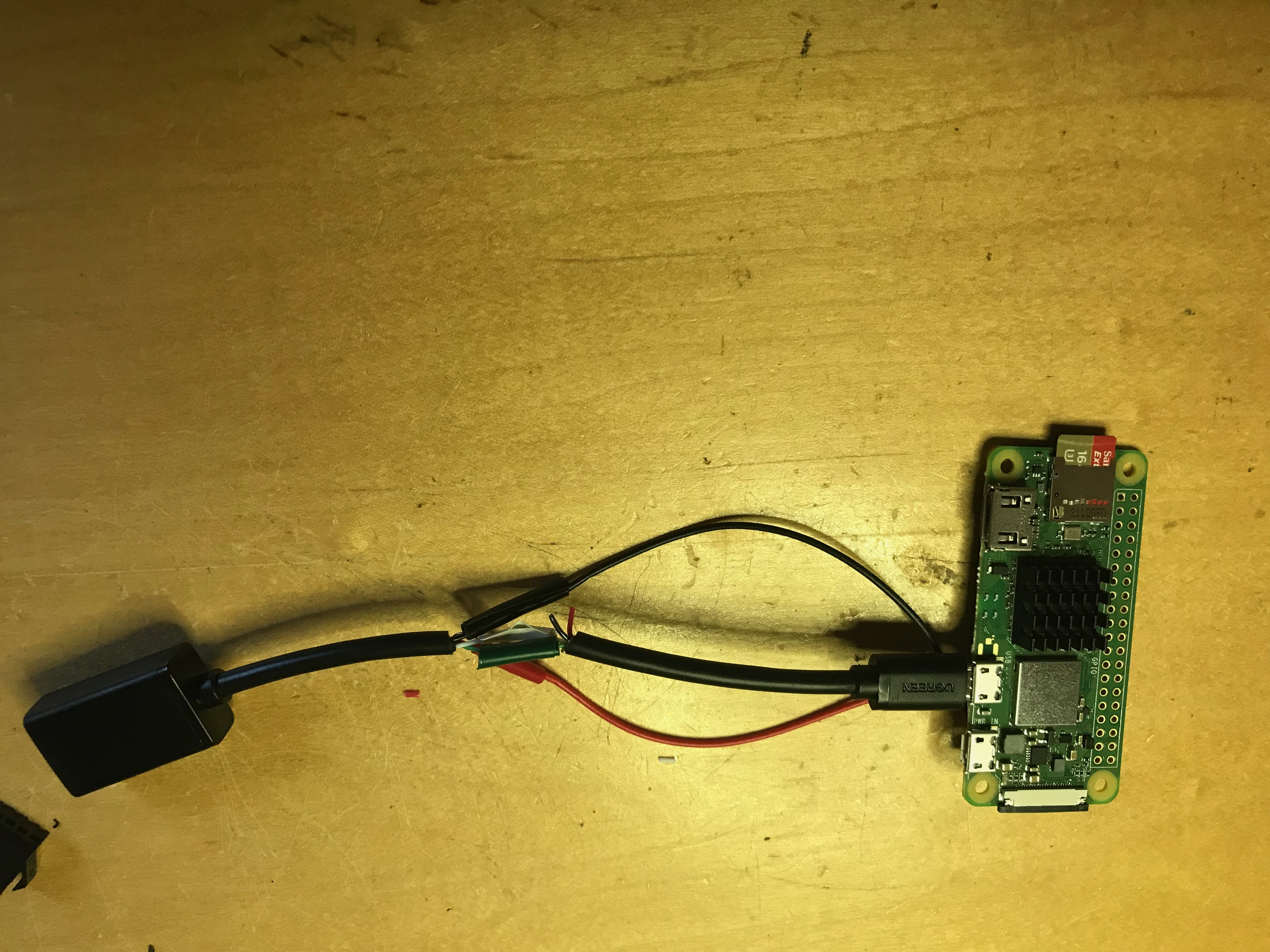

In Intel's official Raspbian installation guide for Pi 3, they recommend reloading the udev device handling rules after git cloning librealsense. As this step is absent from your installation instructions, please try it on your Pi Zero 2W.
cd ~
git clone https://github.com/IntelRealSense/librealsense.git
cd librealsense
sudo cp config/99-realsense-libusb.rules /etc/udev/rules.d/
sudo udevadm control --reload-rules && udevadm trigger
The full guide can be found here:
https://github.com/IntelRealSense/librealsense/blob/master/doc/installation_raspbian.md
Okay, I did that. I wasn't sure if I needed to rebuild, so I did that again too after reloading udev. Same result; No device detected.
Considering the possibility that the Pi Zero 2W is too 'exotic' a configuration for the SDK to work with compared to a more conventional PC or more powerful Outboard such as Pi 3 / 4, does it make a difference if you add the CMake build term -DFORCE_RSUSB_BACKEND=true
Building the SDK in RSUSB mode can help it to work with unusual computer hardware.
Hi @littlebee Do you require further assistance with this case, please? Thanks!