

 IntelLabs
don't reset managed repos by default
ansible git repos are currently force-cloned as part of default playbook. local changes will be reset when running make or make deploy at the toplevel. at the same time, there is no convenient shortcut to just update.
-
we could use some README notes on useful ansible commands
-
makeshould not reset repos by default. if repos exist, maybe deploy should abort and request the user to make distclean? -
in more general, we could use a set of tags/tasks and makefile shortcuts to
- update current repos (but do not force, and also not update system packages)
- get current status for all managed repos, to quickly see if there are any local changes in a given install
- trigger rebuild of userspace components after repo update or local changes (but no system-level config or grub changes or repo updates)

I believe that the reason why git is reseting some repos is due to the force flag being enabled:
https://github.com/IntelLabs/kAFL/search?q=force
Documentation: https://docs.ansible.com/ansible/latest/collections/ansible/builtin/git_module.html#parameter-force
If I remove the force parameter, I will get this error:
make deploy -- --tags clone
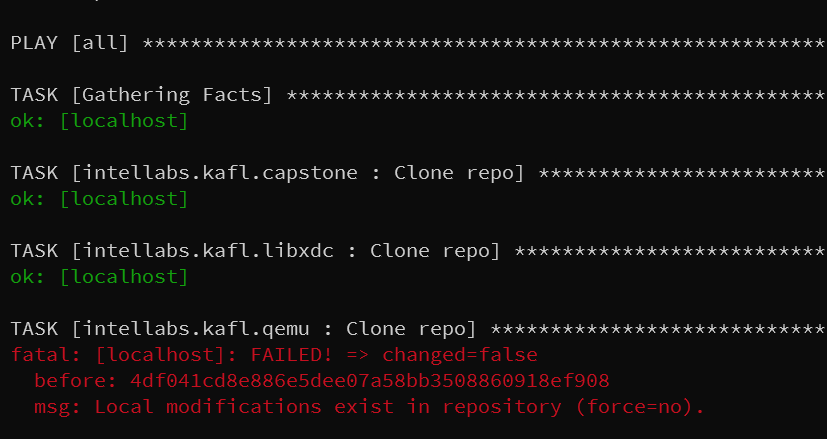
It's something that I toggled early on to avoid this error, and then forgot about it.

Yes exactly. Minimal fix is probably to remove the force flag, add a message on such failures that we refuse to overwrite.
Then add a make distclean that just deletes all of kafl/ and env.sh for easy re-deploy?
A separate working "build" and "update" step would still be useful. I think ansible is now the one-shot approach to this and we just need to get the tags/dependencies sorted out. As a quick solution, I think we can also do a make build step that simply performs pip3 install for kafl and ./compile_nyx_qemu.sh from within the environment.
Just found a similar issue on StackOverflow: https://stackoverflow.com/questions/41178361/how-to-use-ansible-git-module-pull-a-branch-with-local-changes
seems like the git module is surprisingly limited to handle this situation. however, I found a workaround:
- name: Clone repo
  git:
    repo: "{{ qemu_url }}"
    dest: "{{ qemu_root }}"
    version: "{{ qemu_revision | default(omit) }}"
    depth: "{{ git_clone_depth | default(omit) }}"
  tags:
    - clone
  register: qemu_clone
  failed_when:
    - qemu_clone.failed
    - not 'Local modifications exist in repository' in qemu_clone.msg
So this will ignore failure due to local modifications? But on deploy, I think we want it to fail if the repo already exists and is incompatible for some reason.
How about we just fail if the repo is dirty.
-
make deploywill result in defined state if all successful. -
--tags clonecan be used as amake update, but will abort when it runs into any dirty repo states - we can add a
make buildthat simply works based on current checked out status
I agree that make deploy should result in a defined state, and ignoring a dirty repo is not a defined state.
I don't want to duplicate deployment / installation knowledge in a Makefile rule, everything has to be implemented in the playbook for consistency, otherwise it will become difficult to maintain.
What about
# User targets
deploy:
    make -C deploy $@ -- $(EXTRA_ARGS)

# Developer targets
# only update the repo to their latest version (if not dirty)
update:
    make -C deploy $@ -- --tags clone

# this will ignore the clone tags, and therefore dirty repos, but the build steps will be performed.
build:
    make -C deploy $@ -- --skip-tags clone
I think we're aligned. Minor nitpicks:
- We should have an easy way to wipe the install / force redeploy.
make distcleanshortcut to clear managed repos? -
make buildstill seems too broad. As developer, after applying a qemu or libxdc bugfix, don't want it to run apt update, modify kvm groups etc. since this can introduce new issues. I think it should just cause a rebuild of the existing userspace repos: fuzzer, radamsa, qemu. Maybe a globalbuildtag can be used, e.g.--tags build --task qemu,radamsa,fuzzer
The PR #81 introduces a build tag that does just that (rebuild qemu, radamsa and reinstall the fuzzer)
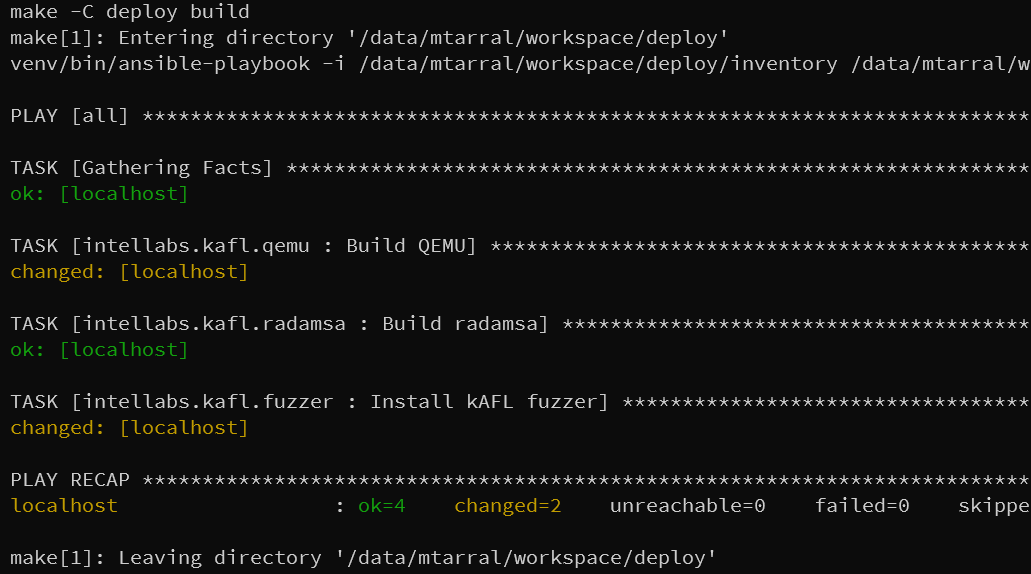
make update && make build works now. Branches are reset as needed and the repo/task is marked as changed.
Closing the issue for now. Some cosmetic issues remain but we can fix them later..
- ansible asks for BECOME password without reason. Maybe we can make it a dependency of the tasks that actually need sudo?
-
make buildtakes forever due to qemu lto build, and it gives no progress indication - it would be nice to print more details for the git repo reset/update actions.
ansible asks for BECOME password without reason. Maybe we can make it a dependency of the tasks that actually need sudo?
Asking for BECOME password is done by a command line switch, no something we can tweak to only depend on become dependant tasks.
make build takes forever due to qemu lto build, and it gives no progress indication
This is known problem of Ansible, lacking verbosity and visibility in long running tasks.
The official solution is make an async task and poll it. Not sure if this resolves our issue.
https://stackoverflow.com/questions/41194021/how-can-i-show-progress-for-a-long-running-ansible-task
But it's not a major blocker.
it would be nice to print more details for the git repo reset/update actions.
You can toggle Ansible verbosity for that.