

 Immediate-Mode-UI
Unicode char 0x2022 shows as 0x20ac
I noticed this when using the 'bullet' character in my code and seeing instead the Euro symbol. So I reproduced with the generic 'extended.c' demo.
Modified it so that font config 'range' includes the 0x2000 to 0x2fff, and changed the font to Ubuntu-R.ttf which includes the characters, and then inserted the bullet character in one of the display texts.
Here's a screenshot. The Euro should be a bullet, and the square box should be a Euro sign:
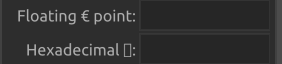
I've verified that inside the nk_draw_list_add_text() function, the nk_rune 0x2022 is parsed off the string. Therefore it must be the font->query() that's at fault.

The problem occurs when the font config 'range' is split. For example, it fails with {0x20,0x200, 0x2000, 0x2fff, 0} but works ok with {0x20,0x2fff,0}
Not sure if it's a baking issue, or a glyph lookup issue.
Curiouser and curiouser...
"Ubuntu-R" has a problem, but e.g. "Roboto-Regular" is fine.
Commenting out line #16598 seems to fix the issue
if (!pc->x0 && !pc->x1 && !pc->y0 && !pc->y1) continue;
What is happening is that a missing glyph throws off the number of glyphs in the range, so the returned glyph isn't the one requested (for some fonts)

@ronaaron
Commenting out line #16598 seems to fix the issue
if (!pc->x0 && !pc->x1 && !pc->y0 && !pc->y1) continue;What is happening is that a missing glyph throws off the number of glyphs in the range, so the returned glyph isn't the one requested (for some fonts)
That was an excellent find! This solves https://github.com/Immediate-Mode-UI/Nuklear/issues/295
Many thanks!

Is this still an issue now that https://github.com/Immediate-Mode-UI/Nuklear/pull/531 has been merged?
