

 ImageMonkey
(info - Javascript Pressure-pen support)
I was curious to know if javascript/the browser can read pen-pressure; I found this.. https://pressurejs.com . flicking though the source code , i see references to 'event.pressure' for pointer events etc
I'm very curious to try this out with another editor experiment.. I wonder how far you could get in JS emulating paint tools. (as you know i've looked into GIMP for making masks aswell)
Trying out the test page, the iPad+ApplePencil works fine: it's reporting 0.00-0.1 for a 'light touch' and values ~0.4 for 'heavy pressure'.
- also works on Google Chrome on my MacBook Pro ('light touch=0.3, heavy=1.0' ). Reading up it seems it's an experimental feature on the Safari 12.1. (must try updating my linux browsers, it didn't work on my current versions).
A painting workflow could harnesses people's 'doodling' itch.. but probably requires more work on the tools, and might be harder to validate? Paint tools are great for more accurate masks, and in scenarios where the outlines are hard to plan. I'd recommend using pressure=brush size rather than opacity as the default.
unfortunately pressure pens aren't so common? but people have wacoms for photo manipulation, there's the samsung Galaxy Note/Tab S4 etc, and Microsoft Surface, and all the current iPads now support Apple Pencil (see the recent iPad mini refresh)

That sounds really interesting!
unfortunately pressure pens aren't so common?
not really sure...I think that might have changed a bit in the last few year. I have the impression that the convertibles changed the situation a bit...it's now cool again to draw with a pen on a device (brings back memories to the good old Palm OS devices).
Looks like that there is someone working on pressure support for fabric.js right now (see last comment here: https://github.com/fabricjs/fabric.js/issues/4885). I haven't looked into the changes, but it sounds very promising :). There will of course be more work needed on our side (we still use the fabric.js 1.x branch which isn't maintained anymore), but as soon as pressure support is in the fabric.js main branch, we could give it a try.
This could be definitely be a topic for #221

one more point: Perhaps there'd be a way to upload images that have been color coded in a paint program, whilst still 'supporting it' as an integral part of the image monkey dataset.
ideas ...
[1] an offline converter that would convert that to vector boundaries .. just submit those boundaries so they look the same as any other annotation. Keeps image monkey simple.
[2] a means of associating a colour-coded image with an existing photo; might it be possible to guess that - correlation of edges ? sounds a bit hit and miss
- Could just paste the image together , e.g. side by side or above/below - and have a means of guessing when an image is such a composition ('half the image is flat primary colours, the other half is natural shades)... or give the image a custom label
... there would need to be a way of relating the colours to labels (a custom label could identify a palette mapping documented by the site, or you could spell it out with individual labels.. "ff0000=vehicle","00ff00=road","0000ff=pavement" etc)
The color coded image is closer to what you'd need for training anyway
interesting idea!
I like the idea of the color coded image, as it would work with every paint program out of the box. I think one of the biggest problems however would probably be to extract the individual annotations from the color coded image. I think that might be pretty tricky. Especially if there are a lot of nested annotations
e.q: imagine two rectangles with different colors (red and blue) that overlap perfectly:

In that case it's quite hard to determine the width of the red rectangle. It's probably doable in most cases, but scanning over the image pixel by pixel could be pretty expensive.
But let's assume for now, that we can make that work: How can we manage the color <-> label relationship in the paint program? I imagine that it's kinda hard to remember which color code maps to which label (especially with a growing label set, the differences between colors become more subtle).
I really hope that we find a way to make that work...it's such a cool and creative idea ;)
I think that might be pretty tricky. Especially if there are a lot of nested annotations
right - if doing boundaries .
What I had in mind was filled areas (easy to paint as a transparent layer .. I can clarify with a screengrab), hence the idea of pairing an image with its color-coding .. but that would need establishing some kind of convention. (and those could be mutually exclusive and not suitable for fuzzy overlapping types like foliage or other transparencies.)
The boundary idea could work with a single image, interestingly, but would have the hazard ou mention.
I imagine that it's kinda hard to remember which color code maps to which label
indeed and even with a few I bet people would get it wrong sometimes.
if noting them in the label list (eg "
r.e. paint tools in a browser... this is quite encouraging regarding features https://muro.deviantart.com .. however pressure support is flaky. I see it working on google chrome on my mac, but not safari (12.1, 'pen events' enabled), or even on iOS safari.
still probably better to pursue the 'lasso' approach (analogous to selection tools?) before trying a big departure like this..
It’s been a while since I started to work on this topic (https://github.com/fabricjs/fabric.js/issues/4885), and now the pressure-sensitive brush works well on iPad and Surface Go on top of Fabric.js. It’s utilizing standard browser APIs and not yet open-sourced, but you could get the idea below:
https://gs.archinc.jp/drawings/5e4fa91448c4290030d09661
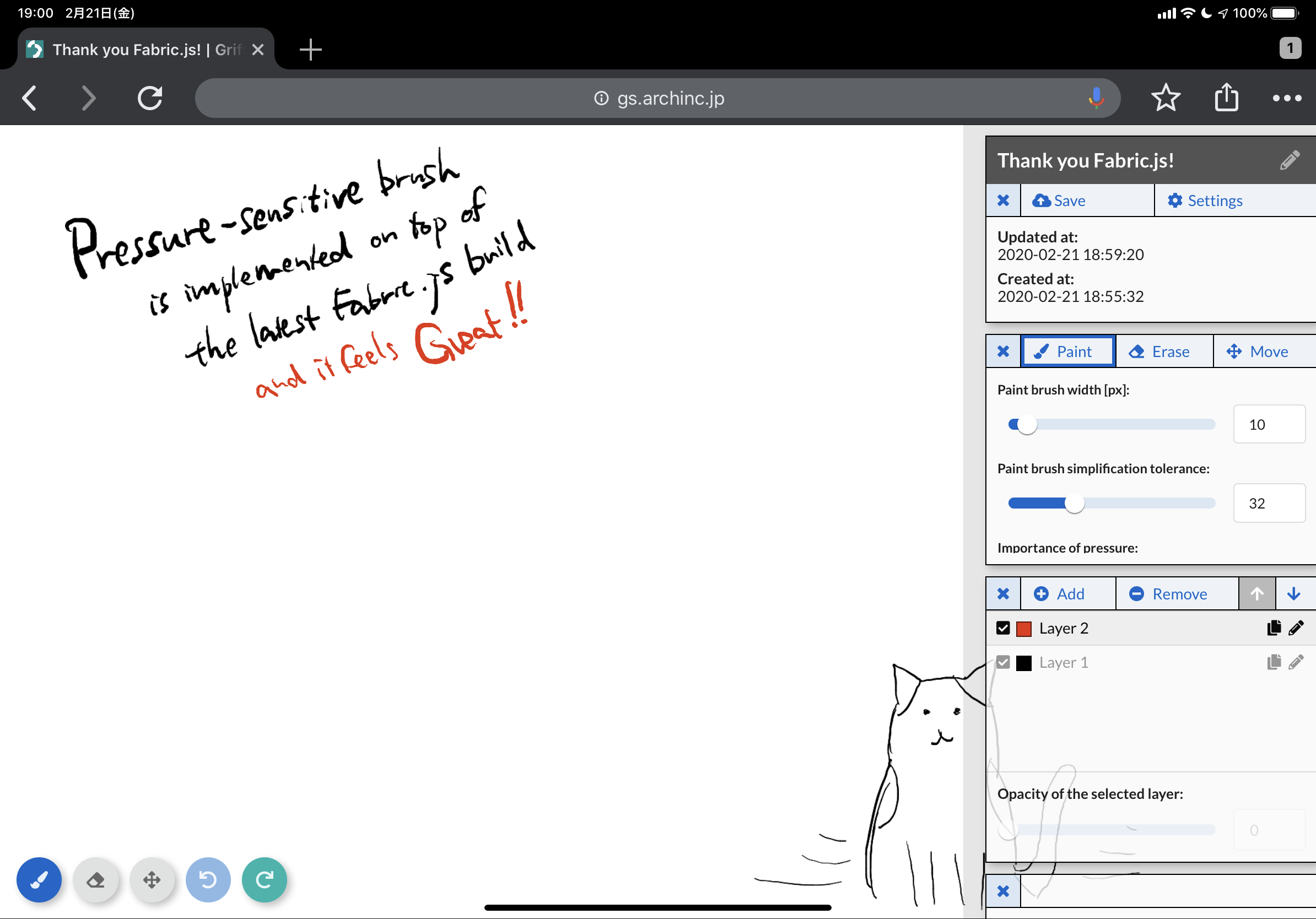

It’s been a while since I started to work on this topic (fabricjs/fabric.js#4885), and now the pressure-sensitive brush works well on iPad and Surface Go on top of Fabric.js. It’s utilizing standard browser APIs and not yet open-sourced, but you could get the idea below:
https://gs.archinc.jp/drawings/5e4fa91448c4290030d09661
Very cool, thanks a lot for sharing!
Out of interest: Do you plan to merge your changes into fabric.js too? :) I think it would be an awesome addition to the feature set of fabric.js!
@dobkeratops thanks for testing it on iPad!
@bbernhard I've been working on open-sourcing the library, and finally it's available! :) It's an extension to the Fabric.js core, and we're in the process of including links to this extension in the official document.
- GitHub repository: https://github.com/arch-inc/fabricjs-psbrush/
- Demo site: https://arch-inc.github.io/fabricjs-psbrush/
- API document: https://arch-inc.github.io/fabricjs-psbrush/api/globals.html