

 ImGuiNET
How to support Vietnamese characters
I am loading Arial font. I am sure this font is supporting Vietnamese characters.
But it is wrong render in ImGUI. For example: "Tôi có thể ăn thủy tinh" => "Tôi có th? ?n th?y tinh" (see the bold characters)
Please help me fix this. Thank you <3

This should be supported, but you need to provide the appropriate "glyph ranges" when loading the font. See this issue for more info.

Thank for your reply.
I am using Nuget Package. I found GetGlyphRange Thai, Japan, Korean, Chinese, ChineseFull but not see Vietnamese.
Can I add Vietnamese manually?
And I have a hard issue (for me) is make ImGUI transparent, clickable, ... please take a look on this issue: https://github.com/mellinoe/ImGui.NET/issues/100 Thank you very much.
Can I add Vietnamese manually?
You should be able to use the ImFontGlyphRangesBuilder type (see this comment) to do it manually, but that isn't usable from C# at the moment. I need to provide a wrapper for the constructor so that you can create one in C#. I would try some of the other glyph ranges and see if they function properly for Vietnamese text in the meantime.
Can I add Vietnamese manually?
You should be able to use the
ImFontGlyphRangesBuildertype (see this comment) to do it manually, but that isn't usable from C# at the moment.
I found this solution for safe code to load IconFont range:
GCHandle rangeHandle = GCHandle.Alloc(new ushort[] { START_OF_RANGE, END_OF_RANGE, 0/*zero from imgui.cpp*/ }, GCHandleType.Pinned);
try
{
	ImGui.GetIO().Fonts.AddFontFromFileTTF("somefont.ttf", 14, null/*here you need config with MergeMode to get result from screenshot*/ , rangeHandle.AddrOfPinnedObject());
}
finally
{
	if (rangeHandle.IsAllocated)
		rangeHandle.Free();
}
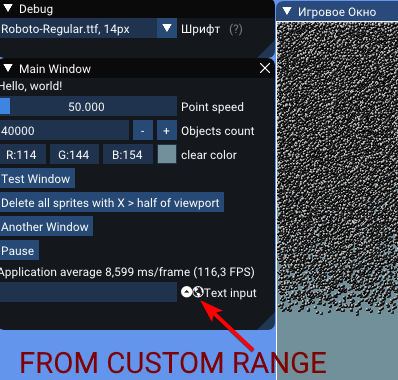

This will also work:
            var io = ImGui.GetIO();

            List<ushort> chars = new List<ushort>();
            // Add chars from ImGui glyph ranges
            AddCharsFromIntPtr(chars, (ushort*)io.Fonts.GetGlyphRangesVietnamese());

            // Add chars from string. Each char must be duplicated.
            var addChars = string.Join("", AdditionalUnicodeChars.Select(c => new string(c,2))).Select(c=>(ushort)c).ToArray();
            chars.AddRange(addChars);

            // Null-terminate the array. Make sure that only 0 is at the end of the array, or else you will run into segfaults and/or missing chars.
            chars.Add(0);

            var arr = chars.ToArray();

            fixed (ushort* ptr = &arr[0])
            {
                _font = io.Fonts.AddFontFromFileTTF("your_font.ttf", 14, null, new IntPtr((void *)ptr));
            }

//.....

        private unsafe void AddCharsFromIntPtr(List<ushort> chars, ushort* ptr)
        {
            while(*ptr != 0)
            {
                chars.Add(*ptr);
                ptr++;
            }
        }
