

 IgniteUI
IgxCalendar and IgxDatePicker UX experience on desktop and mobile
Some examples of UI experience on desktop and mobile devices that I expected to behave differently. Just for the sake of discussing if this is the right way or another would be better.
Updating the calendar while editing the input
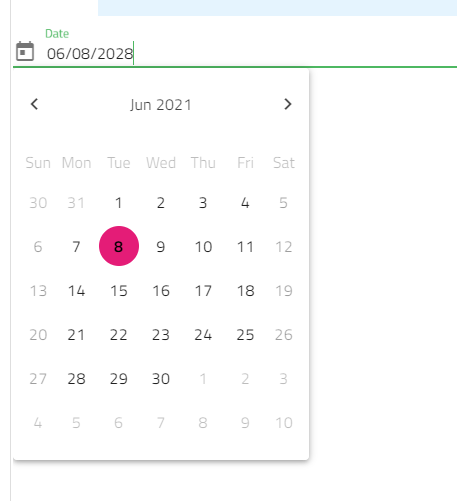
- Open https://infragistics.com/angular-demos/scheduling/datepicker-sample-1
- Open the calendar to select a date
- Update the input value and press Enter
Expectations: The calendar to respect the value in the input
Result Calendar view did not change accordingly
Clearing the input value using the Delete key on the mobile Chrome keyboard for IgxDatePicker and IgxTimePicker
- Open https://www.infragistics.com/angular-demos/data-entries/reactive-forms on mobile
- Select a date in the
Dateinput - After selecting the date, the value in the input is selected.
- Press
Delete
Expectations: value to be cleared
Result: Cursor was moved to first position
Writing in the date picker input
- Focus the IgxDatePicker input on Mobile in order to write in the input
Expectation: A mobile keyboard to be brought to the user
Result The default keyboard is brought to the user.

There has been no recent activity and this issue has been marked inactive.
![github-actions[bot] avatar](https://avatars.githubusercontent.com/in/15368?v=4 "Published by a pub.dev verified publisher")
There has been no recent activity and this issue has been marked inactive.
There has been no recent activity and this issue has been marked inactive.
There has been no recent activity and this issue has been marked inactive.
There has been no recent activity and this issue has been marked inactive.
There has been no recent activity and this issue has been marked inactive.
There has been no recent activity and this issue has been marked inactive.
There has been no recent activity and this issue has been marked inactive.
There has been no recent activity and this issue has been marked inactive.
There has been no recent activity and this issue has been marked inactive.

@radomirchev & @hanastasov, we reviewed the feature request, and we could share the following:
1. Updating the calendar while editing the input
- Updating the calendar view now is happening by closing and reopening it. We could improve this by adding an additional trigger by a keyboard (Enter) press.
2. Clearing the input value using the Delete key on the mobile Chrome keyboard for IgxDatePicker and IgxTimePicker
-
The expectations are covered - after selecting a date from the calendar view, the date is loaded in the input, and we can delete it from the delete keyboard button or from the clear icon within the input.
-
There are three other “glitches”/bugs here in this case:
-
Calendar view position on mobiles (iPhone device used)
-
If we want to enter the date after entering the month manually, the cursor is back at the beginning, which we need to fix as a behaviour. As you can see, the deletion is working from the keyboard and the clear icon. https://github.com/IgniteUI/igniteui-angular/assets/127843837/32f3e4ec-5b9b-46f0-a7e1-f5e31d54bb76
-
Additional trigger action for calendar icon within the Date Picker (this is not a bug, could be considered as an improvement)
3. Writing in the date picker input
- If I understand correctly, the numeric keyboard should be displayed on mobiles, not the default one, and we agree that this is the expected behaviour.
Summary: We could consider the following:
- Adding pressing enter within the input as a trigger for reloading the calendar view dropdown
- Fixing the bring at the beginning cursor when we are typing
- Calendar view dropdown display position
- Bringing a numeric keyboard on mobile, not the default one

@hanastasov the issue have to be updated with UX clarifications and scheduled for development.
There has been no recent activity and this issue has been marked inactive.
There has been no recent activity and this issue has been marked inactive.
There has been no recent activity and this issue has been marked inactive.
There has been no recent activity and this issue has been marked inactive.