

 IgniteUI
ESF does not respect custom column filters
ESF does not respect custom column filters
- igniteui-angular version: 9.1.x
Steps to reproduce
- Set an
IgxStringFilteringOperandcustom filter to a column ofnumberdata type.
public unitFilters = IgxStringFilteringOperand.instance();,
<igx-column field="UnitsInStock" [dataType]="'number'" [filters]="unitFilters">
</igx-column>
- Open ESF dialog
Note that if quick filtering is used, instead of ESF, custom column filters are respected.
Result
Default numeric filters are rendered in the UI, instead of the custom ones
Expected result
Custom filters to be rendered in the UI
Note:
Only the list item that expands the filters is not changed:
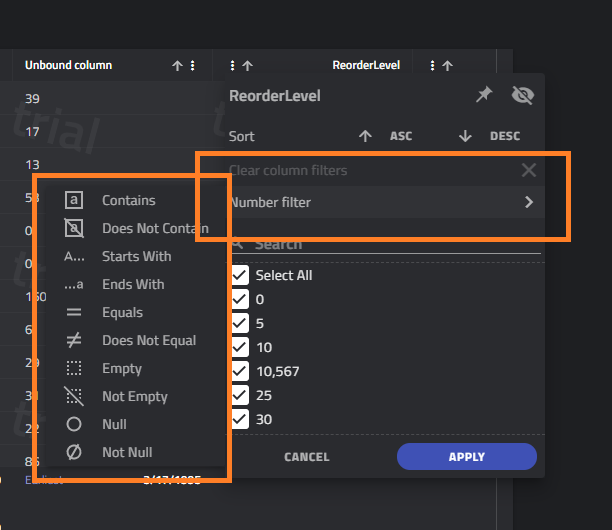

@hanastasov if I understand you correctly the ESF dialog correctly shows Number filter because it takes in account the column data context, which in this case is numeric data and therefore Number filter irrelevant whether in the list that is expanded from there we have default or custom operands

@hanastasov if I understand you correctly the ESF dialog correctly shows Number filter because it takes in account the column data context, which in this case is numeric data and therefore Number filter irrelevant whether in the list that is expanded from there we have default or custom operands
Correct, there are cases where the list item text does not correspond to the filters in the dropdown, as the screenshot shws:
I still think that for a Numeric column we should show Number filters and for a string one, Text filter
I still think that for a Numeric column we should show Number filters and for a string one, Text filter
This is the default behavior. But since we allow the developer to assign custom filters, leaving the above mentioned situation as is seems to me like a bug. Imagine a situation where the values in the ESF list are strings, custom filters are string filters, and the user sees the Number filter prompting text/
So on a numeric column you want to define string filter operands, is that what you are saying because I don't see how that will create any meaningful outcome. If we are changing anything I say we let people input the value themselves just like they are able to input the operand values for the custom filters they have, but I am still reluctant to do so.
Imagine a numeric column, where the developer formats the cell display value to represent the meaning of a numeric value. For example cell value of 20 will display Low text, value of 110 will display Critical text.
The business case says let's filter by 'Low', and 'Critical', so the developer is assigning a custom string filters to that column.
This seems a valid case to me.
@hanastasov, this is a valid case, but changing the label to 'Custom filters' whenever the column's filters are modified does not give the end-user any meaningful information. I agree with @StefanIvanov, that it would be probably better to expose an input for the label.

I expected that a name of the custom filter would appear in the list item, not just "Custom Filter". Buf it this item of the ESF dialog is templatable, maybe it is just enough.
Still, let's ignore the filter label for now. Even when the "Contains" filtering condition is chosen in the dropdown, the corresponding input allows entering numbers only, as if this is a numeric filter.
We had a discussion about this issue and we have agreed that this is a feature request.
In order to provide custom label for the conditional filters we can make the igx-excel-style-conditional-filter content settable like this:
<igx-excel-style-conditional-filter>My custom filters</igx-excel-style-conditional-filter>
Also we can provide a template for the filter value input per column like this:
<igx-column>
    <ng-template igxFilterValueInput></ng-template>
</igx-column>
There has been no recent activity and this issue has been marked inactive.
![github-actions[bot] avatar](https://avatars.githubusercontent.com/in/15368?v=4 "Published by a pub.dev verified publisher")
There has been no recent activity and this issue has been marked inactive.
There has been no recent activity and this issue has been marked inactive.
There has been no recent activity and this issue has been marked inactive.
There has been no recent activity and this issue has been marked inactive.
There has been no recent activity and this issue has been marked inactive.
There has been no recent activity and this issue has been marked inactive.
There has been no recent activity and this issue has been marked inactive.
There has been no recent activity and this issue has been marked inactive.
There has been no recent activity and this issue has been marked inactive.
There has been no recent activity and this issue has been marked inactive.
There has been no recent activity and this issue has been marked inactive.