

 IceWhaleTech
[Bug] Multiple mounting points when managing disks from CasaOS
What happened?
When I upgraded to version 0.3.5, I removed the disks and added them through CasaOS to mount, but when I view the mount points from the explorer (FileBrowser), I see that there are multiple mount points.
In the screenshot, look at sdb and sdc. For example I created mount points vault1 and vault2, corresponding to 2 different disks, but suddenly vault1- and vault2- were generated respectively.
OS: Ubuntu 20.04 LTS CasaOS: 0.3.5
Screenshots
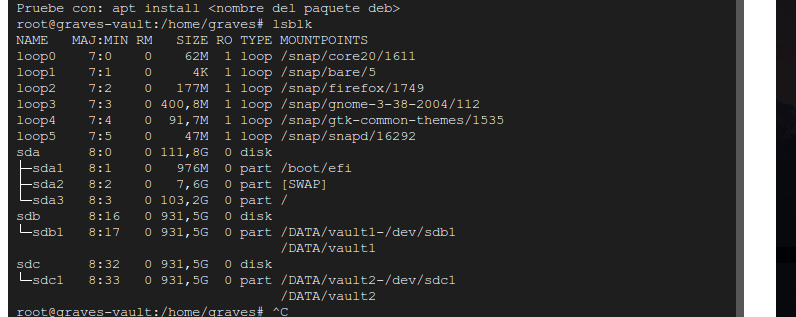

As a workaround to this problem, I recommend running lsblk to see the mount points and then with umount, unmount the duplicate mount points. Finally with file explorer, delete the remaining folders.
In my case it would look like this.
umount /DATA/vault1-/dev/sdb1
umount /DATA/vault2-/dev/sdc1
Everytime I deleted mounted sdb1 in CasaOS, after restart CasaOS, the adb1 will show again in the Storage Manager. I can't delete mounted sdb1 Storage

CasaOS 0.3.7 fixes a lot of storage features, please update to CasaOS 0.3.7
