

 IIFLSecurities
Getting error while running client.client_login() function
I have installed using
pip install IIFLapis
My code is:
from IIFLapis import IIFLClient
client = IIFLClient(client_code=CLIENT_CODE, passwd=PASSWORD, dob=DOB) # DOB is in 'YYYYMMDD' format.
When I am trying to run client_login() function like
client.client_login()
I am getting an Error which is like:
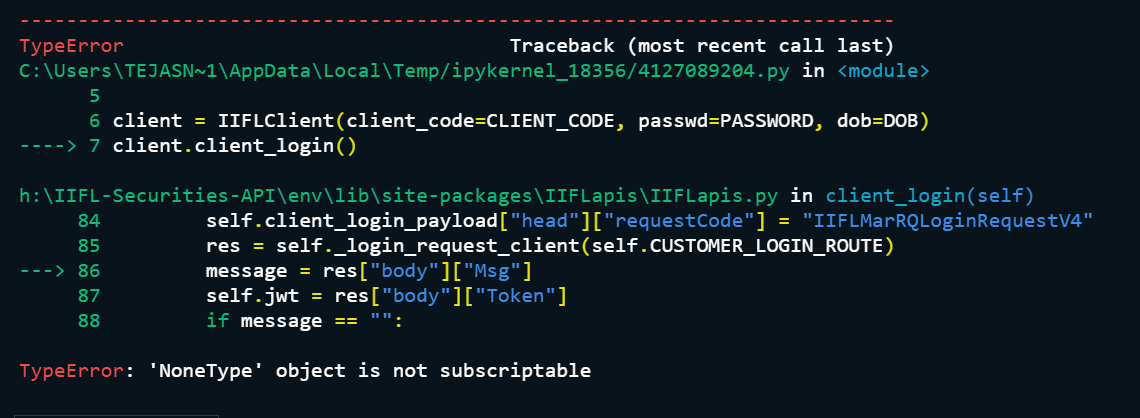 Please, solve this issue...

For me IIFLClient works and I pass 5 parameters ( 2 more parameters: email_id and contact_number ) You should try adding those too - your registered email and number along with client code, password and DOB (YYYYMMDD)
ALSO, I am assuming you have correctly created the "keys.conf" file with all IIFL keys and parameters, and have it placed in the same folder as your script file. Without the proper keys.conf file, nothing may work!

Thanks for the reply. I have added those parameters, but still getting same error. Yes, I have created keys.conf file and placed in the same directory.

Use the latest IIFLapis package.
Can you please provide me the links or documentation for the same?
Use the latest IIFLapis package.
Can you please provide me the links or documentation for the same?
https://pypi.org/project/IIFLapis/ version 2.1.1 make sure you are using python 3.7 or higher. Secondly the directory of the python file you first call to execute the program must have the keys.conf file. Python checks the first execution entry folder for the keys file.
I am using the same package and getting the same error. I also have keys.conf file.
Edit:
I am using now XTSConnect which solved my problem. but it started new problem while placing an order Access Token gets Invalid. Please, if any one know it. Let me know about it.