

 IFL-CAMP
Can't change runtime velocity or acceleration IIWA14
Hello,
I have a problem when I want to change the velocity or acceleration of my IIWA 14 robot. Here is what ROS displays in the console:
Console error :
[ERROR] [1553166264.671247463]: configuration/pathParameters failed, Java error: java.lang.IllegalStateException: Load Mass Validation failed
variance[1] of LBRExtTorqueObs@LBR_iiwa_14_R820_1 is 20.279413709253404 should be less than 10
variance[2] of LBRExtTorqueObs@LBR_iiwa_14_R820_1 is 20.31081749963803 should be less than 10
variance[3] of LBRExtTorqueObs@LBR_iiwa_14_R820_1 is 10.606121791254775 should be less than 10
axisTauExtMsr[3] of LBRExtTorqueObs@LBR_iiwa_14_R820_1 is 19.681329118761088 should be less than 10
cartExtTau[2] of LBRExtTorqueObs@LBR_iiwa_14_R820_1 is 516.6431321013479 should be less than60

[ERROR] [1553166264.677059949]: configuration/pathParameters failed, Java error: java.lang.IllegalStateException: Load Mass Validation failed
variance[1] of LBRExtTorqueObs@LBR_iiwa_14_R820_1 is 20.279413709253404 should be less than 10
variance[2] of LBRExtTorqueObs@LBR_iiwa_14_R820_1 is 20.31081749963803 should be less than 10
variance[3] of LBRExtTorqueObs@LBR_iiwa_14_R820_1 is 10.606121791254775 should be less than 10
axisTauExtMsr[3] of LBRExtTorqueObs@LBR_iiwa_14_R820_1 is 19.68103197906792 should be less than 10
cartExtTau[2] of LBRExtTorqueObs@LBR_iiwa_14_R820_1 is 516.6915449398642 should be less than60
The error values change according to the parameters I send. These values are those displayed with a velocity of 0.5 and an acceleration of 1 (like the default values).
The robot moves or shows me its position without any problem until I change these values. Can you help me or direct me to a solution? I tried to follow all the tutorials of the wiki and search the Internet but I couldn't find anything more.
Thank for your help.
Below is various information about my code and data about SUNRISE:
My Sunrise tool config :
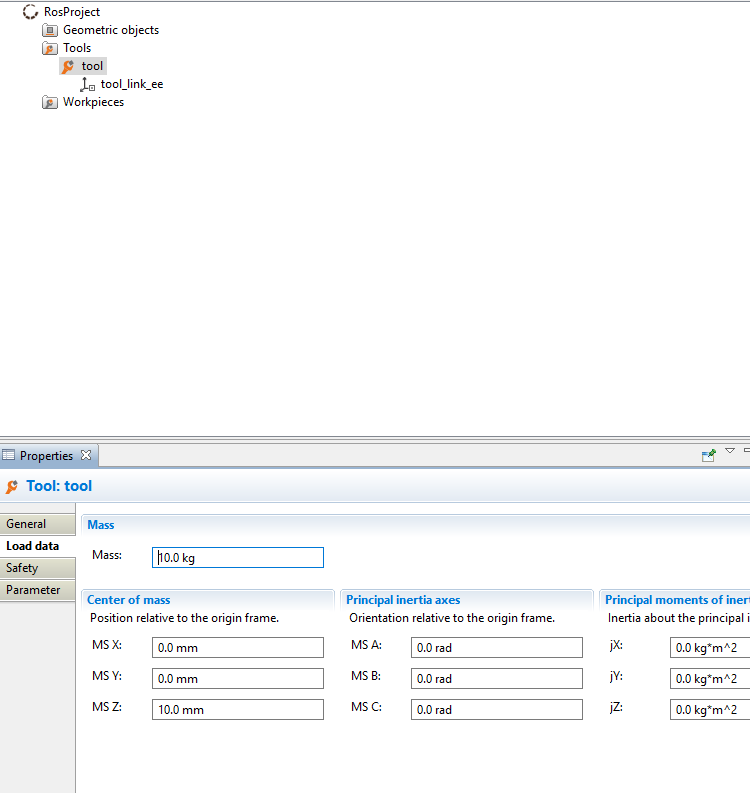
Robot : iiwa14 Sunrise Workbench : 1.13.0.5 ROS Kinetic My safety configuration is the same as here : https://github.com/IFL-CAMP/iiwa_stack/wiki/safetyconf
I type in the console the following line:
roslaunch iiwa_pierre pierre.launch
My CPP test code :
#include <iiwa_ros.h>
#include "ros/ros.h"
#include "std_msgs/String.h"

void chatterCallback(const std_msgs::String::ConstPtr &msg)
{
    ROS_INFO("I heard: [%s]", msg->data.c_str());
}

int main(int argc, char **argv)
{
    ros::init(argc, argv, "talker");
    ros::NodeHandle n;

    iiwa_ros::iiwaRos my_iiwa_ros_object;

    ros::Publisher publisher = n.advertise<geometry_msgs::PoseStamped>("/command/CartesianPose", 1000);
    ros::Subscriber subscriber = n.subscribe("/state/CartesianPose", 1000, chatterCallback);

    my_iiwa_ros_object.init();

    ros::Rate loop_rate(10);

    geometry_msgs::PoseStamped cartesian;

    geometry_msgs::PoseStamped cartesianSet;
    cartesianSet.pose.position.x = 0;
    cartesianSet.pose.position.y = 0;
    cartesianSet.pose.position.z = 1;
    cartesianSet.pose.orientation.x = 0;
    cartesianSet.pose.orientation.y = 0;
    cartesianSet.pose.orientation.z = 0;
    cartesianSet.pose.orientation.w = 1;

    while (ros::ok())
    {
        my_iiwa_ros_object.getPathParametersService().setJointRelativeVelocity(0.5);
        my_iiwa_ros_object.getPathParametersService().setJointRelativeAcceleration(1);

        if (my_iiwa_ros_object.getCartesianPose(cartesian))
        {
            ROS_INFO_STREAM("I got a CARTESIAN Message and its contents is: (X Y Z) - (X Y Z W) "
                                    << cartesian.pose.position.x << " "
                                    << cartesian.pose.position.y << " "
                                    << cartesian.pose.position.z << " - "
                                    << cartesian.pose.orientation.x << " "
                                    << cartesian.pose.orientation.y << " "
                                    << cartesian.pose.orientation.z << " "
                                    << cartesian.pose.orientation.w);

        }
        else
        {
            //ROS_INFO_STREAM("No CARTESIAN Message available");
        }
        my_iiwa_ros_object.setCartesianPose(cartesianSet);

        ros::spinOnce();
        loop_rate.sleep();
    }

    return 0;
}
Launch file :
<?xml version="1.0"?>
<launch>
    <!-- | 		PARAMETERS  		| -->
    <!-- the "sim" argument controls whether we connect to a Simulated or Real robot. -->
    <arg name="sim" default="false" doc="If true, the robot will be simulated in Gazebo" />
    <!-- hardware_interface to use : PositionJointInterface, EffortJointInterface, VelocityJointInterface. -->
    <arg name="hardware_interface" default="PositionJointInterface"/>
    <!-- The is gonna have its nodes/topics under a namespace with the same name. -->
    <arg name="robot_name" default="iiwa"/>
    <!-- Model of the iiwa to use : iiwa7, iiwa14 -->
    <arg name="model" default="iiwa14"/>
    <arg name="rviz" default="false" />

    <!-- Parameters to pass to the ROS node -->
    <arg name="move_group" default="manipulator"/>
    <arg name="ros_rate" default="0.1"/>

    <arg name="tool_name" default="tool"/>

    <param name="/iiwa/toolName" type="string" value="$(arg tool_name)" />

    <param name="robot_description" command="$(find xacro)/xacro --inorder '$(find iiwa_pierre)/urdf/iiwa_tool.urdf.xacro' hardware_interface:=$(arg hardware_interface) robot_name:=$(arg robot_name)" />

    <remap from="/$(arg hardware_interface)_trajectory_controller/follow_joint_trajectory"
           to="/$(arg robot_name)/$(arg hardware_interface)_trajectory_controller/follow_joint_trajectory" />
    <remap from="robot_description" to="/$(arg robot_name)/robot_description" />
    <remap from="/get_planning_scene" to="/$(arg robot_name)/get_planning_scene" />


    <group ns="$(arg robot_name)" unless="$(arg sim)">

        <!-- Load controllers accordingly to parameters -->
        <include file="$(find iiwa_control)/launch/iiwa_control.launch">
            <arg name="hardware_interface" value="$(arg hardware_interface)" />
            <arg name="controllers" value="joint_state_controller $(arg hardware_interface)_trajectory_controller" />
            <arg name="robot_name" value="$(arg robot_name)" />
            <arg name="model" value="$(arg model)" />
        </include>

        <!-- Robot interface -->
        <include file="$(find iiwa_hw)/launch/iiwa_hw.launch" >
            <arg name="hardware_interface" value="$(arg hardware_interface)" />
        </include>

    </group>

    <!-- Load move_group -->
    <group ns="$(arg robot_name)">
        <include file="$(find iiwa_moveit)/launch/move_group.launch">
            <arg name="publish_monitored_planning_scene" value="true" />
            <arg name="hardware_interface" value="$(arg hardware_interface)"/>
            <arg name="robot_name" value="$(arg robot_name)"/>
            <arg name="model" value="$(arg model)" />
        </include>

        <include if="$(arg rviz)" file="$(find iiwa_moveit)/launch/moveit_rviz.launch">
            <arg name="config" value="true"/>
        </include>
    </group>

    <!-- Here we call the ROS node we have written, with the parameters on top   -->
    <node ns="iiwa" name="CommandRobotMoveit" pkg="iiwa_pierre" type="pierre" respawn="false" output="screen">
        <param name="move_group" value="$(arg move_group)"/>
        <param name="ros_rate" value="$(arg ros_rate)"/>
    </node>
</launch>
urdf.xacro file :
<?xml version="1.0"?>

<robot xmlns:xacro="http://www.ros.org/wiki/xacro" name="iiwa14_tool">

    <!-- Import Rviz colors -->
    <xacro:include filename="$(find iiwa_description)/urdf/materials.xacro" />
    <!--Import the iiwa7 macro -->
    <xacro:include filename="$(find iiwa_description)/urdf/iiwa14.xacro"/>

    <xacro:arg name="hardware_interface" default="PositionJointInterface"/>
    <xacro:arg name="robot_name" default="iiwa"/>

    <link name="world"/>

    <xacro:iiwa14 hardware_interface="$(arg hardware_interface)" robot_name="$(arg robot_name)" parent="world">
        <origin xyz="0 0 0.84" rpy="0 0 0"/>
    </xacro:iiwa14>

    <property name="tool_mass" value="10.0" />

    <!--  Here we define a dummy joint between the tip of the iiwa7 and the base of the tool.
  There is no offset between the two, that means the tool is attached to the robot flange. -->
    <joint name="tool_joint" type="fixed">
        <parent link="iiwa_link_ee" />
        <child link = "tool_link" />
        <origin xyz="0 0 0" rpy="0 ${PI/2.0} 0" />
    </joint>

    <!-- Here we define the geometry of the tool. We designed the tool ourselves, so we have a mesh file that represents it.
      Else, one can define it using a geometric representation that approximate it, like a cylinder (see commented lines) -->
    <link name="tool_link">
        <inertial>
            <origin xyz="0 0 0" rpy="0 0 0"/>
            <mass value="10"/>
            <inertia ixx="0"  ixy="0"  ixz="0" iyy="0" iyz="0" izz="0" />
        </inertial>
        <visual>
            <origin xyz="0 0 0" rpy="0 0 0"/>
            <geometry>
                <box size="0.5 0.5 0.5"/>
            </geometry>
            <material name="Grey"/>
        </visual>
        <collision>
            <origin xyz="0 0 0" rpy="0 0 0"/>
            <geometry>
                <box size="0.5 0.5 0.5"/>
            </geometry>
            <material name="Grey"/>
        </collision>
    </link>

    <!--  Here we define another dummy joint.
  It is placed at the end of the tool (12.75 cm), so we can then attach a frame at its TCP for control -->
    <joint name="tool_tip_joint" type="fixed">
        <parent link="tool_link" />
        <child link = "tool_link_ee" />
        <origin xyz="0 0 0.1275" rpy="0 ${-PI/2.0} 0" />
    </joint>

    <!--  The TCP frame is here defined -->
    <link name="tool_link_ee"/>
</robot>

The error appears if you have to high torque in any direction while setting the speed limits for an impedance ControlMode in Sunrise. I assume that the load data you put for you tool (10kg without any offsets for the center of gravity) is just some lucky guess which might be quite different from reality, thus there is less weight on the end-effector than expected - or in other words: the toque sensors sense that there must be some force pushing the robot upwards.
What you can do:
- Run the integrated payload estimation and put the correct values for the payload. Note that you might have to run it a couple of times in different poses, as the accuracy of the payload estimation is quite poor.
- Try using the latest development branch, where the
LoadMassValidationis only triggered if you're actually using impedance control.

Hello,
Thank you for the answer.
I've done various tests. With the "load data", I did several simulations to find the right values. Indeed, the values are very different depending on the position of the robot. My tool is a 32" screen that weighs 9.5 kg and the support weighs about 0.5 kg. With any value I had, it made the same mistake (with different values). Some examples:
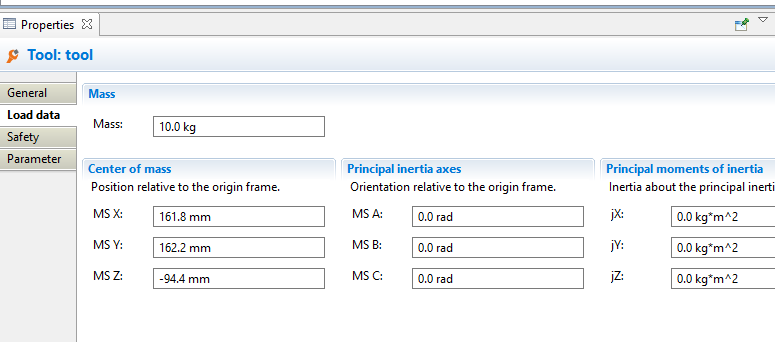
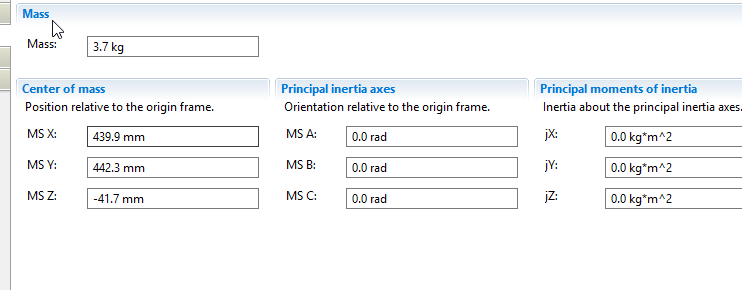
After that, I tried to test the dev branch but as soon as I start my program that moves the robot, I get loop errors: I have the same safetyconfiguration as with the master branch. And I use the same code (see my first post). I only have these errors with the dev branch.
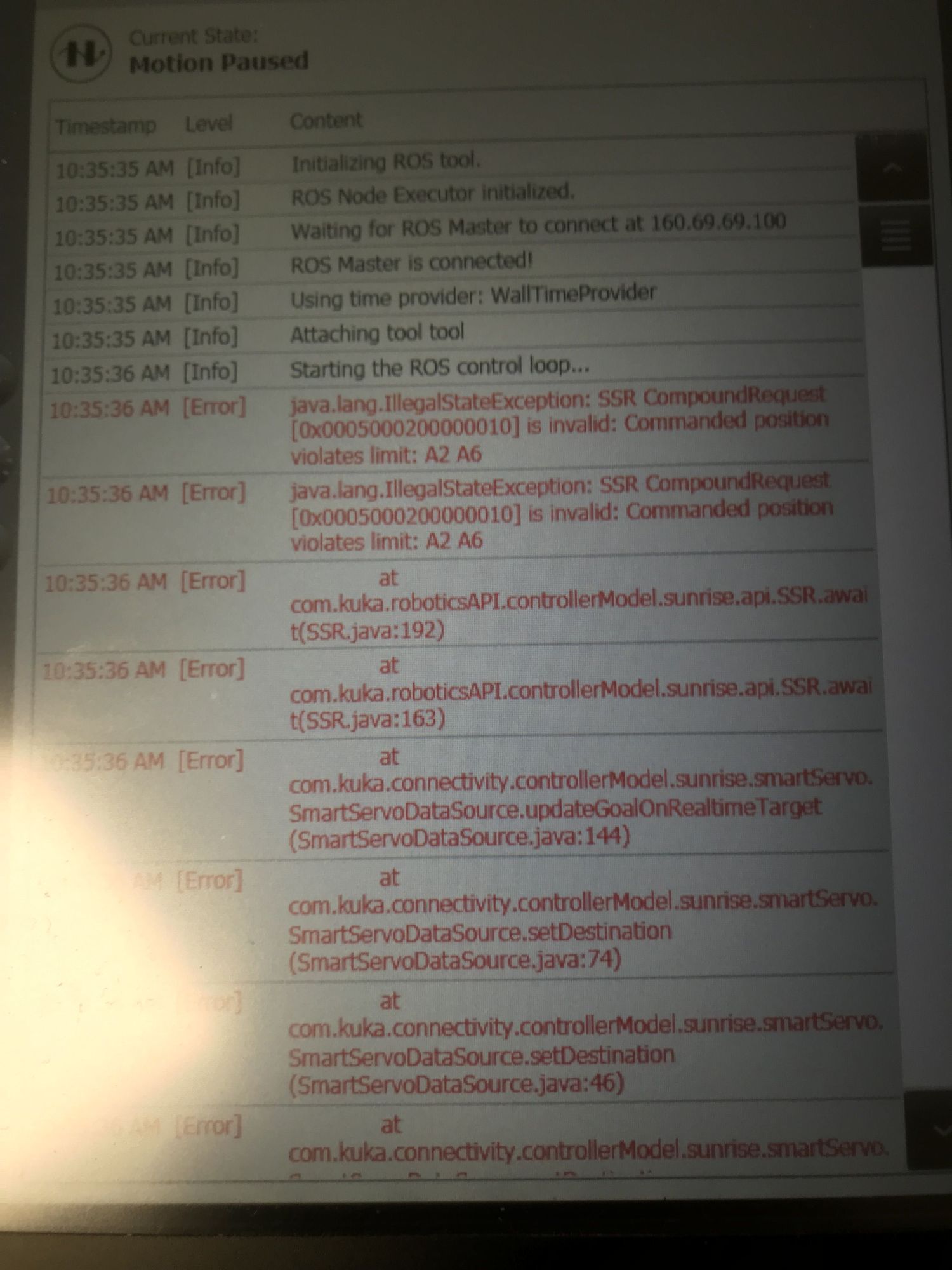
I need to change something in the code with the dev branch? I didn't find any examples or documentation for the dev branch.
We have been using the development branch with our iiwa14 and Sunrise 1.13 for quite some time without any similar issues...
It's strange that the error is complaing about an invalid command position for axes 2 and 6 (which usually happens if you send an invalid command via one of the new ROS action interfaces) but occurs right after starting ROSSmartServo. Are you sure that everything has been restarted cleanly?
Hello,
Thank you for your answer. I tried again with a different test code attached below. I started with the lib iiwa_tool for the code. So I updated the sunrise project with the java libs of the dev branch. I made a new ROS workspace with also the code of the dev branch.
If I try to get the position of the joints, everything goes well but to get the Cartesian position, it always returns FALSE. So in my code, I have the message "WAITING CARTESIAN POSE" in a loop every second.
Is there an error in my code or did I forget to do something with the Cartesian? I understand that on the dev branch, the Cartesian had evolved so I wonder if I shouldn't do something on my side?
void sleepForMotion(iiwa_ros::iiwaRos &iiwa, const double maxSleepTime)
{
    double ttd = iiwa.getTimeToDestinationService().getTimeToDestination();
    ros::Time start_wait = ros::Time::now();
    while (ttd < 0.0 && (ros::Time::now() - start_wait) < ros::Duration(maxSleepTime))
    {
        ros::Duration(0.5).sleep();
        ttd = iiwa.getTimeToDestinationService().getTimeToDestination();
    }
    if (ttd > 0.0)
    {
        ROS_INFO_STREAM("Sleeping for " << ttd << " seconds.");
        ros::Duration(ttd).sleep();
    }
}

int main(int argc, char **argv)
{
    // Initialize ROS
    ros::init(argc, argv, "CommandRobot");
    ros::NodeHandle nh("~");

    // ROS spinner.
    ros::AsyncSpinner spinner(1);
    spinner.start();

    iiwa_ros::iiwaRos my_iiwa;
    my_iiwa.init();

    // Dynamic parameter to choose the rate at wich this node should run
    double ros_rate = 0.1;
    ros::Rate *loop_rate_ = new ros::Rate(ros_rate);

    geometry_msgs::PoseStamped command_cartesian_position;
    iiwa_msgs::JointPosition command_joint_position;
    bool new_pose = false, motion_done = false;

    int direction = 1;

    while (ros::ok())
    {
        if (my_iiwa.getRobotIsConnected())
        {
            while (!my_iiwa.getJointPosition(command_joint_position)) {
                ros::Duration(1.0).sleep();
                ROS_WARN_STREAM("WAITING JOINT POSE");
            }

            ROS_INFO_STREAM("I got a Joint Message and its contents is: " << command_joint_position.position.a1 << " "
                                                                          << command_joint_position.position.a2 << " "
                                                                          << command_joint_position.position.a3 << " "
                                                                          << command_joint_position.position.a4 << " "
                                                                          << command_joint_position.position.a5 << " "
                                                                          << command_joint_position.position.a6 << " "
                                                                          << command_joint_position.position.a7);


            while (!my_iiwa.getCartesianPose(command_cartesian_position)) {
                ros::Duration(1.0).sleep();
                ROS_WARN_STREAM("WAITING CARTESIAN POSE");
            }

            ROS_INFO_STREAM("I got a CARTESIAN Message and its contents is: (X Y Z) - (X Y Z W) "
                                    << command_cartesian_position.pose.position.x << " "
                                    << command_cartesian_position.pose.position.y << " "
                                    << command_cartesian_position.pose.position.z << " - "
                                    << command_cartesian_position.pose.orientation.x << " "
                                    << command_cartesian_position.pose.orientation.y << " "
                                    << command_cartesian_position.pose.orientation.z << " "
                                    << command_cartesian_position.pose.orientation.w);

            my_iiwa.getPathParametersService().setJointRelativeVelocity(0.5);
            my_iiwa.getPathParametersService().setJointRelativeAcceleration(1);

            // Here we set the new commanded cartesian position, we just move the tool TCP 10 centemeters down and back up, every 10 seconds.
            command_cartesian_position.pose.position.z -= direction * 0.10;
            my_iiwa.setCartesianPose(command_cartesian_position);

            sleepForMotion(my_iiwa, 2.0);

            direction *= -1; // In the next iteration the motion will be on the opposite direction


            loop_rate_->sleep(); // Sleep for some millisecond. The while loop will run every 10 seconds in this example.
        }
        else
        {
            ROS_WARN_STREAM("Robot is not connected...");
            ros::Duration(5.0).sleep(); // 5 seconds
        }
    }
}
@pierre-galaup , did you ever end up fixing the issue? I have the same SSRCompoundRequest violates A2 and A6 error and it's driving me crazy.

@isabellahuang No, I dropped it for now and did in Java directly on the robot. I have to come back to this, but I don't have the time right now.