
MalAPIReader
 MalAPIReader copied to clipboard
 HuskyHacks
Reads and prints information from the website MalAPI.io
MalAPIReader
Parses API entries and prints information from the website MalAPI.io
Setup
Clone the repo:
$ git clone https://github.com/HuskyHacks/MalAPIReader.git && cd MalAPIReader
Install Poetry:
$ pip3 install poetry
Enter Poetry shell:
$ poetry shell
Install dependencies:
$ poetry install
Run the script:
$ python3 MalAPIReader.py -h
Usage
usage: MalAPIReader.py [-h] [--pe PE] [--look LOOK] [--verbose] [--report]

Read information from MalAPI.io for WinAPI information.

optional arguments:
  -h, --help            show this help message and exit
  --pe PE, -p PE        Specify a PE to read. The WinAPI will be checked against MalAPI and information will be printed about the API if the information is present.
  --look LOOK, -l LOOK  Look up an API by name and print all information.
  --verbose, -v         Increase verbosity of output
  --report, -r          Write report to the reports directory
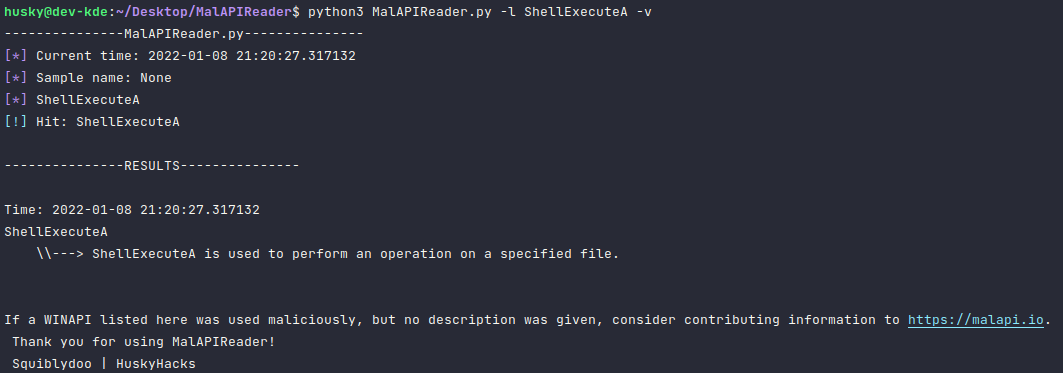
The --look option takes one argument: the name of an API. It will then make a request for the basic details about the API from MalAPI.io and print it. In the example below, we pass "ShellExecuteA" as an argument and receive information back.
i.e.
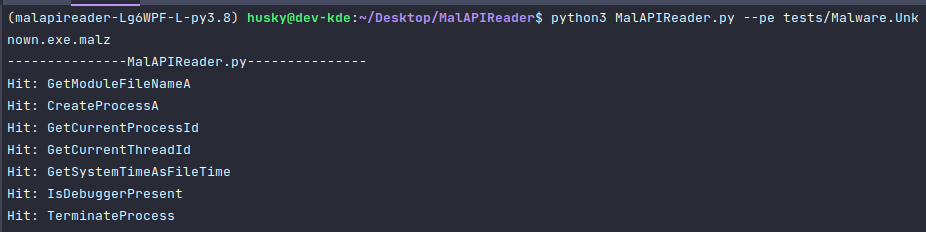
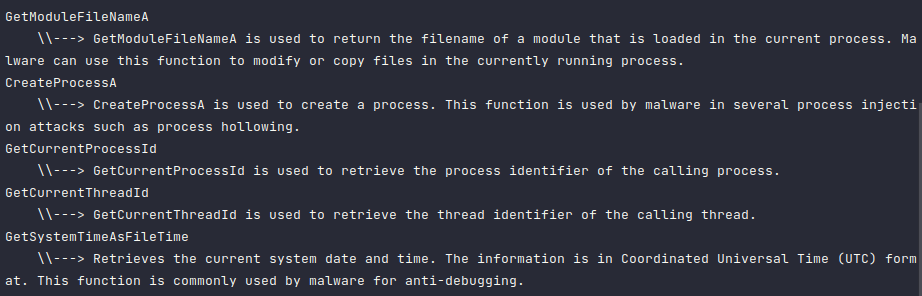
The --pe option takes one argument: the path and name to an PE file. It will then read the Import Address Table and check for any entries on MalAPI.io. If an entry is found, information about the API is then printed.
i.e.
The -r option writes the console out to a date-time stamped logfile in reports/ for later retrieval.
Known Bug
Keyboard Interrupts are not reliable. I am able to interrupt when running from IDLE but not when running from cmd.exe
The --report arg and the --verbose arg create strange log entries due to the use of colorama. All of the data is in there but the colors render as unprintable chars.
Thanks
Thank you mr.d0x for the inspiring project.
Metadata
Owner
 HuskyHacks
Metadata
Reads and prints information from the website MalAPI.io