

 Hopding
Unable to access child fields in pdf form
What were you trying to do?
Hi, I am using this pdf-lib library to modify a pdf programmatically in my React with typescript application. I need to get all the field names to set the intended data in those fields. I am getting all the parent level fields using the getFields() method and I can get their type and name too with getName() method. But, I cannot access the child fields of this parent field and perform some sort of getName() or check() uncheck() operation on that. For instance, I am getting these four checkboxes highlighted in the screenshot attached as kids under one parent with name "phone check1". When I use form.getCheckbox('phone check1').check(), it by default marks the first checkbox as checked. But I need to be able to check the checkbox of my choice be it second, third or fourth as needed. Can someone please help me achieve this.
I have also attached the code snippet through which I am getting all the parent level fields.

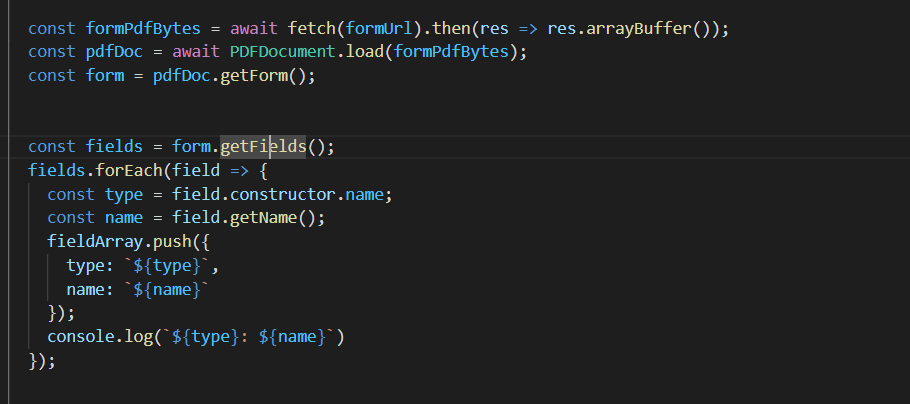
How did you attempt to do it?
I tried accessing the kids fields using this: form.getCheckbox('phone check1').acroField.Kids(). It returns an array of PDFRef objects, but I need them as pdf fields to get their name and mark the checkboxes as check or uncheck.
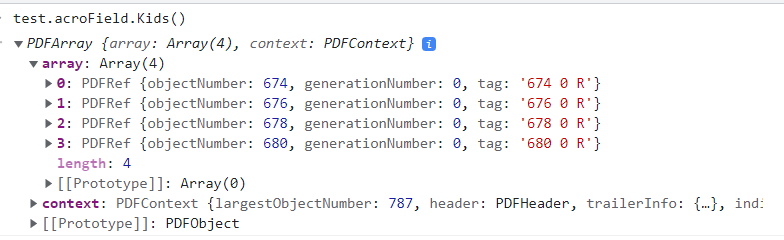
What actually happened?
It returns an array of PDFRef objects, but I need them as pdf fields to get their name and mark the checkboxes as check or uncheck.
What did you expect to happen?
I expected to have the names of all the fields including the children and to be able to perform some sort of check uncheck or stText operations on them.
How can we reproduce the issue?
https://www.fhfa.gov/Media/Blog/Documents/form710.pdf - link to the pdf
Version
1.17.1
What environment are you running pdf-lib in?
Other
Checklist
- [X] My report includes a Short, Self Contained, Correct (Compilable) Example.
- [X] I have attached all PDFs, images, and other files needed to run my SSCCE.
Additional Notes
No response

@JennyMenghani try this -
import { createPDFAcroFields, PDFName } from "pdf-lib";
/** @type {PDFAcroField[]} */
const kids = createPDFAcroFields(field.acroField.Kids()).map(_ => _[0]);

kids.forEach((kid) => {
    if (PDFName.of(valueToCompare) == kid.getOnValue()) {
        kid.setValue(kid.getOnValue()); // Check that particular checkbox.
    }
});
This has helped me to check the child boxes under a parent.
sidenote: The PDF I am working on makes the checkboxes empty when the form is flattened. IDK if that is the flaw in this method or it is the problem in the PDF itself.

Hi @satinjeet, Thank you for looking into this. I tried this piece of logic. But it doesn't seem to work for me. I can get the kids as PDFAcroCheckBox but unable to set their value. Will it be possible for you to try this with the pdf I attached in this bug?
Hello @JennyMenghani ,
I have verified the following code works with your provided pdf
    import { createPDFAcroFields, PDFName } from "pdf-lib";

    /** @type {PDFAcroField[]} */
    const kids = createPDFAcroFields(field.acroField.Kids()).map(_ => _[0]);
    kids.forEach((kid) => {
        if (condition === true) {
            kid.setValue(kid.getOnValue()); // Check that particular checkbox.
        } else {
            kid.setValue(PDFName.of('Off')); // Uncheck the checkbox
        }
    });
note, these are PDFAcroCheckboxes which do not have the check and uncheck convenience functions, you'll need to use the above methods to check and uncheck the boxes.
Mention to @satinjeet for the starter code, I just added the uncheck logic for completeness in case someone finds this issue in the future.

@Trapfether Were you able to flatten the PDF and get the correct render for the checkbox's checked state?
@satinjeet flattening won't work in this case because pdf-lib internally assumes one visual stream per field.
What you can do is determine the location of the pressed checkboxes, and either place a temporary checkbox over them before flattening, or place an image of a checkmark over the checkboxes manually before or after flattening.
Hi, @Trapfether I also face the same issue after flattening the PDF that checkbox ticks disappear. So the solution you suggested is to place a temporary checkbox over them, is there any code snippet for that which we can refer to?

@jigneshkhatri @Trapfether Hey folks, late to the game but the issue seems to be present to this day. I found a solution that works for me with flattening and without the need to place a temporary checkbox. The solution is to set a partial name to the kid. E.g.
function checkAcroFieldValue(form, fieldName, valueToCheck) {
  const { createPDFAcroFields } = require("pdf-lib");

  const kids = createPDFAcroFields(
    form.getCheckBox(fieldName).acroField.Kids()
  ).map(_ => _[0]);

  kids.forEach((kid, index) => {
    if (typeof kid.getPartialName() === "undefined") {
      kid.setPartialName(`${fieldName}-${index}`);
    }

    if (valueToCheck == kid.getOnValue()) {
      kid.setValue(kid.getOnValue());
    }
  });
}

checkAcroFieldValue(form, "check name", PDFName.of("yes"));
