

 HeidiSQL
Error window on editing value in grid
Steps to reproduce this issue
- Connect to a server/database;
- Select a table into sidebar list;
- Click on data tab;
- Click on a column data;
- Press enter to start edit mode;
- Set a value;
- Press enter to exit edit mode.
Current behavior
The application error message is opened.
Expected behavior
Stay in grid.
Possible solution
Sorry!
Environment
- HeidiSQL v 11.0.0.6061
- MySQL 5.7.30-0ubuntu0.18.04.1
- Ubuntu 18.04.4 LTS x86_64 / Wine 3.6 bugreport.txt

Wine 3.6 is outdated or? Please verify the issue persists with wine 4.0. Attention, newer v4 wine have problems with the tab key in Heidisql grids.

There is no Wine 4.x for Ubuntu 18.04.
The stable version of Wine is 5.0 and I can install it by PPA repo.
But the problem don't seem to be Wine.
This problem starts after the upgrade to night build 6057.
This error don't occours in v11.0.0.5919.
Also on Windows, when pressing Enter after editing, I get an access violation message in the bottom log panel (just a text message, not an application crash):
/* #1634496361: Access violation at address 00000000005742AB in module 'heidisql.exe'. Read of address FFFFFFFFFFFFFFFF Message CharCode:13 Msg:256 */
I suppose you get a similar line there?
No. Don't have an error message in botton log panel. Only in dialog message that opens when pressing Enter after editing.
In error dialog the exception message says "Access violation at address 000000000041004E in module 'heidisql.exe'. Read of address 00000060FF000008."
But I realized that instead of pressing Enter, I click on another field after editing, the error does not occur.
Most probably related to #937 and probably also to my modification in bcce290a57a14797f82ca4f529fc37fb557487e7
There are almost two decades that I don't write a Pascal (Delphi) code.
But if I can help with anything, you can call me.


@budiony I was sure this only happens through Wine, but you say the crash happens on Windows (10?) ? And it's not just the logged "Access violation in xyz" in the log panel?
@budiony I was sure this only happens through Wine, but you say the crash happens on Windows (10?) ? And it's not just the logged "Access violation in xyz" in the log panel?
Yes indeed, Windows 10, I have attached log files and screenshots, but you deleted/closed my response as duplicate few weeks ago, I believe that this is problem of the edit field itself with combination of character encoding.
I suppose you mean #1179 - describing the same message appearing in the SQL log panel. Not a crash, just a debug message, but somehow the same cause. On Wine, the same message does not just appear in the log panel, but crashes the whole application.
Not sure about Wine, didn't use it myself under Linux. But again, it appears to me that the same reason could be the cause in both OS-es, given the fact that Wine comes with prebuild implementations of particular Windows DLLs, could be the same DLL(s) causing the problem, difference is that under emulation whole app crashes.
I suppose you mean #1179 - describing the same message appearing in the SQL log panel. Not a crash, just a debug message, but somehow the same cause. On Wine, the same message does not just appear in the log panel, but crashes the whole application.
Since I upgraded to Wine 5.5 and HeidiSQL 11.0.0.6103, the crash windows did stop been showed.
Only a log message like this:
/* #1634496361: Access violation at address 0000001000000000 in module 'heidisql.exe'. Execution of address 0000001000000000 Message CharCode:13 Msg:256 */
While making a new table on Win10 connected to MariaDB 10.2.22 Heidisql 64bit 11.2.0.6213
/* #25: Access violation at address 00000000006CE623 in module 'heidisql.exe'. Read of address FFFFFFFFFFFFFFFF Message CharCode:0 Msg:514 / / #12: Abstract Error Message CharCode:0 Msg:514 / / #26: Abstract Error Message CharCode:0 Msg:514 / / #52: Access violation at address 000000000040EEE2 in module 'heidisql.exe'. Read of address FFFFFFFFFFFFFFFF Message CharCode:0 Msg:514 / / #1634496361: Access violation at address 0000005072F00000 in module 'heidisql.exe'. Execution of address 0000005072F00000 Message CharCode:13 Msg:256 */
(Timestamps on the log window would be nice too btw ;) )

I can confirm that I am getting this on Win 10 connected to MariaDB 10.4.14, tested on HeidiSQL 11.3.6295 64 bit Portable, HeidiSQL 11.2.6213 64 bit Portable, and HeidiSQL 11.2.6213 64 bit.
To recreate, I can simply click on the field of an already existing row in the database and attempt editing it, or I can click on a row, press F2, and attempt to edit it. If I try to insert a new row, duplicate row, or duplicate without keys--into a table with a single primary key--I will get a "Grid Editing error" that looks like the attached image.
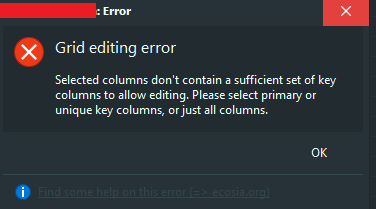
/* #1634496361: Access violation at address 0000001000000000 in module 'heidisql.exe'. Execution of address 0000001000000000 Message CharCode:13 Msg:256 */
/* #1634496361: Access violation at address 0000001000000000 in module 'heidisql.exe'. Execution of address 0000001000000000 Message CharCode:13 Msg:256 */


This issue was just presented to me a second ago, was working fine the past 3 days until now.
Version: 11.3.0.6295

I can confirm that I'm also getting the same issue on Windows 10 using HeidiSQL 12.0.0.6468 (64-bit) against a MySQL database. Updating a value in the grid and press Enter key:
/* #1634496361: Access violation at address 000000000057769B in module 'heidisql.exe'. Read of address 0000000000000000 Message CharCode:13 Msg:256 */

Same issue on Windows 10 Pro Version 21H1 using HeidiSQL 12.1.0.6537 updating a grid value of a MySQL database.
/* #1634496361: Access violation at address 0000001000000000 in module 'heidisql.exe'. Execution of address 0000001000000000 Message CharCode:13 Msg:256 */
Anyway the database table is correctly modified, no other issue beside the display of message in the log pane to the bottom of application window.

I have a problem with HeidiSQL. I have this error: "Access violation at address 000000000040F142 in module 'heidisql.exe'. Read of address FFFFFFFFFFFFFFFF Message CharCode:0 Msg:514".
I`m using Windows 10.

I am seeing this on 12.3.0.6589 Windows 10 Pro.
/* #1634496361: Access violation at address 00000000005E016B in module 'heidisql.exe'. Read of address 0000000000000000 Message CharCode:13 Msg:256 */

I'm seeing this too, mainly while editing the grid during development. The problem is that the editing fails and it is a problem enough that I am considering other options. I am very sad since I've been an everyday user of HeidiSQL since 2017 basically :(((
/* #1634496361: Access violation at address 00000056BC200000 in module 'heidisql.exe'. Execution of address 00000056BC200000 Message CharCode:13 Msg:256 */

Same here. I really like HediSQL over other options I've tried (many of them) but if I can't edit it's not much use to me.
I'm noticing that it is happening while interacting with any kind of grid really (like the one for editing columns). Other times it is harder to correlate to a particular action because maybe a lot of stuff is happening in the log.
So I was reasoning about this, reaching my own, possibly useless, conclusions. While searching online I see that it is not something new (this very issue is close of being 3 years old) and at the same time not so common. The Google results are only 3 pages, mostly from the forum where this issue is often referenced by @ansgarbecker , so only 25 posts here in 2.5 years for such a breaking issue?
I recently changed machine and it's the first time that I notice this error. Could it be installation-related? I'll try to re-install and let you know.
I noticed the age on this issue, too which is why I posted - to add to it with more data.
I do not think it is installation related since I saw it on my previous machine.
I've since switched to DB Browser for SQLite but would like to use Heidi for other databases but with this issue I can't.