

 HaxeFoundation
Please support latest ndk

I think this has been fixed? I am closing this now, but feel free to re-open it.


I thought by this: https://github.com/openfl/lime/issues/1179#issuecomment-387901554 And my understanding (according to the title) was that progress on https://github.com/HaxeFoundation/hxcpp/pull/707 was stopped.
If it's google's problem again, we could wait for them. Or I could add something to my "google don't give a crap about compatibility hack" file. I have not tried the latest NDK yet.
There's two different issues discussed in https://github.com/openfl/lime/issues/1179, one was a Lime issue and fixed since. The other one is that the Android NDK seems to be dropping GCC support starting with version 16 (as mentioned in #707 by @jgranick), so HXCPP will need to be able to build with clang instead. The current workaround is to instruct people to downgrade to NDK r15c, which isn't ideal. :)
Well, perhaps they haven't dropped GCC support just yet? Seems surprisingly hard to find an official statement on it, but it's definitely deprecated and no longer updated, so sooner or later the switch to clang has to happen. Relevant: https://android-developers.googleblog.com/2017/09/introducing-android-native-development.html
Ah, the roadmap has something more concrete:
NDK r18 Estimated release: Q2 2018
[...]
Remove GCC GCC is still in the NDK today because some of gnustl's C++11 features were written such that they do not work with Clang (threading and atomics, mostly). Now that libc++ is the best choice of STL, this is no longer blocking, so GCC can be removed.
https://android.googlesource.com/platform/ndk/+/master/docs/Roadmap.md#ndk-r18
Yes, we should be working with the latest, so i"ll keep it open so I can have a good look at it.
Could we maybe implement a helpful error message like "r15c or older required" when trying to use a version that's too recent? I've lost count of how many people I've had to tell to downgrade to r15c. :)
I got a new Apple Silicon Mac recently, and it was quite the terrible experience setting up NDK r15c. The latest macOS Gatekeeper has gotten really strict, and it does not like all of the unsigned (or maybe unnotarized) executables in that version of the NDK anymore. As I understand it, Google has resolved this issue in newer NDKs.
Anyway, here's my experience trying to use NDK r15c. The first time I built a Haxe project for Android, my build would fail when running each individual executable from NDK r15c for the first time. This required opening the macOS Settings and clicking an "Allow" button in the security section, and then restarting my build again from scratch. I probably repeated this cycle several dozen times before I made it all of the way through a complete build. After that, I could build any app for Android without the same issue, but that first time took me a good extra 30-60 minutes of extra manual intervention at least. I was patient, and I suspected that it would all work in the end. I guarantee that many other developers would have given up long before I did.
Continuing to require NDK r15c is not sustainable anymore. Can you please revisit supporting newer NDK versions? Thank you!

@joshtynjala Have you actually tried with a newer NDK? Support for NDK 20 has supposedly been merged almost two years ago: https://github.com/HaxeFoundation/hxcpp/pull/825
@Gama11 I tried NDK 23 today, and I have tried other NDKs newer than r15c in the past. I get the following error with NDK 23:
/usr/local/lib/haxe/lib/hxcpp/4,2,1/include/hxcpp.h:23:13: fatal error: 'typeinfo' file not found
   #include <typeinfo>
            ^~~~~~~~~~
1 error generated.
Error: Could not create PCH
This is the same error that I've always gotten, so as you can imagine, it was easy to assume that nothing has changed in hxcpp over the last couple of years. Especially since there was no activity on this issue since your most recent comment mentioning r15c being required.
I will try NDK 20 and report back, if I can find that version (Android Studio seems to allow downloading the newest NDK only).
Confirmed that NDK r20b works for me. Unfortunately, I still had to "Allow" some of the executables in this NDK on macOS. However, it was definitely fewer clicks than r15c, so that's a slightly better experience. I'll try some more newer versions to see if I can find a better one.
r21e also works (but still requires forcing Gatekeeper to allow executables). r22b does not work. Nor does r23-beta4.
r22b has a different error than r23-beta4. I'm including the text below for completeness.
Creating /Users/joshtynjala/Development/feathersui/feathersui-openfl/samples/hello-world/bin/android/obj/obj/android-v7/__pch/haxe/hxcpp.h.gch...
In file included from /usr/local/lib/haxe/lib/hxcpp/4,2,1/include/hxcpp.h:349:
In file included from /usr/local/lib/haxe/lib/hxcpp/4,2,1/include/hx/StackContext.h:4:
In file included from /usr/local/lib/haxe/lib/hxcpp/4,2,1/include/hx/QuickVec.h:5:
In file included from /Users/joshtynjala/Library/Android/sdk/ndk/android-ndk-r22b/toolchains/llvm/prebuilt/darwin-x86_64/bin/../sysroot/usr/include/c++/v1/algorithm:643:
In file included from /Users/joshtynjala/Library/Android/sdk/ndk/android-ndk-r22b/toolchains/llvm/prebuilt/darwin-x86_64/bin/../sysroot/usr/include/c++/v1/memory:673:
/Users/joshtynjala/Library/Android/sdk/ndk/android-ndk-r22b/toolchains/llvm/prebuilt/darwin-x86_64/bin/../sysroot/usr/include/c++/v1/atomic:2759:16: error: use of undeclared identifier '__libcpp_signed_lock_free'
typedef atomic<__libcpp_signed_lock_free> atomic_signed_lock_free;
               ^
/Users/joshtynjala/Library/Android/sdk/ndk/android-ndk-r22b/toolchains/llvm/prebuilt/darwin-x86_64/bin/../sysroot/usr/include/c++/v1/atomic:2760:16: error: unknown type name '__libcpp_unsigned_lock_free'; did you mean 'atomic_signed_lock_free'?
typedef atomic<__libcpp_unsigned_lock_free> atomic_unsigned_lock_free;
               ^
/Users/joshtynjala/Library/Android/sdk/ndk/android-ndk-r22b/toolchains/llvm/prebuilt/darwin-x86_64/bin/../sysroot/usr/include/c++/v1/atomic:2759:43: note: 'atomic_signed_lock_free' declared here
typedef atomic<__libcpp_signed_lock_free> atomic_signed_lock_free;
                                          ^
2 errors generated.
Error: Could not create PCH
Hmm... I see now that you need to download the "Mac App Bundle" instead of the .zip to get a notarized version of the NDK. Weird. It looks like they included the NDK files inside an .app file, which you need to extract by right clicking the .app file and choosing Show Package Contents. There's an "NDK" folder that contains the same files as the .zip. I copied that folder somewhere on my hard drive, and Gatekeeper didn't complain (r21e).
I think the most robust way to install the NDK is to download Android Studio and then use the app settings /manager to download the NDK. Google obviously do not care about file size, but if i have to pick one way of installing, this is it.
@hughsando Yeah, that would be the best way, but it's been my experience that Android Studio exposes only the newest NDK, which gives me the typeinfo.h error. I could only get older NDKs by downloading them from the website instead. Maybe I missed how to pick a specific NDK version in Android Studio, though.
You should be able to use the NDK even if it's still inside the .app. A .app is nothing more than a folder with a specific file extension and internal structure that's treated specially by macOS. So I would expect a path like Android NDK.app/Contents/NDK (I'm not sure what the actually filenames are) would work without needing to pull anything out of the bundle.

I'm having an error into Android 10 compiling with the NDK r21e that says:
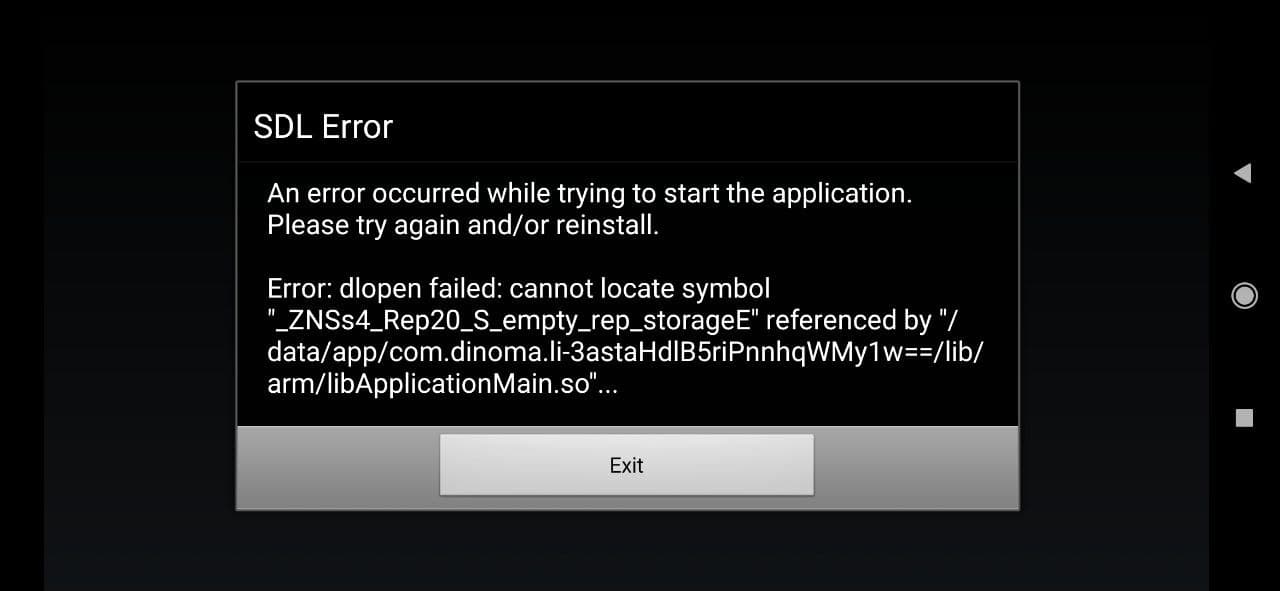
I upgrade as @Gama11 suggested but using NDK r15c was good, haven't tried later versions
UPDATE: I tried with r15c later versions (till 20) and none of them compiled correctly, so I'm using r15c.

Reading the changelog, it sounds like r16's "unified headers" are the problem. Or at least, a problem. They'd explain errors like "can't find typeinfo" and "can't find stdint.h."
The changelog also links to two migration guides. The main guide lists these steps:
- Change
$NDK/platforms/android-$API/arch-$ARCHto$NDK/sysroot. (Looks like replacing 12 lines in android-toolchain-gcc.xml should do it.) Edit: useANDROID_NDK_ROOTforNDK. - Pass
-isystem $NDK/sysroot/usr/include/$TRIPLEwhen compiling, to include architecture-specific files. (There were plans to automate this, so it might not be necessary in newer NDKs.) Edit: don't put a space after-isystem, and useEXEPREFIXforTRIPLE. - Pass
-D__ANDROID_API__=$APIwhen compiling. (This may no longer be needed either.) Edit: this value isn't made available, so we need to update Setup.hx. - At link time, change nothing. (Can do.)
The second migration guide tells you what to expect after following the first. Some headers got removed, and most functions from those headers got placed elsewhere. A quick search should tell you where they ended up, and then you can include that file instead.
I'll try these steps and see if r16 starts working. If it does, I bet r17 will too, but not r18 just yet. (r18 removes GCC, which I'm pretty sure hxcpp requires.)

@player-03 I am successfully using r21e these days. Last time I tried, newer NDK versions than that weren't working, but that was a few months ago.
Ah, I see. I missed android-toolchain-clang.xml the first time. Ok, so that's why NDK versions 20+ are at least partially working.
I tested unified headers anyway, and that made NDK r16 work, but r17 introduced unrelated changes that broke everything again. I could potentially solve that problem too, but there's no point, since the whole GCC toolchain is legacy code at this point. Won't even submit the pull request, since technically it breaks more NDK versions than it fixes. Instead, I'll focus on clang.
Using NDK r21e, I can compile and run DisplayingABitmap without issue, but lime rebuild android fails, so I'm working on that. Once r21 works, maybe we can check the changelogs for update instructions.