

 HaxeFlixel
FlxText Borders Easily Clipped
_title = new FlxText(0, 8, FlxG.width, "This Is\nClipped!", 32);
_title.alignment = "center";
_title.setBorderStyle(FlxText.BORDER_OUTLINE, 0xff008800, 4, 1);
add(_title);
A fairly minor issue, but FlxText objects can have the top of their border clipped quite easily. The positioning of the text should take into account the border size. I'm not sure if the above example is a perfect example, as I'm currently using the Press Start 2P font. It may not show up with the default Flixel font.

This is indeed not an issue with the default font.
Screenshot of what it looks like:


Here it is with Press Start 2P:

More noticable, but I think that even Nokia FC is missing a pixel from the top.
My screenshot was actually with Press Start 2P and looks the same as yours as far as I can tell, probably should've specified. ;)
I'm looking into adding a new feature to FlxText and it will fix this in the process.

I was looking into extending the border and shadow stuff to be more flexible. I spotted the cause of this issue while I working on that and had a solution built into the changes, though the stuff I was working on turned out to be a lot harder than I had anticipated.
If nobody else is keen to fix this immediately, I can make a fix in the next couple of days.
Any progress on this issue? Clipping is ugly and makes borders nearly unusable :(

I'm using this workaround now:
package;

import flash.display.BitmapData;
import flixel.FlxG;
import flixel.text.FlxText;
import flixel.util.FlxColor;

/**
 * Subclass of FlxText that incorporates a fix for
 * https://github.com/HaxeFlixel/flixel/issues/1025. Use this if text borders
 * appear clipped.
 */
class FlxTextHack extends FlxText {

  public function new(x: Float = 0, y: Float = 0, fieldWidth: Float = 0, ?text: String, size: Int = 8, embeddedFont: Bool = true) {
    super(x, y, fieldWidth, text, size, embeddedFont);
  }

  // Copied from FlxText and modified.
  override private function regenGraphic(): Void {
    if (textField == null || !_regen)
      return;

    var oldWidth:Int = 0;
    var oldHeight:Int = FlxText.VERTICAL_GUTTER;

    if (graphic != null)
    {
      oldWidth = graphic.width;
      oldHeight = graphic.height;
    }

    var newWidth:Float = textField.width;
    // Account for gutter
    var newHeight:Float = textField.textHeight + FlxText.VERTICAL_GUTTER;

    // BEGIN ADDITION
    switch (borderStyle) {
      case OUTLINE | OUTLINE_FAST:
        newWidth += borderSize;
        newHeight += borderSize;
      case SHADOW:
        newWidth += shadowOffset.x;
        newHeight += shadowOffset.y;
      case NONE:
    }
    // END ADDITION

    // prevent text height from shrinking on flash if text == ""
    if (textField.textHeight == 0)
    {
      newHeight = oldHeight;
    }

    if (oldWidth != newWidth || oldHeight != newHeight)
    {
      // Need to generate a new buffer to store the text graphic
      height = newHeight;
      var key:String = FlxG.bitmap.getUniqueKey("text");

      makeGraphic(Std.int(newWidth), Std.int(newHeight), FlxColor.TRANSPARENT, false, key);
      if (_hasBorderAlpha)
        _borderPixels = graphic.bitmap.clone();
      frameHeight = Std.int(height);
      textField.height = height * 1.2;
      _flashRect.x = 0;
      _flashRect.y = 0;
      _flashRect.width = newWidth;
      _flashRect.height = newHeight;
    }
    else // Else just clear the old buffer before redrawing the text
    {
      graphic.bitmap.fillRect(_flashRect, FlxColor.TRANSPARENT);
      if (_hasBorderAlpha)
      {
        if (_borderPixels == null)
          _borderPixels = new BitmapData(frameWidth, frameHeight, true);
        else
          _borderPixels.fillRect(_flashRect, FlxColor.TRANSPARENT);
      }
    }

    if (textField != null && textField.text != null && textField.text.length > 0)
    {
      // Now that we've cleared a buffer, we need to actually render the text to it
      copyTextFormat(_defaultFormat, _formatAdjusted);

      _matrix.identity();
      // BEGIN ADDITION
      _matrix.translate(0, FlxText.VERTICAL_GUTTER / 2);
      switch (borderStyle) {
        case OUTLINE | OUTLINE_FAST:
          _matrix.translate(borderSize, borderSize);
        case SHADOW:
          _matrix.translate(Math.max(0, -shadowOffset.x), Math.max(0, -shadowOffset.y));
        case NONE:
      }
      // END ADDITION

      applyBorderStyle();
      applyBorderTransparency();
      applyFormats(_formatAdjusted, false);

      drawTextFieldTo(graphic.bitmap);
    }

    _regen = false;
    resetFrame();
  }
}
I tried to make it theoretically correct, but I don't understand the intricacies of Flash text rendering, nor do I have a clue what VERTICAL_GUTTER is for. But at least in my case, the above seems to incorporate enough slack to fix the clipping.
If the HaxeFlixel devs deem this a sane patch, I'd be happy for it to be applied.
@ttencate I was having a similar issue, but with text that didn't have borders or anything applied:
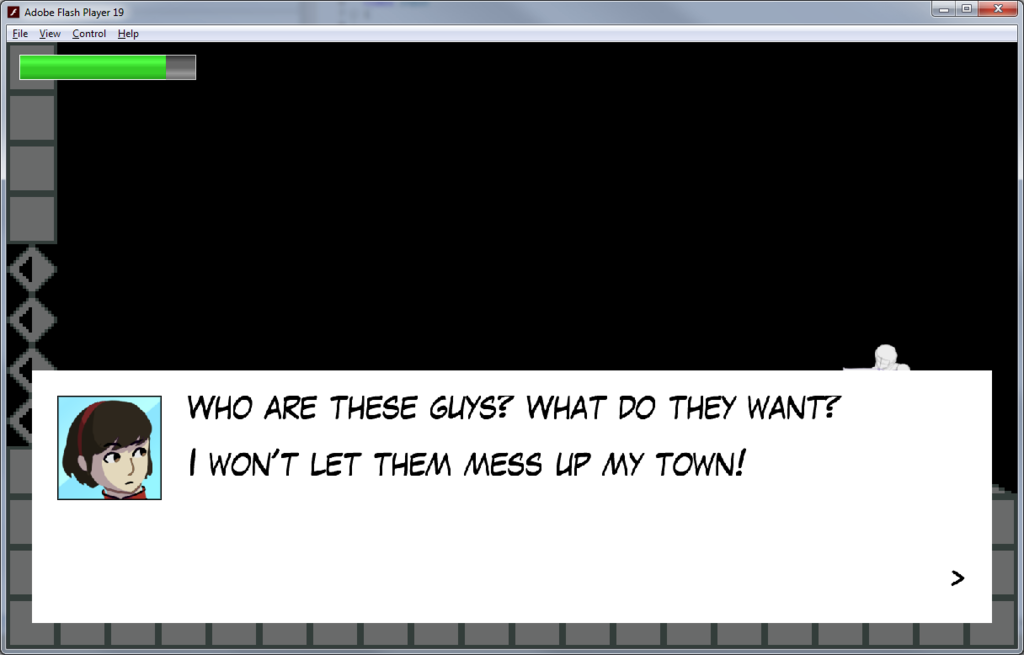
It was being chopped off at the top. I did some digging and came up with this solution which seems to work... I think it could be refined a little bit...
So in FlxText.regenGraphic I made these changes:
private function regenGraphic():Void
{
	if (textField == null || !_regen)
		return;

	var oldWidth:Int = 0;
	var oldHeight:Int = VERTICAL_GUTTER;

	if (graphic != null)
	{
		oldWidth = graphic.width;
		oldHeight = graphic.height;
	}

	var newWidth:Float = textField.width;
	// Account for gutter
	var newHeight:Float = textField.textHeight + VERTICAL_GUTTER;

	// ADD ++
	var metrics:TextLineMetrics = textField.getLineMetrics(0);
	var font:TextFormat = textField.getTextFormat(0, textField.getLineLength(0));

	newHeight += Math.ceil((font.size - metrics.height) * 2);

	switch (borderStyle)
	{
		case OUTLINE | OUTLINE_FAST:
			newWidth += Math.ceil(borderSize*2);
			newHeight += Math.ceil(borderSize*2);
		case SHADOW:
			newWidth += Math.ceil(shadowOffset.x);
			newHeight += Math.ceil(shadowOffset.y);
		case NONE:
	}
	// ++

	// prevent text height from shrinking on flash if text == ""
	if (textField.textHeight == 0)
	{
		newHeight = oldHeight;
	}

	if (oldWidth != newWidth || oldHeight != newHeight)
	{
		// Need to generate a new buffer to store the text graphic
		height = newHeight;
		var key:String = FlxG.bitmap.getUniqueKey("text");

		makeGraphic(Std.int(newWidth), Std.int(newHeight), FlxColor.TRANSPARENT, false, key);
		if (_hasBorderAlpha)
			_borderPixels = graphic.bitmap.clone();
		frameHeight = Std.int(height);
		textField.height = height * 1.2;
		_flashRect.x = 0;
		_flashRect.y = 0;
		_flashRect.width = newWidth;
		_flashRect.height = newHeight;
	}
	else // Else just clear the old buffer before redrawing the text
	{
		graphic.bitmap.fillRect(_flashRect, FlxColor.TRANSPARENT);
		if (_hasBorderAlpha)
		{
			if (_borderPixels == null)
				_borderPixels = new BitmapData(frameWidth, frameHeight, true);
			else
				_borderPixels.fillRect(_flashRect, FlxColor.TRANSPARENT);
		}
	}

	if (textField != null && textField.text != null && textField.text.length > 0)
	{
		// Now that we've cleared a buffer, we need to actually render the text to it
		copyTextFormat(_defaultFormat, _formatAdjusted);

		_matrix.identity();
		// ADD ++
		_matrix.translate(0, (font.size - metrics.height) + (VERTICAL_GUTTER / 2));
		_matrix.translate(0, FlxText.VERTICAL_GUTTER / 2);
		switch (borderStyle) {
			case OUTLINE | OUTLINE_FAST:
				_matrix.translate(borderSize, borderSize);
			case SHADOW:
				_matrix.translate(Math.max(0, -shadowOffset.x), Math.max(0, -shadowOffset.y));
			case NONE:
		}
		// ++

		applyBorderStyle();
		applyBorderTransparency();
		applyFormats(_formatAdjusted, false);

		drawTextFieldTo(graphic.bitmap);
	}

	_regen = false;
	resetFrame();
}
