
RealFire
 RealFire copied to clipboard
 Hakanbaban53
A minimalist animated oneliner theme for Firefox perfectly matching real Dark.
RealFire 🔥
A minimalist animated oneliner theme for Firefox perfectly matching real Dark

🏞 Screenshots
Click me 🐈
Adaptive Tab Bar Extension Support

Horizonal Tabs

MacOs Window Control & Fonts

Animated Background

Tab Preview

Context Menu

Auto-hide Scrollbars

Library

Adaptive Window Color With Windows & GNU/Linux

📃 Browser JS Files
userChrome.css
This helps to customize Firefox User Interface.
userContent.css
This helps to customize web content like a specific site.
aboutUserChrome.sys.mjs by aminomancer
This script helps to enabled or disabled browser scripts. Adding new entry the application menu named UserChrome Maneger (Shortcut Ctrl+Shift+U).
tabThumbnailTooltip.uc.js by aminomancer
Show a large thumbnail image to preview tab content when hovering a tab.
hideScrollbar.uc.js
It's now possible to autohide scrollbars.
verticalTabsPane.uc.js by aminomancer (Edited for RealFire)
This script create a vertical pane across from the sidebar that functions like the vertical tabs pane in Microsoft Edge. Writed by aminomancer but I edited full compatibility for RealFire.
macosTheme.uc.js
This script to convert font and window controls to macos style.
You can look here to find out what other scripts do. 👈
❓ But how does it work?
Custom startup-script (aka mozilla.cfg here) is loaded using local-settings.js. This startup-script adds "loader" scripts from utils folder that loads arbitrary javascript files from the script folder into Firefox
mozilla.cfg also helps in setting local webpage as your homepage. Details in Installation (Currently Not Working!).
💡 Installation
Curl based Installation (You can install this theme with one line command)
GNU/Linux & MacOS
```console
$ curl -s -o- https://raw.githubusercontent.com/Hakanbaban53/RealFire/main/programs/install-curl.sh | bash # Standard
$ curl -s -o- https://raw.githubusercontent.com/Hakanbaban53/RealFire/main/programs/install-curl.sh | bash -s -- -f ~/.var/app/org.mozilla.firefox/.mozilla/firefox # Flatpak
$ curl -s -o- https://raw.githubusercontent.com/Hakanbaban53/RealFire/main/programs/install-curl.sh | bash -s -- -f ~/snap/firefox/common/.mozilla/firefox/ # Snap
```
Windows
```powershell
> curl -sL "https://raw.githubusercontent.com/Hakanbaban53/RealFire/main/programs/install-curl.bat" > %TEMP%\install-curl.bat && %TEMP%\install-curl.bat REM Standard
> curl -sL "https://raw.githubusercontent.com/Hakanbaban53/RealFire/main/programs/install-curl.bat" > %TEMP%\install-curl.bat && %TEMP%\install-curl.bat -b "C:\Program Files (x86)\Mozilla Firefox" REM Custom binary folder
```
This will download the master branch and run the installation script.
`mozilla.cfg` can be configured after complete installation
Script Installation
-
Clone the repository and enter folder:
$ git clone https://github.com/Hakanbaban53/RealFire.git && cd RealFire -
Run installation script
This script will lookup default Firefox profile location and install the theme with default configurations.
GNU/Linux & MacOS
$ ./programs/install.sh # Standard
$ ./programs/install.sh -f ~/.var/app/org.mozilla.firefox/.mozilla/firefox # Flatpak
$ ./programs/install.sh -f ~/snap/firefox/common/.mozilla/firefox/ # Snap
Windows
> programs\install.bat REM Standard
> programs\install.bat -e -b "C:\Program Files (x86)\Mozilla Firefox" REM Disable fx-autoconfig and Custom binary folder
Script options
-
-b <binary_folder>optional- Set custom Firefox binary folder path, for example
/usr/lib32/firefox - Default: Auto detects in linux.
C:\Program Files\Mozilla Firefoxin windows
- Set custom Firefox binary folder path, for example
-
-f <firefox_folder>optional- Set custom Firefox folder path, for example
~/.mozilla/icecat/ - Default:
~/.mozilla/firefox/in linux.%APPDATA%\Mozilla\Firefoxin windows
- Set custom Firefox folder path, for example
-
-p <profile_name>optional- Set custom profile name, for example
4htgy4pu.app - Default: Profile folder name found in
profiles.iniat ->
[Install4F96D1932A9F858E] Default=1yrah0xg.default-release Locked=1 - Set custom profile name, for example
-
-eoptional- Install
fx-autoconfig - Runs sudo to copy
mozilla.cfgandlocal-settings.jsto Application Binary folder - Default: True
- Install
-
-hoptional- Shows help message with flags info
-
Manual Installation
-
Open
about:supportin new tab and clickOpen DirectorynearProfile Directory. -
Open this directory in terminal and clone the repository
Note: If you already have a
chromefolder underProfile Directory, rename it tochrome_bakor anything else to preserve your old theme.$ cd {Your profile directory} $ git clone https://github.com/Hakanbaban53/RealFire.git chrome $ cd chromeMacOS
-
about:support>Application Binary>{Installation folder}firefox
GenerallyInstallation folderis/Applications/Firefox.app/Contents/MacOS/(Firefox Nightlyfor Nightly version)For
MacOS, our destination folder is/Applications/Firefox.app/Contents/Resources/
$ ln -s "`pwd`/programs/user.js" ../user.js $ cp ./programs/mozilla.cfg /Applications/Firefox.app/Contents/Resources/ $ cp ./programs/local-settings.js /Applications/Firefox.app/Contents/Resources/defaults/pref/```Windows
about:support>Application Binary>{Installation folder}firefox.exe
GenerallyInstallation folderisC:\Program Files\Mozilla Firefox\
> mklink ..\user.js "%cd%\programs\user.js" > copy .\programs\mozilla.cfg "C:\Program Files\Mozilla Firefox\" > copy .\programs\local-settings.js "C:\Program Files\Mozilla Firefox\defaults\pref\" -
-
🗑️ If you want to remove the Theme:
GNU/Linux & MacOS
./programs/uninstall.sh
Windows
Not Released Yet....
🔧 Follow-up changes
-
In Firefox
- Right click hamburger button >
customize toolbardisableTitle Bar,Drag Space. - Remove
Flexible Spacefrom urlbar. - Set Density to
Compact/Normal/Touchand Themes toDarkorLight.
- Right click hamburger button >
-
Open
about:support>Clear startup cache...>Restarttwice -
Voilà
⚙️ Configuration
-
You can use the realfire-config.css change the a lot of variables.
-
If you run the automatic installation script, it will install all the files in the folders where they need to be installed.
-
If something breaks on your system then please raise a issue
📌 Known issues
- Adaptive window color with windows not working on preferences page and start page (Windows only). If you want the change it use the realfire-config.css file.
📂 Folder structure
🗃 .
├── 🖿 assets
│  └── 🖻 preview images
├── 🖿 img
│  └── 🖻 new tab background image
├── 🖿 icons
│  ├── 🗎 animation.svg
│  └── 🗐 many icons in .svg format
├── 🖿 includes
│  ├── 🗎 realfire-checkbox.css
│  ├── 🗎 realfire-icons.css
│  ├── 🗎 realfire-config.css
│  └── 🗐 other .css files
├── 🖿 JS
│  ├── 🗎 aboutUserChrome.sys.mjs
│  ├── 🗎 navbarToolbarButtonSlider.uc.js
│  ├── 🗎 tabThumbnailTooltip.uc.js
│  ├── 🗎 verticalTabsPane.uc.js
│  ├── 🗎 tabThumbnailTooltip.uc.js
│  ├── 🗎 macosTheme.us.js
│  └── 🗐 many script in .uc.js format
├── 🖿 programs
│  ├── 🗎 install-cfg.sh
│  ├── 🗎 install.sh
│  ├── 🗎 install-curl.sh
│  ├── 🗎 install.bat
│  ├── 🗎 install-curl.bat
│  ├── 🗎 local-settings.js
│  ├── 🗎 mozilla.cfg
│  └── 🗎 user.js
├── 🖿 resources
│  └── 🗐 userchrome Manager page files
├── 🖿 utils
│  ├── 🗎 .editorconfig
│  ├── 🗎 boot.sys.mjs
│  ├── 🗎 chrome.manifest
│  ├── 🗎 fs.sys.mjs
│  └── 🗎 utils.sys.mjs
├── 🗎 README.md
├── 🗎 userChrome.css
└── 🗎 userContent.css
Credits
-
I started with this amazing material theme : Sweet_Pop! by PROxZIMA
-
One of the best dark theme for Firefox : ShadowFox by overdodactyl
-
Installation script details.
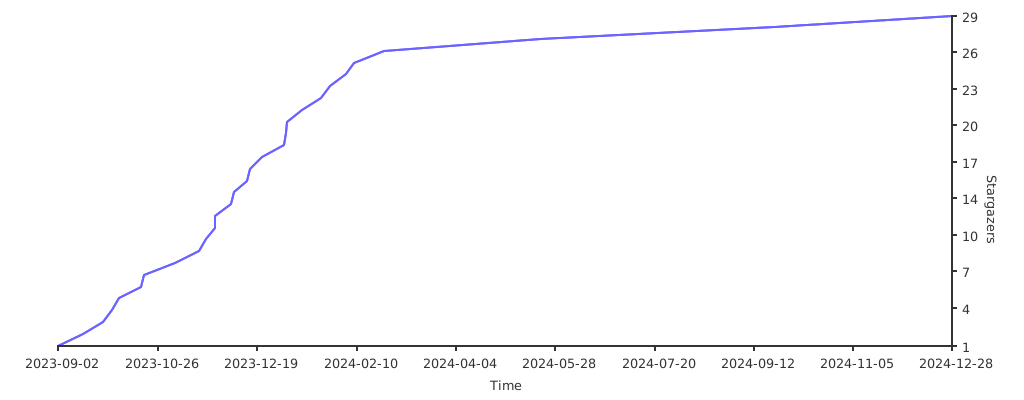
Stargazers over time
Back to top
Hakan İSMAİL ❤
Metadata
Owner
 Hakanbaban53
Metadata
A minimalist animated oneliner theme for Firefox perfectly matching real Dark.