
gmic

gmic copied to clipboard
 GreycLab
Identify the filter in the layer name after applying G'MIC in GIMP
It's an enhancement request. IMO it would be very useful to keep track of filters used. It's not always easy to remember what filters were applied.
A way to do that would be to add the filter name at the end of the layer name created by G'MIC.
For example, let's say we have a layer "121.jpg". We apply the filter "Sharpen [Inverse Diffusion]" and choose to output the result in a new layer. At the end of the process, we'll have the following layers:

121.jpg #1
121.jpg
My suggestion would be to have something like this:
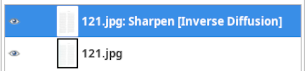
121.jpg: Sharpen [Inverse Diffusion]
121.jpg
or if we want shorter layer names, we could keep only the first 5 letters of each word of the filter name:

121.jpg: SharpInverDiffu
121.jpg
If we then apply the filter "Add Grain" to the new layer, we would have:
121.jpg: SharpInverDiffu: AddGrain
121.jpg: SharpInverDiffu
121.jpg
and so on.
