
graylog2-server

graylog2-server copied to clipboard
 Graylog2
Unexpected timestamp format renders as "Invalid date"
The Message View widget will sometimes display "Invalid date" even though the date field has been indexed successfully - see the lower right of the image below, with the field event_created:
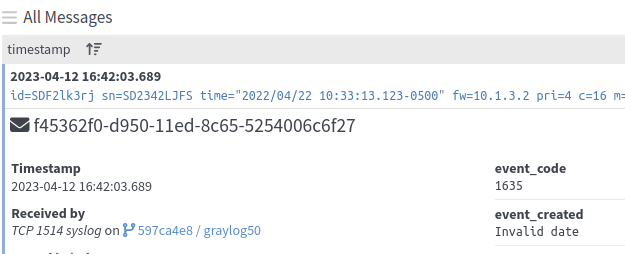
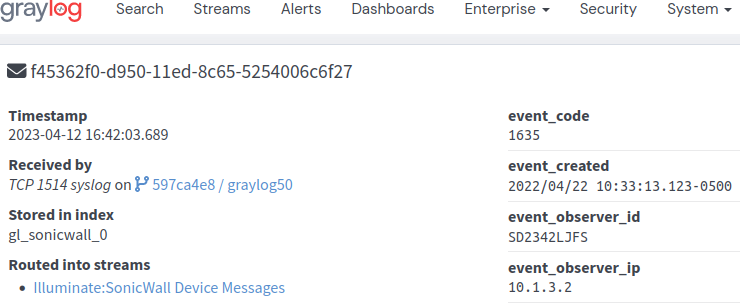
The field can be used for search and aggregations. The value field does display properly when opening the message in a new tab:
Expected Behavior
The date value of the message should be displayed.
Current Behavior
The message view replaces the value with 'Invalid date'
Possible Solution
The message view should recognize more formats and/or If it cannot be parsed in the message view it should show the original value.
Steps to Reproduce (for bugs)
- Install Illuminate and activate the Sonicwall Illuminate pack
- Replay the following message:
'id=SDF2lk3rj sn=SD2342LJFS time="2022/04/22 10:33:13.123-0500" fw=10.1.3.2 pri=4 c=16 m=1635 msg="sample placeholder value" - Expand the message in the message view window and review the
event_createdfield
Context
This may lead to some confusion about the underlying data in the affected fields.
Your Environment
- Graylog Version: 5.0.6
- Java Version: 17.0.6
- Elasticsearch Version: Opensearch 1.3.6
- MongoDB Version: 5.0.14
- Operating System: Ubuntu 20.04.5 LTS
- Browser version: Firefox 111.0.1 64-bit
