

 Graylog2
Decorated fields have an incorrect name in the fields section when editing a table
When decorating a couple of strings and adding it as a table column - that new field's name is somehow corrupted in the table editor.
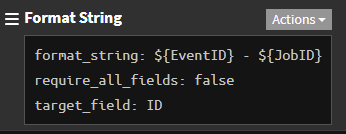
I have two IDs that I want to combine into a decorated field, like so:
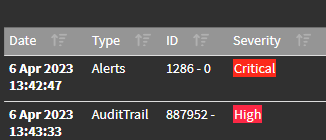
In the table itself the new column (ID) is displayed properly:
But when I edit the table and want to, say, rearrange the fields - that particular decorated field looks like this:
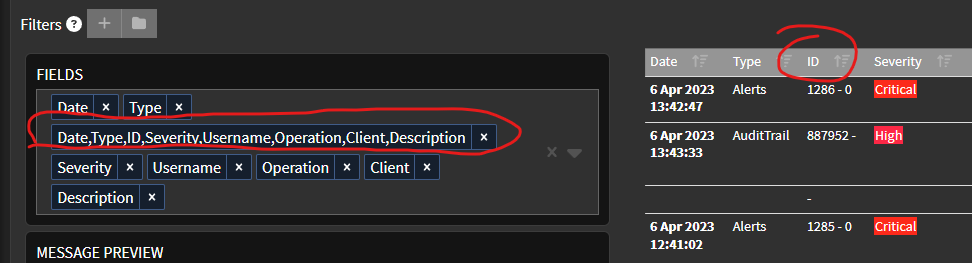
This happens for both existing decorations and for newly created ones.
Expected Behavior
Decorated fields should have the same name you assign to them. In my example - ID.
Current Behavior
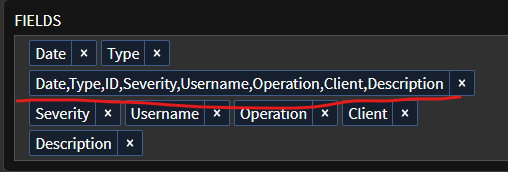
Currently, decorated fields have a confusing random composite name that consists of existing field names along with the one you actually created, mingled up somewhere inside:
Possible Solution
Decorated fields should have the same name you assign to them. In my example - ID. In case that's not possible, decorated fields can have a prefix/suffix such as dec_ID or ID_dec or something similar.
Steps to Reproduce (for bugs)
- Set up a table with some data
- Create a decorated field
- Look at its name in the
fieldssection when editing a table
Context
Obviously this is very confusing and unproductive.
Your Environment
- Graylog Version: 5.0.5+d61a926
- Java Version:
- Elasticsearch Version:
- MongoDB Version: 5.0.+
- Operating System: Ubuntu 22.04 LTS
- Browser version: Latest MS Edge
