

 GoogleCloudPlatform
gcloud/kubectl operations sometimes time out on windows (Add GKE cluster, get nodes, etc.)
(Please ensure you are running the latest version of Cloud Code for IntelliJ with Help > Check for Updates)
- Cloud Code for IntelliJ version: 21.10.1-IB.1
- Google Cloud SDK version: 362.0.0
- OS: Windows 10 10.0
What did you do?
Signed in to GCP from intellij. In Kubernetes Explorer , tried adding GKE cluster by selecting the project. Had also increased the Kubernetes explorer timeout to 30 seconds.
What did you expect to see?
I expect the GKE cluster in my project to be appearing for selection.
What did you see instead?
The GKE cluster in my GCP project doesn't appear and it just shows timed out. This is making the cloud code plugin not useable for us.


(screenshots are helpful) Feel free to deviate from this template as needed, especially if you are submitting a feature request.

Hi @radeepr thanks for the report! Could you please attach your IDE log file? (Help > Show Log in Finder > idea.log)

As a workaround in the meanwhile, you can always call this command from Cloud Code Terminal:
- Open Menu > Tools > Cloud Code > Tools > Cloud Code Terminal
- In the CC terminal, run
gcloud container clusters get-credentials CLUSTER_NAME [--region=REGION | --zone=ZONE, -z ZONE] - GKE cluster should appear in the K8s explorer automatically, if not, try refreshing one time
We see a few other timeout exceptions in your log file, even around checking Cloud SDK version which is supposed to be very fast. That may have to do with Windows as well since we sometimes see longer process times on Windows. To help diagnosing, how long would the following command take to run if you run in from a terminal?
kubectl.exe get nodes -o json
Thanks for the investigation and apologies for delay in getting back,
I was able to able to add GKE cluster with your workaround method. Thanks for that. It takes about 10-12 seconds to load cluster info from GKE which is probably okay to live with.
PS D:\code\CloudCodeHello> date
06 November 2021 17:02:47
PS D:\code\CloudCodeHello> kubectl get nodes -o json
PS D:\code\CloudCodeHello> date
06 November 2021 17:02:59
Apart from that I am finding that the run/debug options also take a lot of time and the screen is quite stuck for a lot of time. I could file a separate one for that.
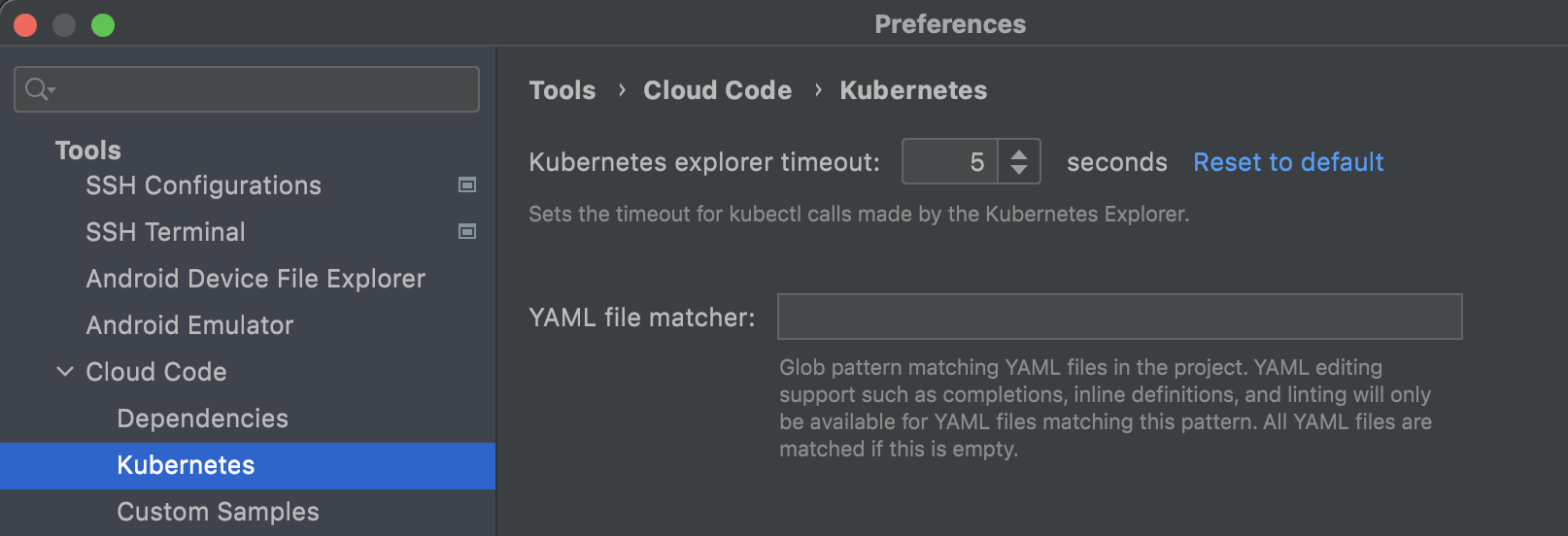
Thanks @radeepr. To increase timeout for the Kubernetes explorer operations, you could use Cloud Code settings here:
Apart from that I am finding that the run/debug options also take a lot of time and the screen is quite stuck for a lot of time. I could file a separate one for that.
I think we don't need a separate issue for that, as this seems to be stemming from the same reason - timing out calls to kubectl. We will rename the issue to apply it more broadly and will work on it. Thank you!
Hi @ivanporty ,
As mentioned in the issue description under "What did you do", I had already tried the option to increase Kubernetes explorer timeout to maximum possible value of 30 seconds. But this doesn't solve the problem.
Oh sorry about that, it's great you're using that already. That setting won't help with other timeouts such as ones in the run configuration but it should help when using the explorer.