

 GoogleChrome
"redundant" event getting triggered.
Library Affected: workbox-sw 5.0.0-alpha.2
Browser & Platform: Google Chrome Version 76.0.3809.100 (Official Build) (64-bit)
Issue or Feature Request Description: So this is a two part issue.
-
redundant is not part of: https://github.com/GoogleChrome/workbox/blob/fc38ffb6656edb7941b8116cfb1ff7dc71f289fa/packages/workbox-window/src/utils/WorkboxEvent.ts#L42-L54 So it might need to be added there.
-
Redundant is getting triggered for me in some weird scenarios. So here is a reproduction https://github.com/azizhk/workbox-route-bug I register my service worker only on
/aroute.
Case A:
- Go to
/aroute -> SW gets registered. - Create a new build (
yarn build) - Refresh on
/a. - Click on Reload button which triggers skipWaiting:
registration.waiting.postMessage({
  type: "SKIP_WAITING"
});
Then "activated" event is triggered.
Case B:
- Go to
/aroute -> SW get registered. - Go to
/route. - Create new build (
yarn build) - Refresh on
/ - Navigate to
/awhich registers SW and findsregistration.waitingso shows Reload button - Click on reload button which triggers skipWaiting Then "redundant" event is triggered.
Over here: https://developers.google.com/web/fundamentals/primers/service-workers/lifecycle It mentions "redundant" is triggered when SW is discarded. Either failed install, or it's been replaced by a newer version
Here it hasn't erred or failed. It is replaced by a newer version but even in "activated" case the Service Worker is replaced by a newer version right? So why is "redundant" event different from "activated".
I have the "Update on reload" unchecked.

This is the code which registers my SW: https://github.com/azizhk/workbox-route-bug/blob/5562f36b189d4a339841ec2f6e6bbea02758a2d1/utils/serviceWorkerRegistrar.tsx#L40-L49
I'll let @philipwalton comment on #2200 as to whether it makes sense to wrap the redundant event via workbox-window.
Apart from that feature request, I wanted to clarify something that's unfortunately not obvious (even if you've thorough read through https://developers.google.com/web/fundamentals/primers/service-workers/lifecycle):
Here it hasn't erred or failed. It is replaced by a newer version but even in "activated" case the Service Worker is replaced by a newer version right? So why is "redundant" event different from "activated".
There are two different service workers in the scenario that you describe, and each of them receives their own unique set of events. You can visualize this a bit by looking in the Application panel of Chrome's DevTools, in the Service Workers tab:
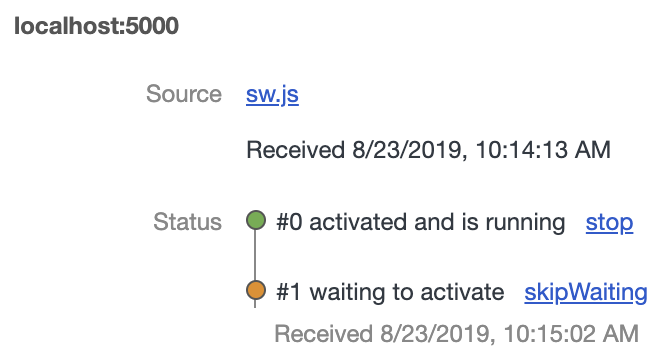
Each service worker has its own unique id number, and you can see both of them, #0 and #1 in that screenshot.
When you trigger the call to skipWaiting() inside of service worker #1, it will become activated event, and at the same time, #0 will become redundant. As a developer, you can write code that listens for state changes on service worker #0 (and you'll see the change to redundant) and/or you can write code that listens for state changes on service worker #1 (and you'll see activated). They're two sides of the same coin.

Oh here is my code:
const wb = new Workbox("/sd.sw.js");
const registration = await wb.register();
if (registration && registration.waiting) {
  onSWWaiting();
}
wb.addEventListener("activated", onSWActivated);
wb.addEventListener("externalactivated", onSWUpdated);
wb.addEventListener("externalwaiting", onSWWaiting);
wb.addEventListener("waiting", onSWWaiting);
I guess I'm not really clear as to which Service Worker I'm adding the event listeners to.
I should be adding the event listeners on the new Service Worker when the user navigates to /a
await wb.register(); should always give me the new Service Worker or the old Service Worker. I'm not sure why this is not consistent.
So this is an area where workbox-window adds in its own abstractions, which I honestly am having trouble wrapping my head around in this case. @philipwalton will know whether, for instance, wb.addEventListener("waiting", onSWWaiting); will trigger for any SW associated with the registration that enters the waiting state, or just for a specific SW. (I think it's any.)
await wb.register(); should always give me the new Service Worker or the old Service Worker.
I can answer that from the context of the underlying service worker API, because I don't think workbox-window changes this: wb.register() (like navigator.serviceWorker.register() or the navigator.serviceWorker.ready promise) will give you a ServiceWorkerRegistration object, not a ServiceWorker object.
A ServiceWorkerRegistration object is kind of like a record keeper that has some metadata specific to the registration (like its scope and navigationPreload setting). It also exposes three properties that give you access to underlying ServiceWorker objects associated with that registration, based on the current state of the ServiceWorker: registration.installing, registration.waiting, registration.active.
So in the scenario corresponding to the screenshot that I posted above, registration.installing would be set to null (because there is no ServiceWorker currently being installed), registration.waiting would be set to the ServiceWorker with id #1, and registration.activate would be set to the ServiceWorker with id #0.
Reiterating what I said at the start, calling addEventListener() on the Workbox object behaves differently from attaching event listeners directly to a specific ServiceWorker object, but I'll let @philipwalton clarify how Workbox determines which ServiceWorker it listens to.
Hey @azizhk I can't reproduce what you're seeing, but it's also not 100% clear how to follow your steps:
Case B:
- Go to
/aroute -> SW get registered.- Go to
/route.- Create new build (
yarn build)- Refresh on
/- Navigate to
/awhich registers SW and findsregistration.waitingso shows Reload button- Click on reload button which triggers skipWaiting Then "redundant" event is triggered.
In these steps you say both "go to" and "navigate to", do those mean the same thing? Does "go to" mean click the links and "navigate to" mean type the URL in the address bar? Should I be navigating in a new tab or the same tab?
Oh here is my code:
const wb = new Workbox("/sd.sw.js");
const registration = await wb.register();
if (registration && registration.waiting) {
  onSWWaiting();
}
wb.addEventListener("activated", onSWActivated);
wb.addEventListener("externalactivated", onSWUpdated);
wb.addEventListener("externalwaiting", onSWWaiting);
wb.addEventListener("waiting", onSWWaiting);
I'm not sure if this is the issue, but you have a race condition in this code. You should add your event listeners before you call register, otherwise by await-ing the result of calling register(), some of those events might have happened before you add their event listeners.
Also, you don't need this part:
if (registration && registration.waiting) {
  onSWWaiting();
}
Instead, you should only need to be listening for the waiting event (which you already are).
Why don't you try switching to the following code and seeing if it changes things:
const wb = new Workbox("/sd.sw.js");

wb.addEventListener("activated", onSWActivated);
wb.addEventListener("externalactivated", onSWUpdated);
wb.addEventListener("externalwaiting", onSWWaiting);
wb.addEventListener("waiting", onSWWaiting);

const registration = await wb.register();
Also, have you tried running the development version of workbox-window? That should be printing log messages to the console, which I think would really help you in debugging this issue.
Aside: I wouldn't recommend having the same callback for the waiting and externalwaiting events (here are details on why), but that's probably not relevant to this issue.
@jeffposnick
@philipwalton will know whether, for instance,
wb.addEventListener("waiting", onSWWaiting);will trigger for any SW associated with the registration that enters thewaitingstate, or just for a specific SW. (I think it's any.)
The waiting event should only be triggered if the service worker registered by this Workbox instance is waiting to activate.

@philipwalton I've made the changes that you've asked regarding the race condition. But still two different scenarios persist:
-
If I register
(new Workbox("/sw.js")).register()while this version is being fetched like during page load, I will get thewaitingevent triggered after the service worker's install script is over. If I call skipWaiting, then it will trigger 'activated'.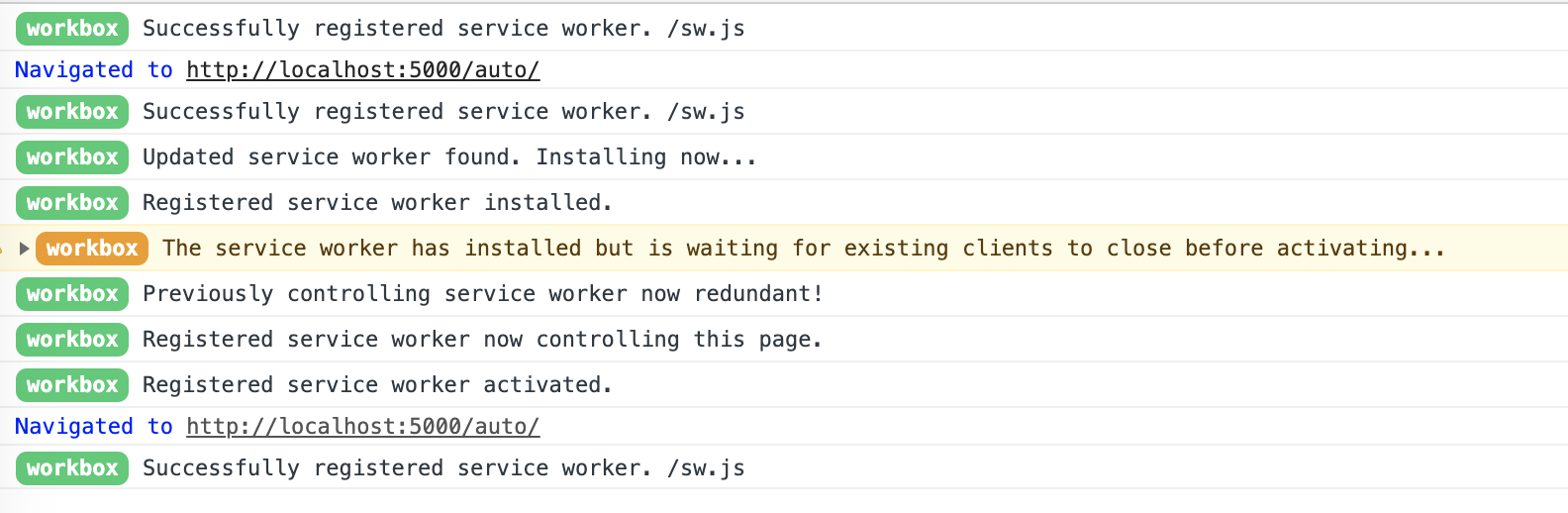
-
If I register based on user action after the install script is over, I will still get the
waitingevent triggered (synthetic). But now if I call skipWaiting, it will trigger 'redundant'.
I've simplified my example, have made only two routes:
/auto - register in componentDidMount
/ - register on user click.
Both cases I trigger skipWaiting on user click on the "Reload" button in the toast message.
I understand that both "activated" or "redundant" are correct, but shouldn't both behaviors result in the same events to get triggered? Should workbox be simplifying like it does with the "waiting" event? Or would you recommend to use wasWaitingBeforeRegister to determine if one should listen for "activated" or "redundant"?
(Re-opening as this was closed automatically via the fix mention in #2200)
Let me know if you are going ahead with synthetic "activated" event. I can try my hand at it.
Hey @azizhk I looked into this a bit more and I agree there's a problem here.
After digging into your "registerOnClick" case, I've realized that the current logic in the Workbox class doesn't handle cases where both of the following things are true:
- The browser makes a soft update check and discovers an update before your code calls
.register() - There was a controlling service worker at page load time with the same script URL as the registered service worker
When both of these cases are true, the Workbox instance considers it's "own" service worker to be the controlling service worker. In most normal updatefound cases, the Workbox instance will update its "own" service worker to the installing service worker, but in your demo case, the updatefound event fires before .register() is called, so the Workbox instance continues to think the original controller is its "own" service worker.
That explains why you're seeing the redundant event firing—because the controlling service worker at page load time becomes redundant as soon as you invoke skipWaiting() from the waiting service worker.
I think the easiest fix would be to move adding the statechange listener here into this if (this._sw) conditional
That will make it so a statechange listener gets added to the waiting service worker in cases where there was already one waiting at registration time.
