

 GhostManager
Project notes are not available in the docx report
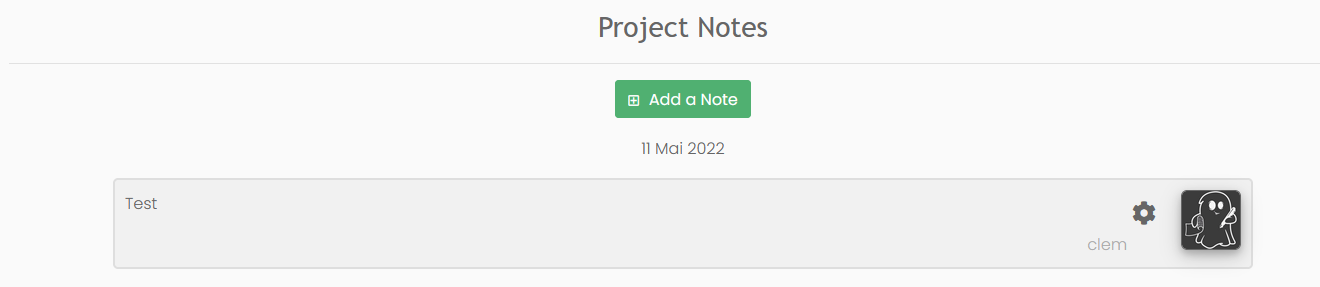
Describe the bug Even if you create a note linked to your project, you cannot retrieve it in the docx report, project.note is always set to "None"
To Reproduce Steps to reproduce the behavior:
- Create a project
- Create a note linked to this project
- Create a report linked to this project
- Generate the docx report with {{ project.note }} inside
Expected Behavior You should be able to retrieve your note.
Screenshots

Server Specs:
- OS: Debian
- Docker 4.8.1
- Ghostwriter 2.3.0

Hey @massot-c, this is intentional, but we could add notes to the data. I don't have them in there right now because I assume the notes are probably bits of disparate information that are not written as pieces of a report – i.e., they wouldn't be suitable as report content.
They'd be easy to include and make sense as part of the JSON as a project data export. However, they would be in a list sorted by timestamp. You'd have to do some work to pull a specific note.
What's your use case for pulling notes into the report?

Hello Christopher,
I would like to put the grade of the report and some other stuff related to the project so I can parse them and use them inside the report.
For instance, put "{"global_grade":"A", "cve_grade":"B"} and retrieve them with a custom filter in the report {{ project.note|to_json|attr("global_grade")}}.
There is no place where I can put something like that in the project field.
Best regards, Clément
Le jeu. 12 mai 2022 à 20:52, Christopher Maddalena @.***> a écrit :
Hey @massot-c https://github.com/massot-c, this is intentional, but we could add notes to the data. I don't have them in there right now because I assume the notes are probably bits of disparate information that are not written as pieces of a report – i.e., they wouldn't be suitable as report content.
They'd be easy to include and make sense as part of the JSON as a project data export. However, they would be in a list sorted by timestamp. You'd have to do some work to pull a specific note.
What's your use case for pulling notes into the report?
— Reply to this email directly, view it on GitHub https://github.com/GhostManager/Ghostwriter/issues/210#issuecomment-1125318732, or unsubscribe https://github.com/notifications/unsubscribe-auth/AMH55QSP7IU6273XPUWTCVTVJVHNFANCNFSM5VXKVNJA . You are receiving this because you were mentioned.Message ID: @.***>
I see. That's very interesting 🤔
I think this could spin out into a feature. There's an idea I've had knocking around in my head for custom project values or tags. You'd set a key and a value and it would be passed to the report. To use your example, you'd create a new tag global_grade, and set the value to A. Then you could simply access {{ global_grade }} in the report. You're probably not the only one who would use this feature if it were available.
Similar to adding new sections to reports. Same idea on a larger scale for writing much more than simple values.
Using notes sounds like a functional option for the time being. I'll see about adding notes to the project data to the next release candidate for v2.3.0.
Thanks for the context, @massot-c!
Hello Christopher,
I was wandering if there is a way, in the docx, to apply a font color depending on a condition.
For instance, if a vulnerability is minor, I would like to apply a cell background color to yellow (and I managed that) and the font color to black to display "minor". But if the vulnerability is major, I would like to apply a cell background color to red and the font color to white to display "major".
You know what I mean?
Have a good day. Clément
Le ven. 13 mai 2022 à 20:51, Clément Massot @.***> a écrit :
Thanks a lot Christopher,
At the moment, I added these values inside an objective description. I created a Jinja custom filter called 'from_json' that return json.loads(s) and I retrieve my dictionary by doing {{objectives[0]. description|strip_html|from_json}}
Have a good weekend Clément
Le ven. 13 mai 2022 à 20:33, Christopher Maddalena < @.***> a écrit :
I see. That's very interesting 🤔
I think this could spin out into a feature. There's an idea I've had knocking around in my head for custom project values or tags. You'd set a key and a value and it would be passed to the report. To use your example, you'd create a new tag global_grade, and set the value to A. Then you could simply access {{ global_grade }} in the report. You're probably not the only one who would use this feature if it were available.
Similar to adding new sections to reports. Same idea on a larger scale for writing much more than simple values.
Using notes sounds like a functional option for the time being. I'll see about adding notes to the project data to the next release candidate for v2.3.0.
Thanks for the context, @massot-c https://github.com/massot-c!
— Reply to this email directly, view it on GitHub https://github.com/GhostManager/Ghostwriter/issues/210#issuecomment-1126337466, or unsubscribe https://github.com/notifications/unsubscribe-auth/AMH55QRV7U5GRE2UQFOQ2YDVJ2OBBANCNFSM5VXKVNJA . You are receiving this because you were mentioned.Message ID: @.***>
@massot-c You can set a color value for each severity in the admin panel. Every finding has a severity_rt attribute that inserts the severity in that font color. Each finding also has a severity_color attribute so you can do thigs like set the background color fo a tbale cell:
{% cellbg finding.severity_color %}{{ finding.severity }}
If you want to apply specific formatting based on any value you can do that with Jinja2 if/else statements.
Thanks a lot Christopher,
At the moment, I added these values inside an objective description. I created a Jinja custom filter called 'from_json' that return json.loads(s) and I retrieve my dictionary by doing {{objectives[0]. description|strip_html|from_json}}
Have a good weekend Clément
Le ven. 13 mai 2022 à 20:33, Christopher Maddalena @.***> a écrit :
I see. That's very interesting 🤔
I think this could spin out into a feature. There's an idea I've had knocking around in my head for custom project values or tags. You'd set a key and a value and it would be passed to the report. To use your example, you'd create a new tag global_grade, and set the value to A. Then you could simply access {{ global_grade }} in the report. You're probably not the only one who would use this feature if it were available.
Similar to adding new sections to reports. Same idea on a larger scale for writing much more than simple values.
Using notes sounds like a functional option for the time being. I'll see about adding notes to the project data to the next release candidate for v2.3.0.
Thanks for the context, @massot-c https://github.com/massot-c!
— Reply to this email directly, view it on GitHub https://github.com/GhostManager/Ghostwriter/issues/210#issuecomment-1126337466, or unsubscribe https://github.com/notifications/unsubscribe-auth/AMH55QRV7U5GRE2UQFOQ2YDVJ2OBBANCNFSM5VXKVNJA . You are receiving this because you were mentioned.Message ID: @.***>
I'm glad you found a solution that works for you! I'm going to see about adding project notes to the report data serializer for an upcoming release.
I apparently forgot to update this. Project notes are now available in the report data. The project dictionary has a notes keys. The value is a list of all notes on the project.