

 GeoNode
After installing Via Docker, Geoserver routes to HTTP after signin.
Expected Behavior
The install appears to be working properly but when I login into geoserver it returns a 444 and closed connection in the browser. The protocol switches from https to http.
I am not sure if it is a tomcat issue or a nginx issue. i have checked the configuration files
Steps to Reproduce the Problem
1.install via basic install on ubuntu 20.04 2.change .env to domain using https in url 3. go to https://www.domain.com/geoserver
Specifications

Did you configure all the env variables for the public URLs with the https domain? Including HTTP_HOST (should be empty) and HTTPS_HOST?
I suggest to use the new create-env.py script (see the README) which simplifies the creation of the envfile.
EDIT: A PR is going to be merged with a fix to create-env that affects the configuration of https domains.

Thank you for your quick response.
I had an instance of geonode running for a class I was teaching. I cleared the server to do a fresh install and I am using the .env that I had used with the previous instance which worked smoothly.
everything else seems to work with this install except I can not upload files and I can not login into the geoserver without it re-routing to http and giving an error. If i append https to the failed Http request I can see a logged in page of the geoserver admin but if i click on the options with in geoserver it redirects to http again.
I will do a fresh install again and try the create-env.py
I noticed that even if HTTPs is properly configured, the geoserver form still class an unsecured HTTP route at form submission.
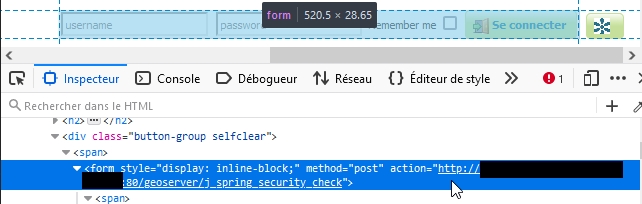

Here it is:
COMPOSE_PROJECT_NAME=geonode
DOCKER_HOST_IP=
DOCKER_ENV=production
# See https://github.com/geosolutions-it/geonode-generic/issues/28
# to see why we force API version to 1.24
DOCKER_API_VERSION="1.24"
BACKUPS_VOLUME_DRIVER=local

C_FORCE_ROOT=1
FORCE_REINIT=false
INVOKE_LOG_STDOUT=true

# LANGUAGE_CODE=pt
# LANGUAGES=(('en','English'),('pt','Portuguese'))

DJANGO_SETTINGS_MODULE=geonode.settings
GEONODE_INSTANCE_NAME=geonode
GEONODE_LB_HOST_IP=
GEONODE_LB_PORT=

# #################
# backend
# #################
POSTGRES_USER=postgres
POSTGRES_PASSWORD=postgres
GEONODE_DATABASE=geonode
GEONODE_DATABASE_PASSWORD=geonode
GEONODE_GEODATABASE=geonode_data
GEONODE_GEODATABASE_PASSWORD=geonode_data
GEONODE_DATABASE_SCHEMA=public
GEONODE_GEODATABASE_SCHEMA=public
DATABASE_HOST=db
DATABASE_PORT=5432
DATABASE_URL=postgis://geonode:geonode@db:5432/geonode
GEODATABASE_URL=postgis://geonode_data:geonode_data@db:5432/geonode_data
GEONODE_DB_CONN_MAX_AGE=0
GEONODE_DB_CONN_TOUT=5
DEFAULT_BACKEND_DATASTORE=datastore
BROKER_URL=amqp://guest:guest@rabbitmq:5672/
ASYNC_SIGNALS=True

SITEURL=https://%DOMAIN_NAME%/

ALLOWED_HOSTS=['django', '*', '%DOMAIN_NAME%', '127.0.0.1']

# Data Uploader
DEFAULT_BACKEND_UPLOADER=geonode.importer
TIME_ENABLED=True
MOSAIC_ENABLED=False
HAYSTACK_SEARCH=False
HAYSTACK_ENGINE_URL=http://elasticsearch:9200/
HAYSTACK_ENGINE_INDEX_NAME=haystack
HAYSTACK_SEARCH_RESULTS_PER_PAGE=200

# #################
# nginx
# HTTPD Server
# #################
GEONODE_LB_HOST_IP=%DOMAIN_NAME%
GEONODE_LB_PORT=80

# IP or domain name and port where the server can be reached on HTTPS (leave HOST empty if you want to use HTTP only)
# port where the server can be reached on HTTPS
HTTP_HOST=%DOMAIN_NAME%
HTTPS_HOST=%DOMAIN_NAME%

HTTP_PORT=80
HTTPS_PORT=443

# Let's Encrypt certificates for https encryption. You must have a domain name as HTTPS_HOST (doesn't work
# with an ip) and it must be reachable from the outside. This can be one of the following :
# disabled : we do not get a certificate at all (a placeholder certificate will be used)
# staging : we get staging certificates (are invalid, but allow to test the process completely and have much higher limit rates)
# production : we get a normal certificate (default)
# LETSENCRYPT_MODE=disabled
# LETSENCRYPT_MODE=staging
LETSENCRYPT_MODE=production

RESOLVER=127.0.0.11

# #################
# geoserver
# #################
GEOSERVER_WEB_UI_LOCATION=https://%DOMAIN_NAME%/geoserver/
GEOSERVER_PUBLIC_LOCATION=https://%DOMAIN_NAME%/geoserver/
GEOSERVER_LOCATION=http://geoserver:8080/geoserver/
GEOSERVER_ADMIN_USER=admin
GEOSERVER_ADMIN_PASSWORD=%SECRET%

OGC_REQUEST_TIMEOUT=30
OGC_REQUEST_MAX_RETRIES=1
OGC_REQUEST_BACKOFF_FACTOR=0.3
OGC_REQUEST_POOL_MAXSIZE=10
OGC_REQUEST_POOL_CONNECTIONS=10

# Java Options & Memory
ENABLE_JSONP=true
outFormat=text/javascript
GEOSERVER_JAVA_OPTS="-Djava.awt.headless=true -Xms2G -Xmx4G -XX:+UnlockDiagnosticVMOptions -XX:+LogVMOutput -XX:LogFile=/var/log/jvm.log -XX:PerfDataSamplingInterval=500 -XX:SoftRefLRUPolicyMSPerMB=36000 -XX:-UseGCOverheadLimit -XX:+UseConcMarkSweepGC -XX:+UseParNewGC -XX:ParallelGCThreads=4 -Dfile.encoding=UTF8 -Djavax.servlet.request.encoding=UTF-8 -Djavax.servlet.response.encoding=UTF-8 -Duser.timezone=GMT -Dorg.geotools.shapefile.datetime=false -DGEOSERVER_CSRF_DISABLED=true -DPRINT_BASE_URL=http://geoserver:8080/geoserver/pdf -DALLOW_ENV_PARAMETRIZATION=true -Xbootclasspath/a:/usr/local/tomcat/webapps/geoserver/WEB-INF/lib/marlin-0.9.3-Unsafe.jar -Dsun.java2d.renderer=org.marlin.pisces.MarlinRenderingEngine"

# #################
# Security
# #################
# Admin Settings
#
# ADMIN_PASSWORD is used to overwrite the GeoNode admin password **ONLY** the first time
# GeoNode is run. If you need to overwrite it again, you need to set the env var FORCE_REINIT,
# otherwise the invoke updateadmin task will be skipped and the current password already stored
# in DB will honored.

ADMIN_USERNAME=admin
ADMIN_PASSWORD=%SECRET%
ADMIN_EMAIL=admin@%DOMAIN_NAME%

# EMAIL Notifications
EMAIL_ENABLE=False
DJANGO_EMAIL_BACKEND=django.core.mail.backends.smtp.EmailBackend
DJANGO_EMAIL_HOST=%DOMAIN_NAME%
DJANGO_EMAIL_PORT=25
DJANGO_EMAIL_HOST_USER=
DJANGO_EMAIL_HOST_PASSWORD=
DJANGO_EMAIL_USE_TLS=False
DJANGO_EMAIL_USE_SSL=False
DEFAULT_FROM_EMAIL='GeoNode <[email protected]>'

# Session/Access Control
LOCKDOWN_GEONODE=False
CORS_ORIGIN_ALLOW_ALL=True
X_FRAME_OPTIONS="SAMEORIGIN"
SESSION_EXPIRED_CONTROL_ENABLED=True
DEFAULT_ANONYMOUS_VIEW_PERMISSION=True
DEFAULT_ANONYMOUS_DOWNLOAD_PERMISSION=True

# Users Registration
ACCOUNT_OPEN_SIGNUP=True
ACCOUNT_EMAIL_REQUIRED=True
ACCOUNT_APPROVAL_REQUIRED=False
ACCOUNT_CONFIRM_EMAIL_ON_GET=False
ACCOUNT_EMAIL_VERIFICATION=none
ACCOUNT_EMAIL_CONFIRMATION_EMAIL=False
ACCOUNT_EMAIL_CONFIRMATION_REQUIRED=False
ACCOUNT_AUTHENTICATION_METHOD=username_email
AUTO_ASSIGN_REGISTERED_MEMBERS_TO_REGISTERED_MEMBERS_GROUP_NAME=True

# OAuth2
OAUTH2_API_KEY=
OAUTH2_CLIENT_ID=%SECRET%
OAUTH2_CLIENT_SECRET=%SECRET%

# GeoNode APIs
API_LOCKDOWN=False
TASTYPIE_APIKEY=

# #################
# Production and
# Monitoring
# #################
DEBUG=False

SECRET_KEY=%SECRET%

STATIC_ROOT=/mnt/volumes/statics/static/
MEDIA_ROOT=/mnt/volumes/statics/uploaded/
GEOIP_PATH=/mnt/volumes/statics/geoip.db

CACHE_BUSTING_STATIC_ENABLED=False

MEMCACHED_ENABLED=False
MEMCACHED_BACKEND=django.core.cache.backends.memcached.MemcachedCache
MEMCACHED_LOCATION=127.0.0.1:11211
MEMCACHED_LOCK_EXPIRE=3600
MEMCACHED_LOCK_TIMEOUT=10

MAX_DOCUMENT_SIZE=2
CLIENT_RESULTS_LIMIT=5
API_LIMIT_PER_PAGE=1000

# GIS Client
GEONODE_CLIENT_LAYER_PREVIEW_LIBRARY=mapstore
MAPBOX_ACCESS_TOKEN=
BING_API_KEY=
GOOGLE_API_KEY=

# Monitoring
MONITORING_ENABLED=True
MONITORING_DATA_TTL=365
USER_ANALYTICS_ENABLED=True
USER_ANALYTICS_GZIP=True
CENTRALIZED_DASHBOARD_ENABLED=False
MONITORING_SERVICE_NAME=local-geonode
MONITORING_HOST_NAME=geonode

# Other Options/Contribs
MODIFY_TOPICCATEGORY=True
AVATAR_GRAVATAR_SSL=True
EXIF_ENABLED=True
CREATE_LAYER=True
FAVORITE_ENABLED=True

# LDAP
LDAP_ENABLED=False
LDAP_SERVER_URL=ldap://<the_ldap_server>
LDAP_BIND_DN=uid=ldapinfo,cn=users,dc=ad,dc=example,dc=org
LDAP_BIND_PASSWORD=<something_secret>
LDAP_USER_SEARCH_DN=dc=ad,dc=example,dc=org
LDAP_USER_SEARCH_FILTERSTR=(&(uid=%(user)s)(objectClass=person))
LDAP_GROUP_SEARCH_DN=cn=groups,dc=ad,dc=example,dc=org
LDAP_GROUP_SEARCH_FILTERSTR=(|(cn=abt1)(cn=abt2)(cn=abt3)(cn=abt4)(cn=abt5)(cn=abt6))
LDAP_GROUP_PROFILE_MEMBER_ATTR=uniqueMember

# CELERY

# expressed in KB
# CELERY__MAX_MEMORY_PER_CHILD="200000"
# ##
# Note right autoscale value must coincide with worker concurrency value
# CELERY__AUTOSCALE_VALUES="1,4"
# CELERY__WORKER_CONCURRENCY="4"
# ##
# CELERY__OPTS="--without-gossip --without-mingle -Ofair -B -E"
# CELERY__BEAT_SCHEDULE="/mnt/volumes/statics/celerybeat-schedule"
# CELERY__LOG_LEVEL="INFO"
# CELERY__LOG_FILE="/var/log/celery.log"
# CELERY__WORKER_NAME="worker1@%h"
One more information, if I send manually a login request to https://%DOMAIN_NAME%/geoserver/j_spring_security_check I have a HTTP 302 response with "location" header value equals to http://%DOMAIN_NAME%/geoserver/j_spring_security_check
Actually, following documentation sovled the problem for me. @bcarty you can refer to the following chapter: Install and enable https secured connection through the let's encrypt provider
following documentation sovled the problem for me.
well, i didn't find the documentation crystal clear here @Inogeo but i did manage to get the redirect working after reading some code and inferring some stuff.
in the end it was simply to change one env setting
PUBLIC_PORT=443
see also https://github.com/GeoNode/geonode/issues/9870 for my traefik setup suggestions
@bcarty can you confirm that @giohappy can close this issue?
