

 FrodeSolheim
Remote Debugger Support
Currently FS-UAE (or any UAE version) from what I know doesn't support any remote debugging.
I would like to implement this but I would like to have have some guidance on how to do this before I get started.
I would likely want to use the existing code in debug.cpp but perhaps split it up so on path could go to sending to a remove socket and one still print to the internal monitor.
I would very much prefer to have a binary structure to be sent over the socket instead of sending text.
Any suggestions on how to go about with this?
Cheers!

On Sat 04 Apr 2015 at 07:30:03 -0700, Daniel Collin wrote:
I would like to implement this but I would like to have have some guidance on how to do this before I get started.
gdb has some remote debugging protocol I think. Is that what you had in mind, or were you not aware of that?
-Olaf.

Hi,
I looked at the GDB protocol and it seems that it would work as a good base to implement. My question then is if I should try to have try to unify some of the code in debug.cpp and debug_remote.cpp (or something similar?
I just want to make sure there are no objects in adding this feature and I want to go about the correct way of doing it.
After looking over the code for a while I have some more questions.
Implementing the remote debugger seems pretty straightforward. The main problem is code duplication which I would like to avoid.
Pretty much all of the code uses console_out_f to write the data to the console. That makes total sense in the current implementation. The problem with the remote debugger is that it wants to send back the data in another format compared to what is being written to the current.
There are a few approaches to this:
- Have console_out_f being a function pointer instead which defaults to the current code and the remote debugger can change this to “catch” the written text output by a command, parse the text and send the correct formated way.
Pros. Small amount of code duplication. Cons. Need to parse data that already exists in existing structures inside UAE. Seems wasteful.
- All functions that should dump a state writes to a struct with all the values in it. Then there are two functions that takes that data in. One that writes to the console console and one for the remote debugger.
Pros. Keeps the current structure, no extra parsing is required for the remote debugger. Cons. Adds complexity in the current functions as data needs to be populated in a out struct which isn’t needed today.
- Duplicate most of the code that remote debugger need from the current debugger code.
Pros. Allows the remote debugger to do things fully independent of current debugger code, very small parts of the current code needs to change Cons. Duplicated code is never good, bugs occur when people change one file and forgets the other.
Another issue is the GDB Protocol. While it might serve as a good basis it also doesn’t cover lots of the Amiga specific things that one wants to support (copper debugging, etc)
I’m thinking about using the GDB Protocol as a basis where it makes sense but also add extended commands where it also makes sense that regular GDB might not understand.
Suggestens and thoughts about this?
Cheers!
Hi, I have little knowledge of the internals of the debugging module, and I do not have any strong preferences on this topic at the moment.
However, one thing I think is very important: I try to keep the changes between FS-UAE and WinUAE as small as possible (in common code), to keep the code bases from drifting apart and easy merging of WinUAE improvements.
So I would be skeptical to merging updates which changes too much of the existing code, if Toni is not also willing to merge it. But if Toni is not interested, and for example most of the new stuff can be put in new modules, and changes to existing code kept to a minimum, then I'm much more likely to accept the changes into the main branch :)

Thanks for the reply,
Yes the plan is to make the change as little intrusive as possible and there is nothing in the change that would be specific to either F-UAE or WinUAE so that should be fine.
That being said I will need to change some general files (debug.cpp needs to know if remote is being used or not, the new code needs to have a update call per and such) but I will try to keep it minimal and most code will be inside the new debug_remote.cpp/h files.
What kind of remote debugging? Your post do not explain (or I simply don't "get it") what do you want to do, include some examples please.

@tonioni
Imagine having a regular debugger (Visual Studio, WinDBG, etc) connected to UAE but debugging the Amiga code running inside the emulator. The way to do this is to allow an external debugger to connect to UAE and send commands to it (like step instruction, show memory, etc) and UAE sends back info according to the request (if step: send back new PC, registers, etc, if memory: send back memory given range requested by the debugger)
Does that make it clear?
To show more what I mean. Here is a screenshot of my debugger connected to C64 VICE (http://vice-emu.sourceforge.net)
https://dl.dropboxusercontent.com/u/5205843/vice_prodbg.png
What I want to do is to implement something similar for UAE
Ok. I think you shouldn't use existing debugger commands because they are not stable or even supposed to be stable (it is mostly my own playground, tweaking/changing when I need some temp option when debugging some specific demo or game). Of course you can use (mostly safely) functions that are not part of parsing or formatting debugger commands.
Best (and most boring) option probably is better separation of input parsing/output formatting from "stable" debugger operations. (like disassembler, memwatch/breakpoint detection)
Alright. Thanks for the reply.
So I think I will go for more of a hybrid approach then. My plan is then to:
- Have the code in debug_remote.cpp/h
- Add a command line parameter to say if the remote debugger should be active or not.
- Inside debug.h/cpp I will need to do some minor changes so if the remote debugger is active it will call some of those functions (for example if an illegal happens) but the changes should be quite minimal and the if no remote debugger is active it will behave as it is today.
- I plan to implement the debugger using the GDB protocol but will likely add some extra stuff for Amiga (like copper debugging and similar things)
- Parse the output from the operations as you say. I will likely in some cases do something own (when getting memory for example)
- In order to make the capturing of output I thought about changing the console_out/console_out_f to function pointers that defaults to the current implementation. As these are just for printing data the overhead shouldn't matter. This would allow me to set custom output that I can capture easily by invoking the stable commands as you write above.
Sounds good?
@emoon I think adding a GDB interface to WinUae and Fs-uae is very important. Great you are working on it. Thanks!

@valentinomiazzo Thanks. Notice (as written above) I will likely add some extensions that may not work directly with GDB but requires custom support but hopefully standard operations should work fine.
Also notice that I intend to do most of this work during July when I'm on vacation. I just want to make sure I have a good direction before I start so really appreciate your input here!
I think there is a good amount of people that would like to develop something for Amiga but are blocked by the difficulty of setting up a development environment. With a GDB interface people can develop on their platform of choice with the IDE they like. This reduces a lot the barrier to entry and would be beneficial for the whole Amiga community. So, if you want an advice, try to make it compatible with the most common debuggers like Eclipse, VS, etc...
I will but in some cases it will be hard because copper debugging is like debugging a different CPU at the same time as the regular CPU. I have no idea if GDB support that.
On the 'custom' side I can suggest to expose Amiga internals in JSON form so people can develop plugins and use libraries like http://d3js.org/ to visualize these data .
No, it would not be. I imagine people will start using the standard debuggers built-in in the IDE because used to them. But when they will start to bang the hardware and need to profile they will start to use dedicated more specific debuggers like your.
Ah yes true. Thanks for the input.
I will start with getting the basics up and running and the plan for my debugger in general is to allow people using write plugins and custom visualises in various languages. Currently C/C++ is supported but I intent to expand that in the future.
I will go on implementing this as outlined in my previous post above unless someone objects.
@emoon I just want to clarify that I'm not one of the mantainers of winuae or fs-uae. Therefore please don't give to my posts any kind of official weight. I just expressed my opinion :)
Looks good. Just keep debug.c changes minimal, even if it means duplication. When you have some proof of concept (or better) ready, then it is time to check which parts of original debugger are really reusable.
@tonioni Thanks for the comments. Sounds good.
Yes. The plan is to keep debug.c changes minimal.
If we want to have close to zero changes in debug.c I suggest that perhaps we should have a global debug "interface" (Interface meaning a struct with function pointers, like activate_debugger, update_debugger, close_debugger). So default we use the current debugger but if remote is activate that one is used otherwise the remote one but perhaps that is overkill.
Thoughts?
If you just need to hook into a handful (or two) of functions in debug.c, perhaps just add something like this to the beginning of the functions:
#ifdef WITH_REMOTE_DEBUGGER if (use_remote_debugger) { call_remote_debugger_function(); return; } #endif
(this way, the changes are easily identified, but could get a bit messy unless you only need to add to relatively few places).
Just wanted to let everyone know that I will be starting to work on this now.
Great! Il 25/lug/2015 04:38 PM, "Daniel Collin" [email protected] ha scritto:
Just wanted to let everyone know that I will be starting to work on this now.
— Reply to this email directly or view it on GitHub https://github.com/FrodeSolheim/fs-uae/issues/63#issuecomment-124851558.
I have one question. I need to place my
remote_debug_update ();
call somewhere (this is to keep the update the socket, check for incoming events, etc) this needs be called once per frame or something similar.
Right now I stuck it into this function in newcpu.cpp
static int do_specialties (int cycles)
Which is fine but once there is a connection there will be plenty of 'hammering' on the socket (as I guess this code is called once per CPU instruction) If the remote debugger hasn't been setup the code will just return directly and shouldn't have any issues perf wise but once connected this may or not be an issue (haven't actually tested yet)
I thought about using some cpu timer to check how much time that has elapsed since the last time the code was called which may work ok.
Any other suggestions?
Adding function call to hsync or vsync handlers (devices_hsync or devices_vsync*) is usually the best way to do. Use of UAE timers is only needed if you want cycle-exact triggers. ("Execute my callback function exactly after 123 DMA clocks")
Just wanted to give a update:

As I decided to go for implementing the GDB protocol I can of course use GDB for testing. In this screenshot gdb is connected to FS-UAE, and can request registers, memory and so on.
Wow! This is awesome.
One question: how this relates with running gdbserver on the emulated Amiga? I imagine this is completely orthogonal.
BTW, even just have a cross toolchain windows-68k with working gdb/gdbserver is quite a feature. Please, if you want, document how to you got it work, it is not well documented on the web.
Thanks!
So this gdbsever isn't actually running "on" the Amiga but as part of UAE. This allows for debugging things which can't be launched from easy (track loaded demos, OS stuff, etc)
What I do hope (not sure about this yet) is that I can load an executable within UAE and tell the Amiga to start it (this is because if there is debug symbols in the executable the debugger needs to match line with actual code loaded in memory)
Regarding working toolchain I really only used this: http://crosstool-ng.org and selected 68k target. I haven't actually tried to use this to compile anything for the Amiga, just use GDB.
When it comes to building stuff for Amiga I use vbcc + vasm for our demo stuff which can be found over here: http://sun.hasenbraten.de/vbcc/
So I have some questions that maybe @FrodeSolheim or @tonioni (or anyone else of course) perhaps can reply to.
What I want to do from the backend is to load a Amiga executable into memory and execute it. I don't know every single details of what that involves but here goes:
- Can I allocate memory from the Amiga host in some way that the Amiga "knows" about it. As UAE holds all the memory for the Amiga this should be doable I hope.
- Then I need to do a own exe loader (no issue here)
- Then I need to start it. I would assume I need to do a bit more than just set the PC to the start of the executable and go or is that all to it?
The primary reason I want to do this (as I hinted at in an above post) is that I want to support debug info for the executables which means the debugger must know where in memory a certain line maps to given source file)
That gets really tricky and it is going to be impossible without adding helper routines to UAE Boot ROM.
You can't safely allocate memory from emulator side (For example It is impossible to know if memory lists are currently valid). Starting a process is even more complex.
Only Amiga-side m68k code can call emulator C code (via trap system) and only trap called C code can call few Amiga library functions (mainly allocmem(), freemem() and signal() and few others).
AFAIK only working solution is to set some trigger from debugger that boot rom code detects (for example set bit in boot rom ram area from host-side that boot rom code vblank routine checks), when triggered, it starts a dos process which then calls your debugger C code via trap, C code uses allocmem() to allocate memory for exe and poke it to amiga memory in relocated format, then start address is returned back to m68k boot rom code which jumps to loaded exe's entry point, when call returns, another emulator C code function gets called (if you need it) and either your code or boot rom code frees exe's segments then "debug" process exits.
It sounds complex but it really isn't that complex, most of that stuff already exists. I can do the uae boot rom part if needed.
Thanks for the reply Toni,
It actually doesn't sound that bad. If you would be able to add the needed code in the UAE Boot ROM I would really appreciate that.
Next to allocating regular memory I would likely need to alloc chipmem as well and I'm not sure if that is currently exposed?
I forgot that you can call any library function from trap routine with CallLib() function. You are not restricted to few special cases. bsdsocket.cpp is good example showing how it works.
Debugger trap stuff added. filesys.cpp has "debugger_boot()" that sends signal to uae boot rom code which then creates new dos process and calls debugger_helper() with mode parameter=1. Here you can inject your executable to Amiga RAM, when debugger_helper() returns, it will call dos/RunCommand() with values you left in m68k registers (if D1 = 0, do nothing), when RunCommand() returns, mode=2 will be called (d0=RunCommand() return code).
Sweet! Thanks. I have been a bit side tracked by some other stuff lately but I will take a look at it soon again.
@FrodeSolheim Hey do you have any plans to bring in the latest WinUAE code soonish?
@emoon Hi, short version: you can work off the FS-UAE "future" branch if you want updated WinUAE code :)
Right now I am focusing on releasing a stable 2.6.0 version (based on WinUAE 3.1.0 code), so the master branch is still tracking this WinUAE version (both the development versions and the stable/beta versions of FS-UAE).
I maintain a parallel branch called "future" where I continue to merge updated WinUAE code (and where I also merge in updates from the "master" branch. This branch will be merged into "master" when I switch to WinUAE 3.2-based emulation for the development versions).
Please don't hijack this thread for this. If you think that this is a problem open a issue over at the WinUAE repro. Also FS-UAE is cross platform already and if you took the time to look at the code changes in both FS-UAE and WinUAE you would see that there is code sharing going between the two projects.
The future branch is now updated with the latest WinUAE beta (3200b10) changes.
How could I check remote debugging functionality? Which branch is it, and which defines are need?

@DrMefistO Hi, right now the the remote debugger is very basic. You can find it over at my branch here https://github.com/emoon/fs-uae/commits/master
The way it works is:
- Start fs-uae with -remote_debugger=1
- Start gdb (m68k version)
- Do a remote connection to the target (localhost if you are running on the same machine)
- Now you can step, break, read/write memory, registers, etc.
That is what is supported right now.
- "Start gdb (m68k version)" - where could I find this version? What features are you going to add in the future?
That is great! I'll check it.
@DrMefistO I built it from source using http://crosstool-ng.org/ for Linux and I also built it for Mac by just grabbing the latest GDB source and compiling it from m68k-target.
Right now I have the bare minimum implemented. My plan in general is to have a bare minimum GDB implementation that I will then use for my debugger which should have some more features in it which GDB might not support (using extensions) like copper debugger, etc
@emoon Please note, the future branch has been merged into master (and is deleted).
@FrodeSolheim Thanks for the heads up. I plan to work on this again during the next week.
Hello, I am also highly interested in getting more detailed remote debugging functionality into fs-uae as I am starting to use FS-UAE more and more as my main testing stations for my OS3 and OS4 development (YAM, MUI, etc.). And seeing that someone is actually working on getting a remote gdb working is really great.
However, what I would really require first would be a nicer/better/smoother functionality to be able to remotely catch serial output. Currently something like this is discussed in https://github.com/FrodeSolheim/fs-uae/issues/78 but is possible for an OS3/m68k session only via using socat and defining serial_port = /tmp/vser in the fs-uae configuration files. However, it would be great if serial debugging could be made even more easy and straight forward by e.g. implemented a domain socket or tcp socket functionality where one could connect to fs-uae on a certain port and then see all serial output similar to a real amiga machine. Here, proper serial debugging is really essential together with this nice gdb remote session functionality to use fs-uae for developing amiga applications.

@jens-maus I will take that into consideration but right now I will focus on the tcp socket implementation.
Hi,
I started to dig in this again.
When I call debugger_boot() (this code)
void debugger_boot(void)
{
    Unit *u;
    for (u = units; u; u = u->next) {
        if (is_virtual(u->unit) && filesys_isvolume(u)) {
            put_byte(u->volume + 173 - 32, get_byte(u->volume + 173 - 32) | 2);
            uae_Signal(get_long(u->volume + 176 - 32), 1 << 13);
            break;
        }
    }
}
The problem here is that the units pointer is NULL I started to dig a bit more into this and filesys_install is being called which has this code
    org (rtarea_base + 0xFF40);
    calltrap (deftrap2 (startup_handler, 0, _T("startup_handler")));
    dw (RTS);
But it doesn't seem that startup_handler is ever being called (which would set up units) I start FS-UAE with stock (A500 config) and a single floppy in DF0.
Is there something else I need to do to get this to work?
Easiest solution is to configure some dummy directory filesystem or enable some expansion that uses UAE boot rom.
I just wanted to say that even if progress isn't super fast it's progressing.
Here is a screenshot of my debugger ProDBG connected to FS-UAE and doing assembly stepping.

@tonioni working on getting executables to launch again and I think I found one issue here:
https://github.com/FrodeSolheim/fs-uae/blob/master/src/filesys.asm#L2746
    lea doslibname(pc),a1
    jsr -$0228(a6) ; OpenLibrary
    moveq #2,d1
 >> move.w #$FF3C,d0
    bsr.w getrtbase
    move.l a0,a2
    moveq #1,d1
    jsr (a0) ; debugger init
    tst.l d1
    beq.s .dend
    move.l d1,a3
    jsr -$1f8(a6) ; RunCommand
It seems like dosbase is never moved to a6 so the RunCommand will not be executed correctly (it will call something in exec instead)
I tried to to set a6 from my callback code but still RunCommand doesn't seem to behave correctly for some reason but maybe it doesn't actually work that I poke it that way?
The code I use to try to run this looks (right now) something like this
 void start_debug_executable() {
    uae_u32 fname = ds ("c:dir");
    uae_u32 full = ds ("");
    int len = 0;

    uaecptr dosbase = get_base ("dos.library");

    m68k_dreg (regs, 1) = fname;
    CallLib (context, dosbase, -150); // LoadSeg

    uaecptr seglist = m68k_dreg (regs, 0);

    m68k_dreg (regs, 1) = fname;
    CallLib (context, dosbase, -570); // SetProgramName

    m68k_areg (regs, 6) = dosbase;  // make sure we really have dosbase at a6

    // Setup args for RunCommand
    m68k_dreg (regs, 1) = seglist;
    m68k_dreg (regs, 2) = 4096;
    m68k_dreg (regs, 3) = full;
    m68k_dreg (regs, 4) = len;
}
Right, move.l d0,a6 is missing.
What does RunCommand return in D0? Or does it hang?
Also did you append \n at the end of command line? DOS reads arguments from input stream and if there is no linefeed, internal read command will block.
It just returns 1. I also tested to do a program that crashes the machine to just make sure it gets executed but doesn't seem to be.
I tested the exact same code in in separate program (it didn't actually create a task first though) i just loadseg/runcommand and it worked there as expected at least.
I can try with a crate task also in my test program to make sure it works fine there. I looked at the code in filesys.asm and it looks fine except that missing move.l
Environment can be quite different than when run from CLI, no paths, current directory can be something else. Try with full path name ("dh0:c/dir dh0:" or so. Perhaps the dir command actually executed but path was non-existing?)
yeah I used full path name when testing but I will make sure to double check it.
Test using some very tiny program that does not take any parameters and does something obvious (like writing to DFF180 or similar). It will reduce unknown variables, those C: commands that still have BCPL internals can always work strangely.
Do you get any output if you redirect output to a file? (dir blahblah >ram:file.txt) Empty file or nothing?
@tonioni
Found the issue.
When you call a trap the register state will be saved and restored here https://github.com/FrodeSolheim/fs-uae/blob/master/src/traps.cpp#L271 which rendered all my changes to the registers doing nothing as they would be replace directly after the call finished (I started to get suspicious when i tested to set a6 to 0 and the Amiga would still be running)
I did this hack:
    context->saved_regs.regs[14] = dosbase;
    context->saved_regs.regs[1] = seglist;
    context->saved_regs.regs[2] = 4096;
    context->saved_regs.regs[3] = full;
    context->saved_regs.regs[4] = len;
And now it works as it should. I had to to expose the TrapContext struct (which is only local to the traps.cpp file) inside my file by taking a copy of it.
Any suggestions on how to do this in another way?
@tonioni
I guess something I could do is to expose some functions in traps.h that allows you set set the registers in the context without exposting it to the outside. Still not sure if that is the correct approach though.
It probably is better to allocate stack space from Amiga side, send the start address to UAE-side, UAE code can then fill the stack space with register values which are then moved to registers when UAE code returns back to Amiga-side. Messing with trap stuff will only results in pain.
Alright. I will just try to figure out how to compile the filesys binary in a way so it work :) (I use vasm, vlink and while I got it to compile the Amiga will just reboot/crash with it)
Anyway, Another thing I have been thinking about is I would like to "abort" an executable. Say you are debugging and stepping, you see what you did wrong and then just just want to quit out. On Amiga this becomes a bit complicated because you don't have an OS that cleans up after you exit.
So it was suggested to me that perhaps using save states here would be a good idea. I wonder what problems you see with using that?
I use asmone to compile it but any assembler should work. Executable must be single hunk, no relocations. Perhaps you had some debugging options enabled or something similar. Assemble, then feed it to filesys.sh script.
Statefiles get too difficult to support when there is "external" state to save. (debugger). Statefile would make it impossible to replace debugged program with newer/fixed version. It should be much easier to just reboot and have some extra support code that automatically restarts debugging session from scratch.
I use asmone to compile it but any assembler should work. Executable must be single hunk, no relocations. Perhaps you had some debugging options enabled or something similar. Assemble, then feed it to filesys.sh script.
Yeah I tried that but I guess I screwed up :)
Statefiles get too difficult to support when there is "external" state to save. (debugger). Statefile would make it impossible to replace debugged program with newer/fixed version. It should be much easier to just reboot and have some extra support code that automatically restarts debugging session from scratch.
Well in this case I don't actually want to save external state. I just want to get back to the state before I started an executable. Now rebooting is of course easier but also slower (esp for A500 with accurate CPU emulation) unless there is a way to "fast reboot" the machine (like run as fast as possible until a certain point)
Emulator config can be easily changed from inside the emulation, using uae-configuration program or directly using same interface that uae-configuration internally uses. (via uae.resource, don't use ancient direct uae boot rom interface, it is obsolete)
I dunno how the internals work (in FS/WinUAE) but at least in FS-UAE it feels like booting an A500 is ~ the same speed as real one (meaning you see some slow fades up before the 1.3 hand appears unless if you have hdd) For me in FS-UAE it takes ~5 sec booting the Amiga until I get a Shell prompt (not loading Workbench) when having a HDD.
Is this the time to be expected or can one get this faster? I'm assuming that running with faster emulation will speed this up a lot.
It will take less than 1 second in fastest possible cpu mode (m68k_speed=max)
So the approach would then be:
1. store the current cpu speed
2.when the user wants to exit the program, set cpu speed to max
3.reboot
4.if the user has rebooted the debugger (before running the program)
   will switch back to the original cpu mode.

Just a small progress report. Now with basic source level debugging. Still early days for this but progressing.
@emoon What is the state of your work? Any progress or possibility to try it out?

@cahirwpz Status is: ~Works on my machine. It's quite a bit until it's really use-able unfortunately.
@emoon any status update? I checked your master branch but as far as I can tell there is no related commit in the master branch or I am blind? Did the code move somewhere else?

@emoon Please share the code with us. This change is highly desired by the community. If you don't have the time to work on remote debugging maybe some could pick the task up and continue your work!
Hi. I'm really sorry for the lack of updates on this. One of the reasons is that I decided to switch UI system for my debugger (ProDBG) and that has added much extra time which has caused the work on the FS-UAE backend to be very slow.
Rest assured that I will continue on with this in a few months. I really want this to be really good myself so I'm really sorry that it's taking much longer time than I initially hopped.
I have started to bring back local remote debugging changes to FS-UAE here https://github.com/emoon/fs-uae I hope to have some more info/example done next week.
I have now added my local changes to my fork of fs-uae. Also here is a tutorial of how to use it. As stated before this is super early but very basic stuff is working https://gist.github.com/emoon/f4cc058dd2a23c6cb9bce16b2548339a
My plan is to do more work on this with in a few months as I'm busy with other things.
@emoon, hi, I'm willing to create an debug adapter in my vscode extension, and by the way help you on your work for fs-uae. Can you tell me, what would be the best path to follow ? What are the main elements that I can contribute ? (I already got your code and I'm inspecting the protocol between your debugger and fs-uae.)

Hi, So almost all code (except some small hooks in the rest of the code calling this) is located here https://github.com/emoon/fs-uae/tree/master/src/remote_debug
The debug protocol is based on the GDB serial protocol. The more I think about it the more I'm not sure this is actually the best choice for Amiga. While it works fine for debugging "regular" programs it fails in some regards like:
- Blitter debugging
- Copper debugging
- DMA and related debugging
- Debugging of "just running code" such as if you run a demo from a floppy image. It doesn't really fit the GDB "run file, debug model"
While all of the above can be added as extensions to the GDB protocol I'm still not sure if that is the way to go or not.
It might still be possible to keep the debugger protocol based on the GDB one but not complain to it. My initial idea was that (remote) GDB could be used with it and it current (should) work but going forward there would either have to be extensions that isn't supported with GDB as related to what I wrote above.
I'm very much open to suggestions here.
(edit: It may also be possible to stick with basic things working for regular GDB but added with extensions that some debuggers may or may not support (such as the DMA stuff described above))
ProDBG code for this is mostly here https://github.com/emoon/ProDBG/blob/master/src/addons/amiga_uae_plugin/src/lib.rs and here for the GDB wrapper https://github.com/emoon/ProDBG/blob/master/src/crates/gdb-remote/src/lib.rs (this is mainly just to read/send command to a GDB remote connection over socket)
Also the code in https://github.com/emoon/fs-uae/tree/master/src/remote_debug is quite much WIP and could need a bunch of cleanup and error checking added to it. I haven't done much of it as it has been only for me testing out things and trying to figure out how to structure everything.
Did you look at other protocols like nodejs debug protocol : https://github.com/buggerjs/bugger-v8-client/blob/master/PROTOCOL.md ? I think that for asm learning purposes (I'm new to asm programming), a basic debugging (without copper, blitter or dma) will already be a good thing to have.
No, I looked at GDB serial protocol (which is somewhat working already) as many debuggers already have GDB wrappers implemented and thus it would work "out of the box" for many of them.
Basic debugging with stepping and setting breakpoints is already supported (it may need cleanup/fixing/etc but the code is there)
The communication with the debugger is working, I had to modify some code to make the debugger wait for the vRun command from the IDE (it started too fast). @emoon, @tonioni, what is the best way to link a [source file, line] to a breakpoint address / offset ? I'm thinking (it's my first guess) in loading the amiga hunk file, disassembling it, finding the code in the source file, and then calculating an offset. Is there a simpler way ?
Sorry, I forgot about this... I recently did my own executable debugger that supports invalid memory accesses, segtracker like functionality, uses static load address, symbol/stabs support, stack frame tracking and more.. (only remote part is missing which does not interest me)
http://eab.abime.net/showthread.php?t=91321
debugmem.cpp source file probably helps.
@prb28 I parse the debug info inside the debugger (which is what most debuggers will do) my code for this is here https://github.com/emoon/ProDBG/blob/master/src/addons/amiga_uae_plugin/src/debug_info.rs When running an executable in remote_debug.cpp this code https://github.com/emoon/fs-uae/blob/master/src/remote_debug/remote_debug.cpp#L1275-L1298 will reply back with a list of loaded dynamic segments (so the OS can load it anywhere and doesn't rely on static addresses) so you can use this info to match up file/line when setting breakpoints.
@emoon , ok, I will re-code your hunk parser (https://github.com/emoon/ProDBG/blob/master/src/crates/amiga_hunk_parser/src/lib.rs) in javascript to match the lines with the segments send by uae. @tonioni , thx, understanding debugmem.cpp, will be my challenge to add some features to the work of @emoon.
Just a little preview, still a lot to do... There are some strange glitches in the stepping process and an error in the source line to pc link (previous line executed is highlighted, it should be the next one).
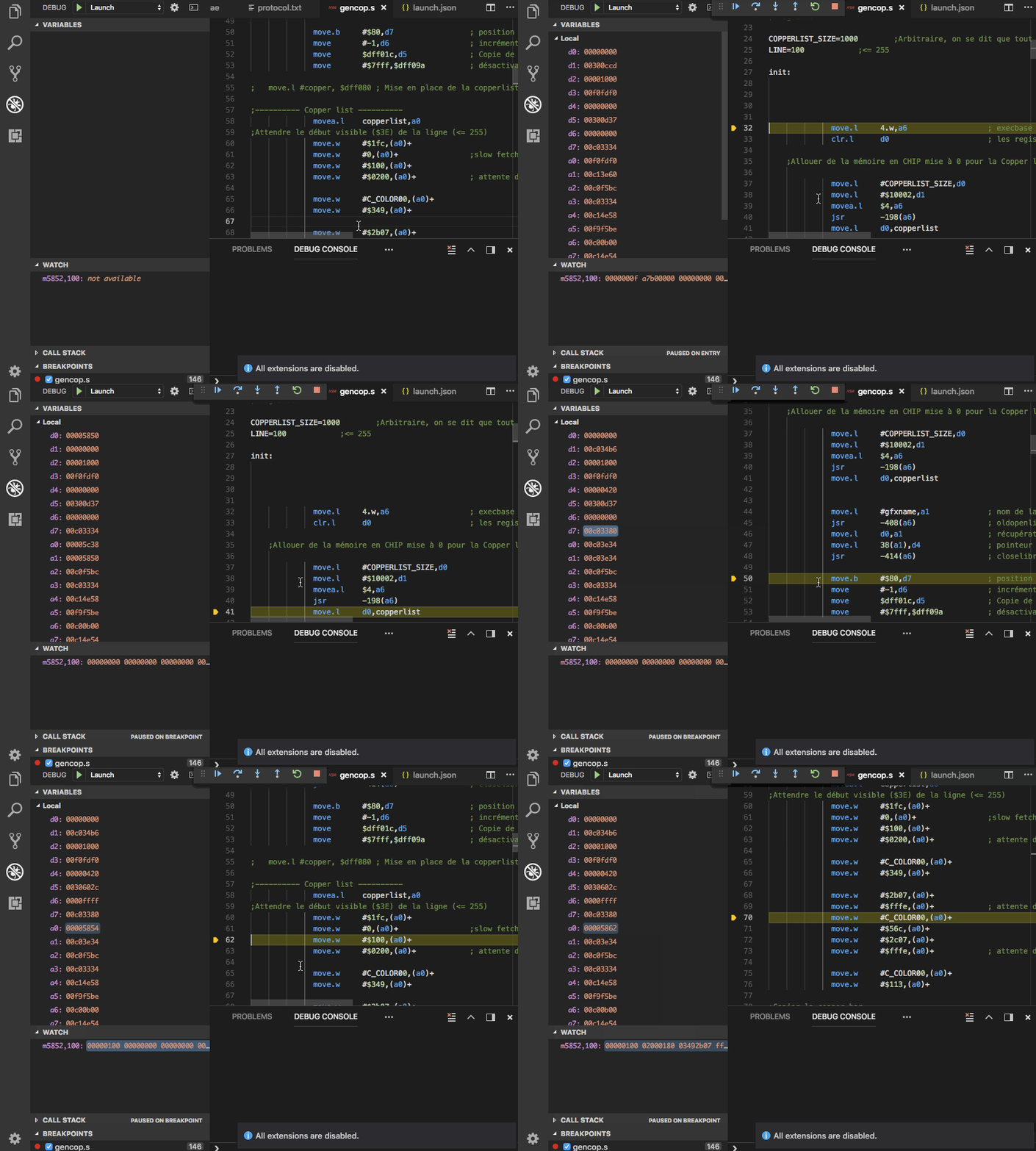
cool! @prb28 is your version of the debugger also made in that hipster language rust or did you chose something that's more than just a fad (i.e. C or C++) ?

@rofl0r , No my "debugger" is just an extension to the editor : https://code.visualstudio.com/. The proxy to fs-uae (using the gdb remote serial protocol coded by @emoon) is in Typescript (javascript), the current code is here : https://github.com/prb28/vscode-amiga-assembly/tree/dev-debug.
Still in a really early stage (full of non working options and bugs) but as a proof of concept I prepared an example repository: https://github.com/prb28/vscode-amiga-wks-example. The binaries (vasm, fs-uae and vlink) are for osx, but it should be easy to build for another platform. Beware, it may not be usable for more than stepping in a simple program. Dumping memory and setting registers should work, the continue option does not always work (must be a bug in my code).
I'm interested in knowing what, in your opinion, should be a minimal feature set for a remote Amiga debugger. Do we need, in a first version, the copper, DMA, blitter, ..., debuggers ?