FrodeSolheim
Option to disable joystick actions of opposite movements (up+down) (left+right)
This is a request for an option to disable/ignore joystick emulated events of left+right or up+down Would probably be safest for this feature to be the standard/default once implemented.
When using keyboard keys as a controller (emulating a joystick), you have the ability to trigger an action of both opposite movements, such as Left+Right or Up+Down by simple holding down both keys of opposite direction. This is normally not possible using a real joystick/gamepad and since most games are not expecting such an input, this may cause unpredictable side-effects or glitches in the game. Players who use keyboard may accidently hit these keys while performing fast movements and end up glitching the game.
Games affected for example: Moonstone: player 1, pushing up+down results to walking up through obstacles and outside the game boundaries. Pushing left+right results in walking fast towards the right, through obstacles and outside the game boundaries World Games: In the bull riding event, if you hold down all arrow direction keys you cant fall off the bull, so you win every time. Battle Squadron (WHDload version): When you set the WHDload option bit to detect when a mouse or joystick is plugged in (similar to FS-UAE port 0 autoswitch), hitting 2 opposite directions will confuse the game to switch you to mouse mode until you until you hit all directions again separately.
Possibly many more games are affected which I am not aware of since I personally use a joystick.
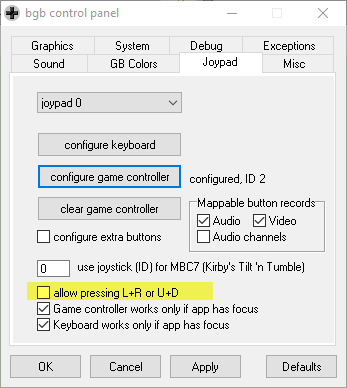
Here is an image example of the feature request which is already used in another emulator.