
standards-support

standards-support copied to clipboard
 FreedomScientific
JAWS is not navigating in grid for Microsoft Teams App
Summary
This is issue with JAWS table navigation in Microsoft Teams app.
Example:
- Open Microsoft Teams app
- Schedule a meeting in calendar. Invite at least 1 person.
- Join the meeting. Other person should join as well.
- In the meeting view navigate to the "Breakout rooms" button in the top toolbar.
- Press button to activate "Breakout rooms"
- In the dialog change "Assign participants" into "Manually"
- Press button "Create Rooms"
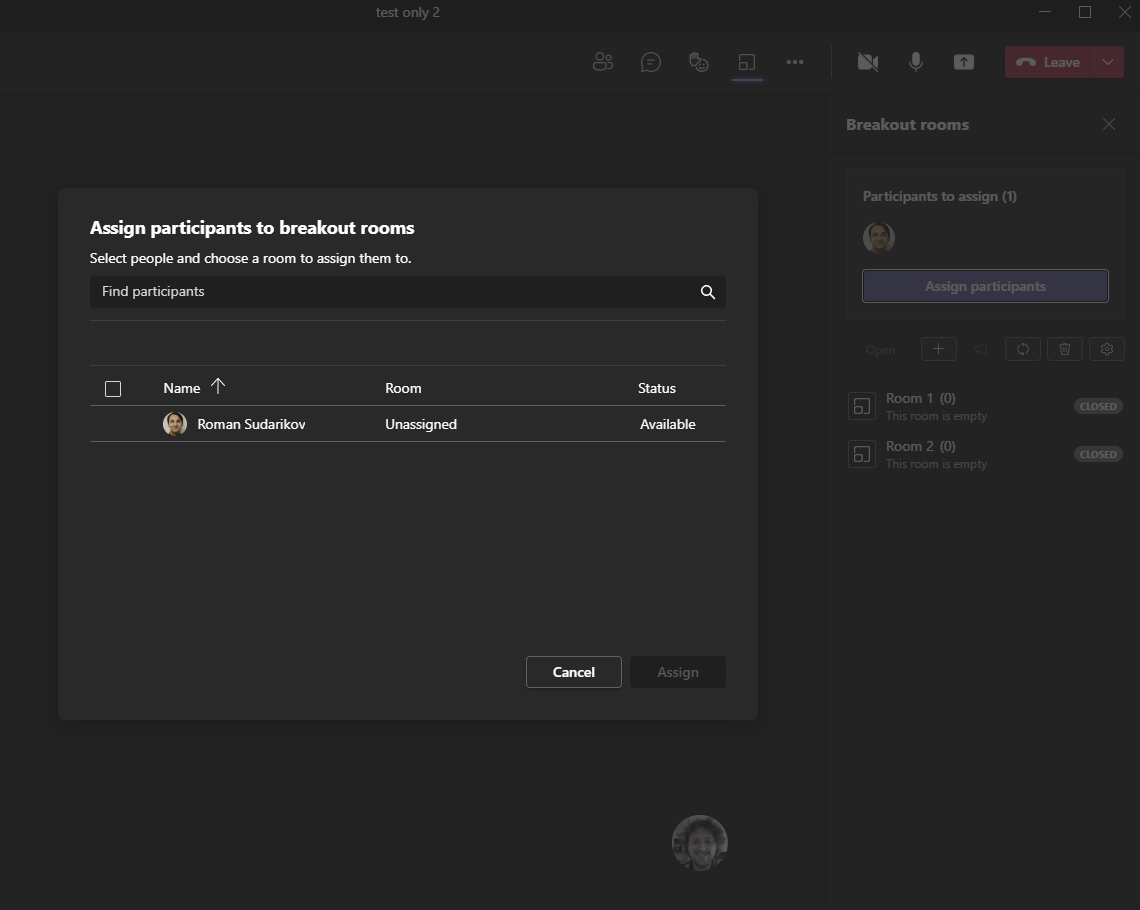
- Use TAB key until you reach the "Assign participant Grid"
- User ctrl+alt+up/down/right/left arrow keys to navigate in the grid
Expected result
JAWS navigates through the grid cells
Actual result
JAWS doesn't navigate in the grid
Navigation in this grid works in the Edge 96.0.1054.62. As well navigation works with pure Electron app. Tested with static page in small electron app.
This testing above maybe indicates JAWS handling grid navigation somehow differently for Microsoft teams app?
Example
UI of affected Table:
Additional Information
JAWS version and build number
JAWS 2022.2110.36
Operating System and version
win11 OS build 22000.376 version: 21H2
Browser and version:
Microsoft Teams app 10.4.7 which contains Chromium 85.0.4183.121
