FreedomScientific
Buttons cannot be selected by letter in JAWS' Form Field List if they have the aria-pressed attribute
Summary
If a
Expected result
When the Form Field list is open, it should be possible to jump to any item in the list by typing the first letter of its name.
Actual result
Nothing happens when the first letter is typed.
Example
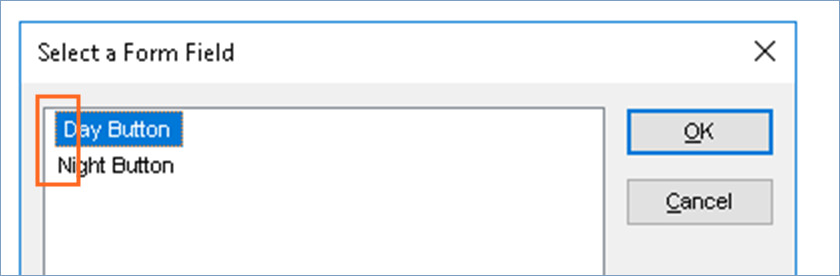
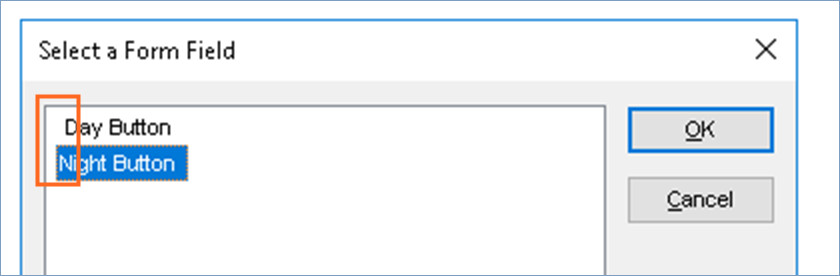
In this example, both buttons appear in the jaws form fields list. The Night button can be selected by typing the letter N but the Day button cannot be selected by typing the letter D.
The screenshots show how there is a space before the word "Day" but not before "Night".
Additional Information
As far as we can tell, this does not happen with other ARIA attributes, although we have only tested a handful.
This does not seem like a major issue, but it was the subject of a complaint by our client's client.
Despite knowing the cause, we have not yet found a workaround.
JAWS version and build number
We tested this using JAWS 2018.1804.26 but the issue was also observed by our client and their client, who may well have been using different versions.
Operating System and version
We tested this using Windows 10
Browser and version:
Internet Explorer 11, Firefox 63 and Chrome 70. The behaviour is the same in all three browsers.

Test case created in Codepen: https://codepen.io/rallynut/pen/xxGNJLJ
Reproduced issue using JAWS 2020.2004.66 in Chrome 81.0.4044.138, Firefox 76.0.1, and IE11 11.778.18362.0.

tested in JAWS 2023.2307.37 issue still present in both chrome and FireFox. There is a space before the button names (that have aria-pressed) in the form field list