FreeRDP
Some RemoteApps don't show their Icon in the Taskbar
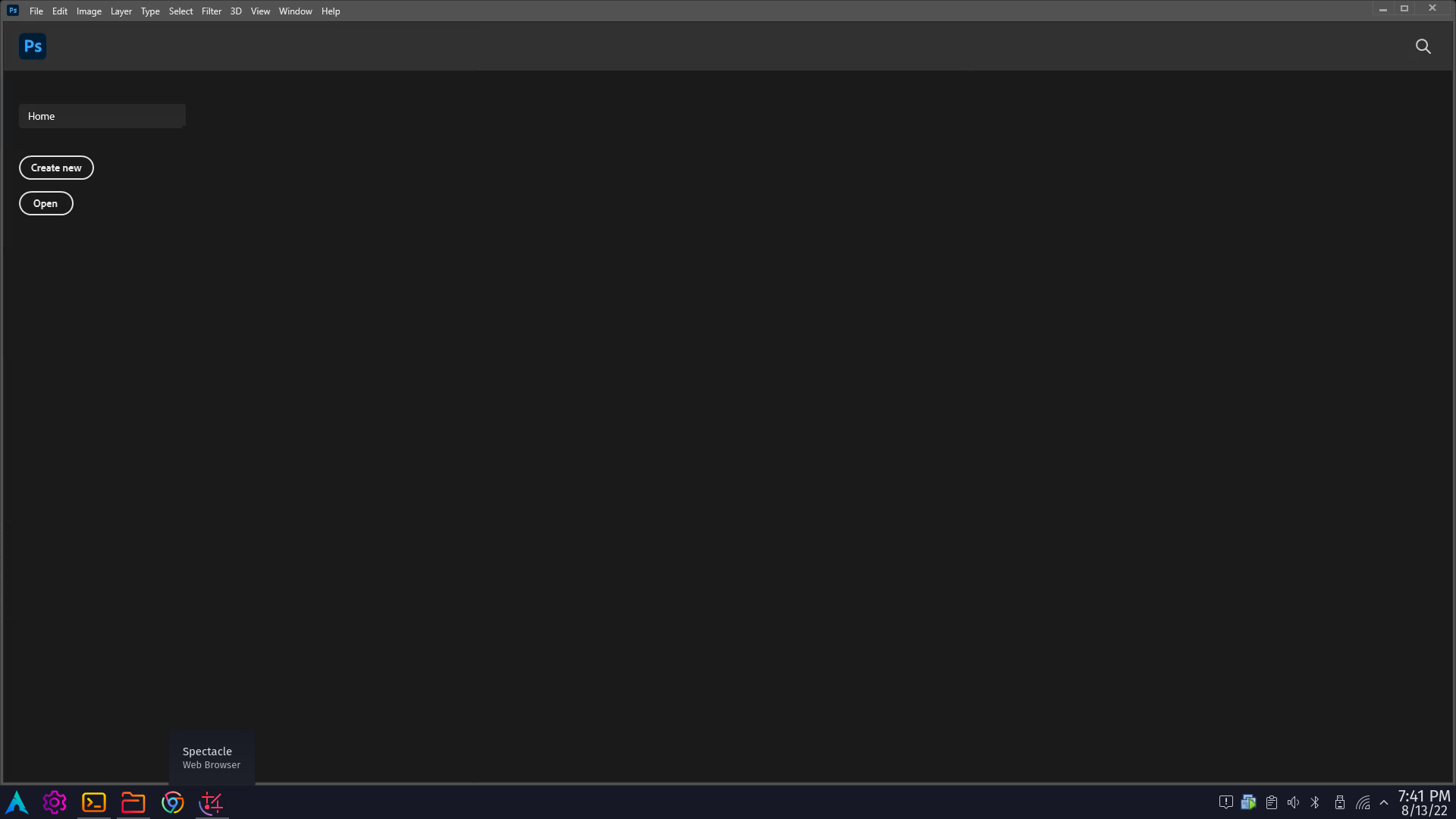
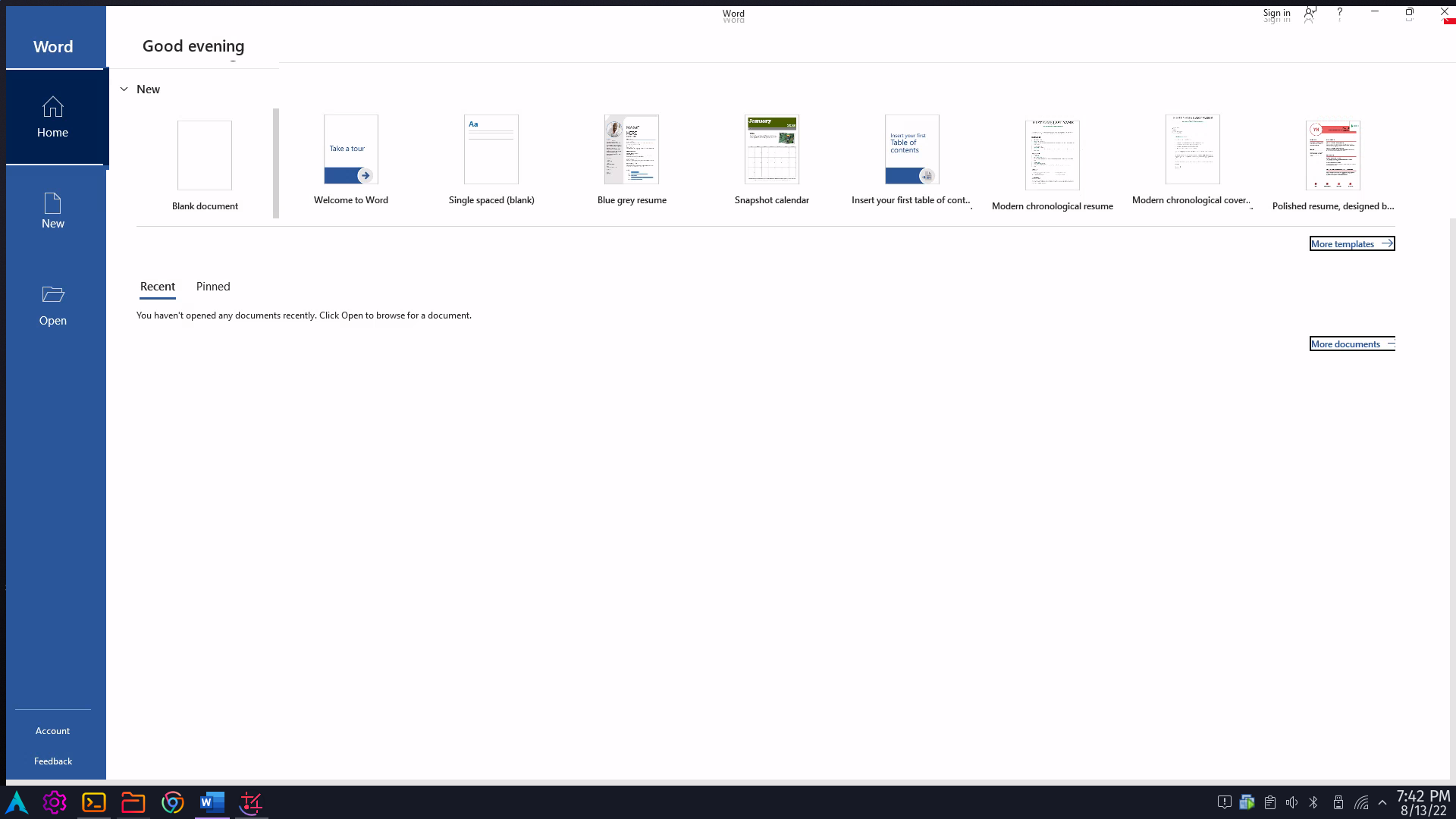
Describe the bug When using Remote Apps, some apps like Adobe Illustrator and Photoshop don't have their icons in the Linux host taskbar when launched while others like Microsoft Excel and Word do. This makes application management difficult for me since I can't maximize them if I ever minimize them.
To Reproduce Steps to reproduce the behavior:
- On Windows Guest ungroup programs in the taskbar (I'm not sure if this does anything but I'll mark this anyways)
- In the Linux Host terminal run
xfreerdp /u:[user] /p:[pass] /app:"C:\Program Files\Adobe\Adobe Photoshop 2021\Photoshop.exe" /v:[ip]to launch Photoshop (or any other problematic application) - The application starts as expected but its icon doesn't show in the Linux Host taskbar
Expected behavior For the icon to show in the taskbar that allows me to minimize, maximize, etc.
Screenshots
I've attached two screen shots. One with Photoshop which shows the problem I'm trying to describe (the taskbar at the bottom lacks the Photoshop icon) and another with Word which shows the expected behaviour (there's the Word icon in the taskbar)
Application details
- FreeRDP version: 2.8.0
- Command line used:
xfreerdp /u:[user] /p:[pass] /app:"C:\Program Files\Adobe\Adobe Photoshop 2021\Photoshop.exe" /v:[ip] - Output of
xfreerdp /buildconfig:
This is FreeRDP version 2.8.0 (2.8.0)
Build configuration: BUILD_TESTING=OFF BUILTIN_CHANNELS=ON HAVE_AIO_H=1 HAVE_EXECINFO_H=1 HAVE_FCNTL_H=1 HAVE_GETLOGIN_R=1 HAVE_GETPWUID_R=1 HAVE_INTTYPES_H=1 HAVE_JOURNALD_H=TRUE HAVE_MATH_C99_LONG_DOUBLE=1 HAVE_POLL_H=1 HAVE_PTHREAD_MUTEX_TIMEDLOCK=ON HAVE_PTHREAD_MUTEX_TIMEDLOCK_LIBS= HAVE_PTHREAD_MUTEX_TIMEDLOCK_SYMBOL=1 HAVE_SYSLOG_H=1 HAVE_SYS_EVENTFD_H=1 HAVE_SYS_FILIO_H= HAVE_SYS_MODEM_H= HAVE_SYS_SELECT_H=1 HAVE_SYS_SOCKIO_H= HAVE_SYS_STRTIO_H= HAVE_SYS_TIMERFD_H=1 HAVE_TM_GMTOFF=1 HAVE_UNISTD_H=1 HAVE_XI_TOUCH_CLASS=1 WITH_ALSA=ON WITH_CAIRO=OFF WITH_CCACHE=ON WITH_CHANNELS=ON WITH_CLANG_FORMAT=ON WITH_CLIENT=ON WITH_CLIENT_AVAILABLE=1 WITH_CLIENT_CHANNELS=ON WITH_CLIENT_CHANNELS_AVAILABLE=1 WITH_CLIENT_COMMON=ON WITH_CLIENT_INTERFACE=OFF WITH_CUPS=ON WITH_DEBUG_ALL=OFF WITH_DEBUG_CAPABILITIES=OFF WITH_DEBUG_CERTIFICATE=OFF WITH_DEBUG_CHANNELS=OFF WITH_DEBUG_CLIPRDR=OFF WITH_DEBUG_DVC=OFF WITH_DEBUG_KBD=OFF WITH_DEBUG_LICENSE=OFF WITH_DEBUG_MUTEX=OFF WITH_DEBUG_NEGO=OFF WITH_DEBUG_NLA=OFF WITH_DEBUG_NTLM=OFF WITH_DEBUG_RAIL=OFF WITH_DEBUG_RDP=OFF WITH_DEBUG_RDPDR=OFF WITH_DEBUG_RDPEI=OFF WITH_DEBUG_RDPGFX=OFF WITH_DEBUG_REDIR=OFF WITH_DEBUG_RFX=OFF WITH_DEBUG_RINGBUFFER=OFF WITH_DEBUG_SCARD=OFF WITH_DEBUG_SND=OFF WITH_DEBUG_SVC=OFF WITH_DEBUG_SYMBOLS=OFF WITH_DEBUG_THREADS=OFF WITH_DEBUG_TIMEZONE=OFF WITH_DEBUG_TRANSPORT=OFF WITH_DEBUG_TSG=OFF WITH_DEBUG_TSMF=OFF WITH_DEBUG_TSMF=OFF WITH_DEBUG_TSMF_AVAILABLE=0 WITH_DEBUG_URBDRC=OFF WITH_DEBUG_WND=OFF WITH_DEBUG_X11=OFF WITH_DEBUG_X11_CLIPRDR=OFF WITH_DEBUG_X11_LOCAL_MOVESIZE=OFF WITH_DEBUG_XV=OFF WITH_DSP_EXPERIMENTAL=OFF WITH_DSP_FFMPEG=ON WITH_EVENTFD_READ_WRITE=1 WITH_FAAC=OFF WITH_FAAD2=OFF WITH_FFMPEG=TRUE WITH_FFMPEG=TRUE WITH_GFX_H264=ON WITH_GPROF=OFF WITH_GSM=OFF WITH_GSSAPI=OFF WITH_ICU=ON WITH_IPP=OFF WITH_JPEG=ON WITH_LAME=OFF WITH_LIBRARY_VERSIONING=ON WITH_LIBSYSTEMD=ON WITH_MACAUDIO=OFF WITH_MACAUDIO=OFF WITH_MACAUDIO_AVAILABLE=0 WITH_MANPAGES=ON WITH_MBEDTLS=OFF WITH_OPENCL=OFF WITH_OPENH264=OFF WITH_OPENSLES=OFF WITH_OPENSSL=ON WITH_OSS=ON WITH_PAM=ON WITH_PCSC=ON WITH_PROFILER=OFF WITH_PROXY=ON WITH_PROXY_MODULES=OFF WITH_PULSE=ON WITH_SAMPLE=OFF WITH_SANITIZE_ADDRESS=OFF WITH_SANITIZE_ADDRESS_AVAILABLE=1 WITH_SANITIZE_MEMORY=OFF WITH_SANITIZE_MEMORY_AVAILABLE=1 WITH_SANITIZE_THREAD=OFF WITH_SANITIZE_THREAD_AVAILABLE=1 WITH_SERVER=ON WITH_SERVER_CHANNELS=ON WITH_SERVER_INTERFACE=ON WITH_SHADOW=ON WITH_SMARTCARD_INSPECT=OFF WITH_SOXR=OFF WITH_SSE2=ON WITH_SWSCALE=ON WITH_THIRD_PARTY=OFF WITH_VAAPI=OFF WITH_VALGRIND_MEMCHECK=OFF WITH_VALGRIND_MEMCHECK_AVAILABLE=1 WITH_VERBOSE_WINPR_ASSERT=ON WITH_WAYLAND=ON WITH_WINPR_TOOLS=ON WITH_X11=ON WITH_XCURSOR=ON WITH_XDAMAGE=ON WITH_XEXT=ON WITH_XFIXES=ON WITH_XI=ON WITH_XINERAMA=ON WITH_XKBFILE=ON WITH_XRANDR=ON WITH_XRENDER=ON WITH_XSHM=ON WITH_XTEST=ON WITH_XV=ON WITH_ZLIB=ON
Build type:          None
CFLAGS:              -march=x86-64 -mtune=generic -O2 -pipe -fno-plt -fexceptions         -Wp,-D_FORTIFY_SOURCE=2 -Wformat -Werror=format-security         -fstack-clash-protection -fcf-protection -flto=auto -fPIC -Wall -Wno-unused-result -Wno-unused-but-set-variable -Wno-deprecated-declarations -fvisibility=hidden -Wimplicit-function-declaration -Wredundant-decls -g -fno-omit-frame-pointer -DWINPR_DLL
Compiler:            GNU, 12.1.0
Target architecture: x64
- OS version connecting to (server side): Windows 10 Pro (Running in VMWare)
- If available the log output from a run with
/log-level:trace 2>&1 | tee log.txtlog.txt
Environment (please complete the following information):
- OS: Garuda Linux, Arch based, KDE Plasma Wayland
- Version/Distribution: N/A afaik (rolling release)
- Architecture: [amd64, arm]: x64


@SoumyBhow do you have the chance to try this with current master?
I've replaced freerdp with freerdp-git from the AUR which from my understanding compiles and installs master but it didn't solve my issue.
In Cairo-Dock, RemoteApp Outlook starts with an icon, but than the icon gets replaces with a grey block and a question mark as it now detects a "rail:somenumber" applicaton. When I a set a custom icon, then it somehow magically returns the Outlook icon (not the custom icon). Maybe it has something to to with the switch to the "rail" part.