

 FortyNorthSecurity
Kali ARM support - wrong Geckodriver
OS Used - ALL Information (architecture, linux flavor, etc.)
5.14.0-kali2-arm64 Fresh install, ran the setup script. Then used this command
./EyeWitness.py -f domains --timeout 8
Error you are encountering
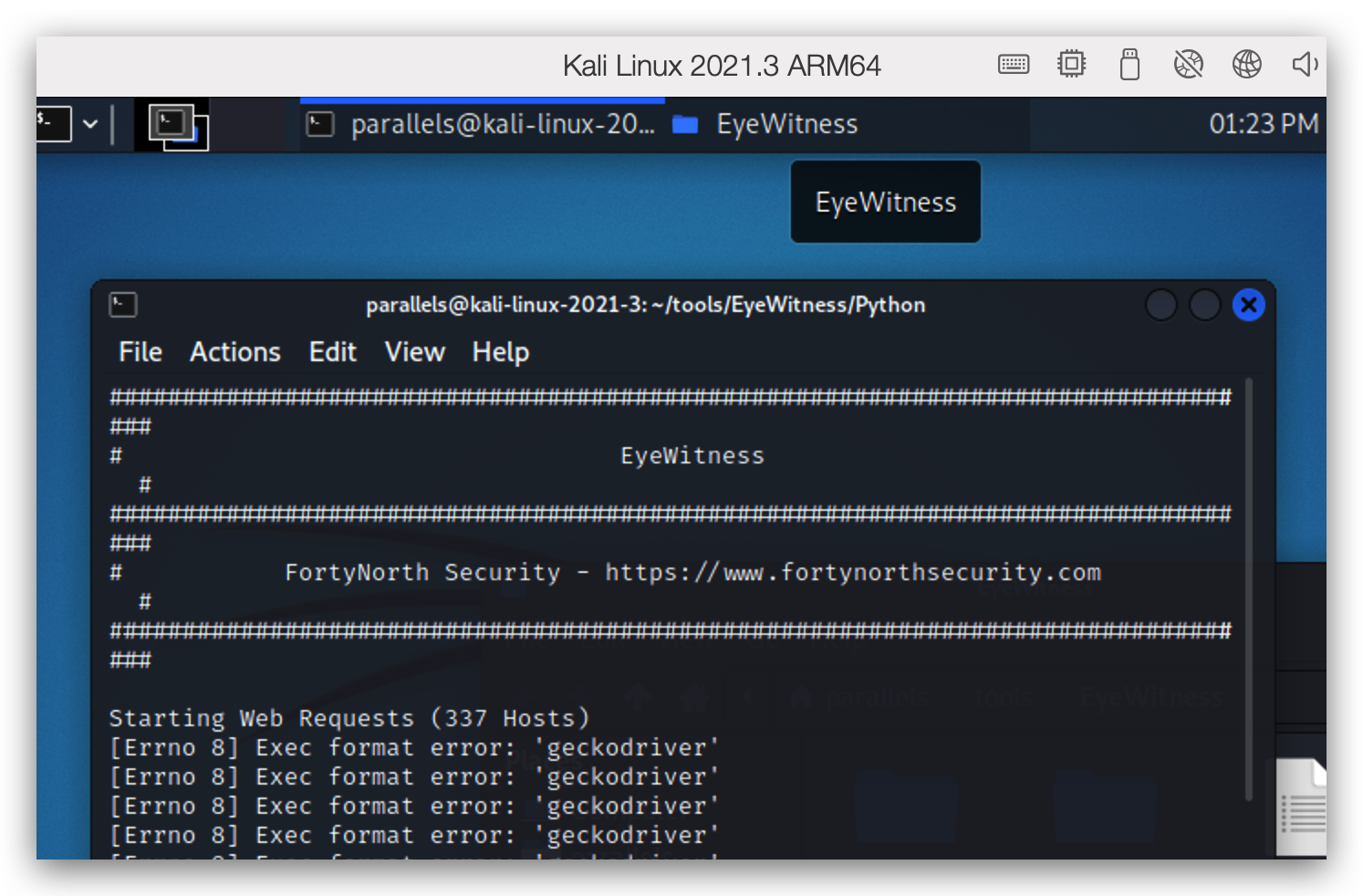
Expected behavior (vs. what you encountered)
It scans
Possible Fix
If you can make a check if arm => download the ARM Geckodriver; it should work I guess.
In what location is the geckodriver saved? Then I can check this solution myself and report back.

I am able to get this working by doing the following:
- Add a new aarch64 URL to setup.sh script
geckodriver_aarch64='https://github.com/mozilla/geckodriver/releases/download/v0.32.0/geckodriver-v0.32.0-linux-aarch64.tar.gz'
- Scroll down and find your OS, you can see there is a segment to install geckodriver. Replace 32 bit version with aarch64 (because you are not using amd64, so else clause will execute).
    if [ ${MACHINE_TYPE} == 'x86_64' ]; then
      wget ${geckodriver_x86_64}
      tar -xvf geckodriver-v0.32.0-linux64.tar.gz
      rm geckodriver-v0.32.0-linux64.tar.gz
      mv geckodriver /usr/sbin
      if [ -e /usr/bin/geckodriver ]
      then
        rm /usr/bin/geckodriver
      fi
      ln -s /usr/sbin/geckodriver /usr/bin/geckodriver
    else
+      wget ${geckodriver_aarch64}
+     tar -xvf geckodriver-v0.32.0-linux-aarch64.tar.gz
+     rm geckodriver-v0.32.0-linux-aarch64.tar.gz
      mv geckodriver /usr/sbin
      if [ -e /usr/bin/geckodriver ]
      then
        rm /usr/bin/geckodriver
      fi
      ln -s /usr/sbin/geckodriver /usr/bin/geckodriver
    fi
- Rerun
setup.shand you are good to go! Tested on M2 Mac w/ Parallels and Kali.
It would be nice if someone can modify the setup script to include this modification (ofc don't just replace 32bit support). Currently don't have time to do this as setup.sh supports so many OSes, with some of them doesn't support ARM (for example Parrot).

Have been looking into this. Looks like each OS has its own block of code for downloading the gecko driver. The code is largely duplicated so I'm trying to factor it out into a function which can then be called instead. This will hopefully make changes such as adding a new architecture less painful.
Testing on the different OS versions is going to be time consuming though. Might put in a WIP pull request so others can test it on different OS/CPU setups.
