

 FortiPower
address: Add geo(graphy) type (country) with example

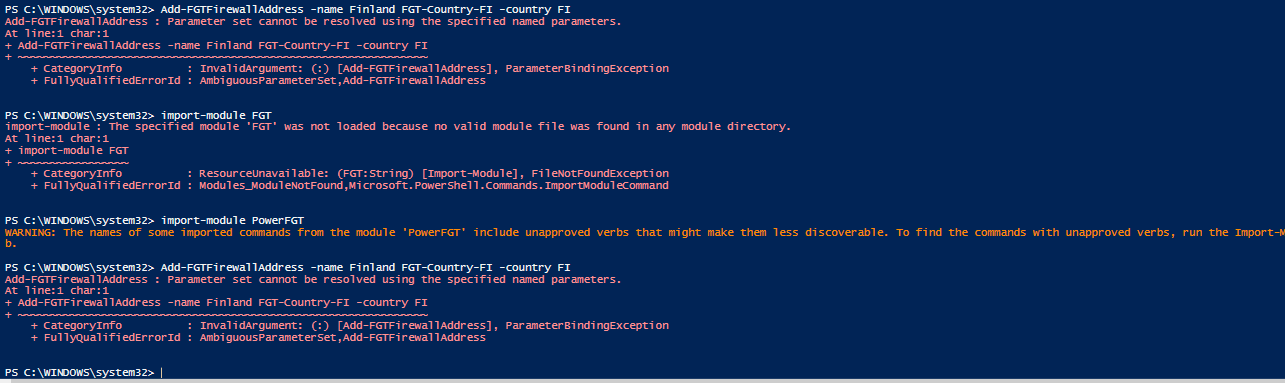

can you try
Add-FGTFirewallAddress -name FGT-Country-FI -country FI
?
(Remove the extra Finland... or remove extra FGT-Country-FI ;-) and kept only finland =)
and use
Import-Module PowerFGT -Force
Could you entertain a few questions for me please?
Is this an HTTP API? If so where did you learn how to build HTTP API’s If not what type of API is it and where did you learn to build it?
I appreciate your answers!
Could you entertain a few questions for me please? Is this an HTTP API? If so where did you learn how to build HTTP API’s If not what type of API is it and where did you learn to build it? I appreciate your answers!
Yes, it is a HTTP API, you can search on Google a PDF FOS REST API reference for help to understand API or you can also look the code of this module (Connection.ps1 and RestMethod.ps1), there is also FNDN (but need an account validated by Fortinet...)
![azure-pipelines[bot] avatar](https://avatars.githubusercontent.com/in/9426?v=4 "Published by a pub.dev verified publisher")
So my issue was that I created a new address.ps1 file and pasted the new code in there because I was getting permission denied when updated your original file. I found a way to update the code in there and save successfully. Odd though that a new file named address.ps1 didn’t work even though I renamed the old file address_old.ps1.
It ended up working though so thank you so much for your quick response and help with updating the API!
So my issue was that I created a new address.ps1 file and pasted the new code in there because I was getting permission denied when updated your original file. I found a way to update the code in there and save successfully. Odd though that a new file named address.ps1 didn’t work even though I renamed the old file address_old.ps1. It ended up working though so thank you so much for your quick response and help with updating the API!
Thanks for feedback !
Sorry for delay, but the new release will be available on next month (not yet ETA...)