

 FormidableLabs
Stacked Bar Charts - center label on Bar Segment
Bugs and Questions
Checklist
-
[x] This is not a
victory-nativespecific issue. (Issues that only appear invictory-nativeshould be opened here) -
[x] I have read through the FAQ and Guides before asking a question
-
[x] I am using the latest version of Victory
-
[x] I've searched open issues to make sure I'm not opening a duplicate issue
The Problem
In a stacked bar chart, I'm trying to add labels to each bar segment on top of the bar.
Sort of like this:

When adding labels to a stacked bar chart, the label for each chart segment seems to render "after" the segment, on top of the beginning of the next segment like this instead:

I'm really struggling to figure out how to center the labels over each segment. As the labels are their own elements and not children to the bar segments they belong to.
I played around with all combinations of textAnchor and verticalAnchor and ended up at a bit of a hacky solution where I calculate the offset based on domain range and chart width. But it's still a bit off...
Any ideas on how to center the labels? Maybe I just missed something simple?
Reproduction
Sandbox based on the 100% column stacked bar example here:
https://codesandbox.io/s/basic-victory-example-yx95d
The main part being:
labelComponent={
  <VictoryLabel
    dx={data => {
      // (graphWidth / (maxDomain-minDomain)) * (datum.y / 2)
      // ^scale factor percent to pixels  * half the width of segment in %
      return (-(400 - 2*30) / (100 - 0)) * data.datum.y/2;
    }}
  />
}
Is there any less hacky way to achieve the same?
Thanks!

This would be especially valuable for tooltips positioned above or below the bars (or left or right of the bars in a vertical chart). They currently render with their origin at the right side of the bar they label (as seen in @jonashaefele's second image):
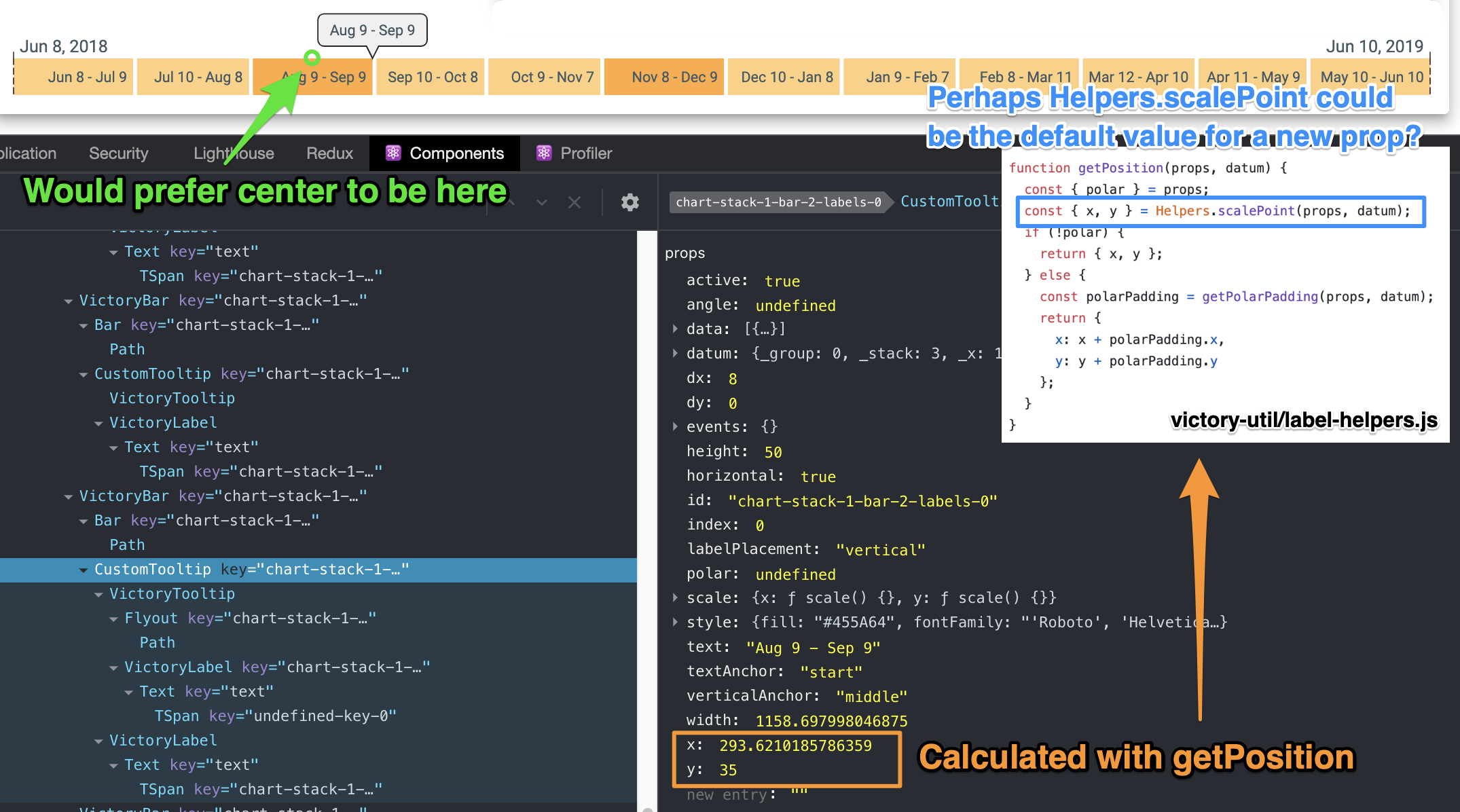
The tooltip's x and y props are calculated by the getPosition helper which subsequently delegates to scalePoint. The latter method makes use of the scale prop, potentially providing a way to influence the tooltip position, though I don't know what the side effects would be of writing my own scale function. The D3Scale interface is also fairly involved, so it would be a bit more work to do so than it ought to be.
One possible solution is to parameterize the call to getPosition or Helpers.scalePoint. Perhaps a new prop getPosition could be added to VictoryTooltip and VictoryLabel, and default to the current implementation of getPosition in label-helpers.js? Then the user could override that default behavior for more customized positioning. On the other hand, implementing something like targetOrigin and anchorOrigin would likely hit 99% of use cases and provide a simpler API for the user:
interface TooltipOrigin {
  vertical: 'top' | 'center' | 'bottom';
  horizontal: 'left' | 'center' | 'right';
}

interface VictoryTooltipProps extends VictoryLabelableProps {
  anchorOrigin: TooltipOrigin;
  targetOrigin: TooltipOrigin;
  ...
}

Here's how I ended up solving this, using TypeScript:
import { VictoryTooltip, VictoryTooltipProps } from 'victory';

type Coordinate = { x: number; y: number };

class CustomTooltip extends VictoryTooltip {
  constrainTooltip(center: Coordinate, props: VictoryTooltipProps, ...args: any[]) {
    // @ts-ignore-next-line
    const { x } = super.constrainTooltip(
      { x: this.getCenterX(props), y: center.y },
      props,
      ...args
    );

    return { x, y: center.y };
  }

  getFlyoutProps(props: VictoryTooltipProps, ...args: any[]) {
    // @ts-ignore-next-line
    return super.getFlyoutProps({ ...props, x: this.getCenterX(props) }, ...args);
  }

  /**
   * Finds the center x-coordinate of the bar
   */
  getCenterX(props: VictoryTooltipProps) {
    const midpoint = calculateMiddle(props.datum);
    // @ts-ignore
    return props.scale.y(midpoint.toJSDate());
  }
}
The getFlyoutProps method is overridden to provide the super method with the x-coordinate of the bar's center. The constrainTooltip method is overridden for the same reason, additionally providing customized tooltip constraint behavior (I wanted the tooltip not to overflow the chart on the sides, but don't have a problem with vertical overflow--hence I ignore the y value returned by super.constainTooltip). The calculateMiddle is a function particular to my specific situation which calculates the center of the bar in user-space, i.e. in the same units that the data uses. In my case the independent axis is time-based, so calculateMiddle returns a Date object at the middle of the time interval that the bar represents.
Final result:

The multiple @ts-ignore comments are regrettable but necessary, because the VictoryTooltip type declaration doesn't include the class methods I'm overriding. There may be a way to properly type the props such that props.scale is recognized by the compiler, I didn't look deeply into that.
Hi there! Same problem here. Any idea if there is a deadline or when this feature/bug might be released? I will follow this thread. Anyway, thanks for the workaround.
