
WillBot
 WillBot copied to clipboard
 ForkKILLET
A Bot with concise and free Will
Willbot β
Willbot β 是基于 OICQ 协议库,使用 MongoDB 存储数据的 QQ 机器人.
Willbot β 拥有简洁而自由的 意志.
上一版 Willbot 在 main 分支,已经停止维护,感谢TA的付出.
安装
$ git clone https://github.com/ForkKILLET/Willbot.git
$ cd Willbot
# 需要配置 Willbot
$ yarn
$ yarn start
配置
配置文件默认位于 ~/.config/WillbotBeta/config.yml. 可以使用 --rc-path | -c 选项指定 资源目录 路径,配置文件必须在资源目录下并且名称为 config.yml.
Willbot β 使用 schemastery,必须的配置项是:
account:
  uin: number		# 机器人的 QQ 号
  pw: string		# 机器人的 QQ 密码

database:
  addr: string		# MongoDB 地址
  port: number		# MongoDB 端口

commands:
  prompts: string[]	# 提示符(唤起机器人的前缀)
Willbot β 会列出有误的配置项.
扩展
向 src/commands/ 目录中添加/删除 .will.js 结尾的文件,即可自定义命令. 暂时没有文档.
使用
以下假定提示符为
w>.
命令
调用命令
以 提示符 命令 参数 的形式调用 Willbot β.
提示:当你不知道某个命令在哪时可以使用
where.
w> where echo
echo: 1 result(s)
test.echo
使用 . 号(英文句号)分割的命令名称调用多级命令.
w> test.echo Hello, will!
Hello, will!
如果一个命令显示 not executable,说明这个命令不能直接执行,但可能有子命令.
w> test
test: not executable
在 任意 命令后加 .? 或 .help 即可使用帮助命令.
提示:甚至可以对
?使用哦,试一下?.?
w> ?
(root): [perm] 0
[subs] dice, github, msgflow, my, perm, pyrga, sudo, test, where, whoami, ?, chess, help
[no usage]
[help] Willbot v0.15.0 β

w> test.?
test: [perm] 0
[subs] echo, hello, eval, tokenize, ?, say, ~, help
[no usage]
[help] no information
test: subs: echo, ?, say, help
转义
命令中可以使用 '、"(单双引号),\(反斜杠)转义, \u??、\0??、\x??(十六进制转义、八进制转义、二位十六进制转义)和环境变量.
w> test.echo "Willbot   真\u9999"
Willbot   真香

w> test.echo 空\ 格\n换行
空 格
换行
[perm] 命令权限
WillBot β 有权限系统. 可以用 perm.get 获知自己的权限等级(默认为 0,大多数命令不需要权限就能调用,因此负数权限等级如 -1 就意味着封禁).
w> perm.get
0
试图调用权限要求高于自己等级的命令,会报错. perm.set 用于设定用户权限等级,帮助中 [perm] 字段表明其权限要求为 3.
w> perm.set.?
set: [perm] 3
[subs] ?, help
[usage] set <uid: num> <level: num>
[help] Set <uid>'s permission level to <level>

w> perm.set 23456 1
permission denied (Require 3)
[usage] 命令用法
w> where.?
where: [perm] 0
[subs] ?, help
[usage] where <command: str>
[help] Show the path of a <command>
帮助的 [usage] 字段描述命令的用法. 如上例子中,where 为命令名称,其后的 <command: str> 代表一个 str 类型的必填参数.
参数类型
如上例子中,str 即为参数类型. 参数类型的含义见下表:
| 参数类型 | 含义 | 举例/说明 |
|---|---|---|
str |
字符串类型 | qwq, "space between", ... |
num |
数字类型 | 123, 4.567, 8e9,... |
bool |
布尔类型 | 仅 true 和 false |
text |
文本类型 | 命令的完整内容. 如 echo a b 会输出 a b,而不需要转义 |
参数权限
就像命令有权限要求一样,一个命令中不同参数也可以有不同的权限要求. 例如 dice.jrrp.history 的 chart 参数需要 2 级权限.
w> dice.jrrp.history.?
history: [perm] 0
[subs] ?, help
[usage] history [[perm] 1 chart: bool]
[help] 获取您的历史人品
参数可选性
参数分为 必填参数、可选参数(顾名思义)和指定具名参数(将在后面解释).
<arg: type>
[arg: type]
[--arg: type]
参数名称
如上例子中,command 为参数名称. 名称有三个用途:
- 在
[help]字段中,用于解释这一参数. - 用 具名参数(或称为选项风格参数)的形式传入:
其优点在于w> where --command jrrp jrrp: 1 result(s) dice.jrrp- 书写较长命令时更为直观.
- 可以 不按顺序 传入. (即
--a 1 --b 2与--b 2 --a 1等效) - 对于
bool类型参数,--a和--no-a可作为--a true和--a false的简写.
- 用于 指定具名参数.
w> echo.?
echo: [perm] 0, [alias] say
[subs] ?, help
[usage] echo [--error: bool] <sentence: text>
[help] Send <sentence> in the current context. Send error with --error on.
[--error: bool]表示,传入error参数时必须用具名参数形式. 原因很容易理解:我们无法判断echo true sth是要输入true sth还是输出错误sth.
自定义使用
WillBot β 尝试为开发者和使用者提供高度自定义的体验. 接下来介绍用于定制 WillBot β 的命令 my.
w> my.?
my: [perm] 0
[subs] alias, with, env, ?, help
[no usage]
[help] Customize your WillBot β
自定义路径
- 如果你每天早上准时到群里
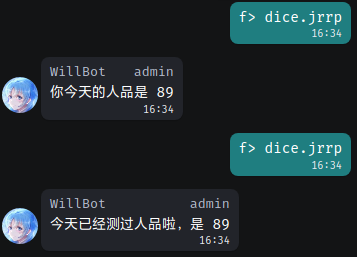
dice.jrrp,会不会觉得太费事了?jrrp还能是哪个jrrp,只能是今日人品啊……
介绍:my.with
w> my.with dice
Done.

w> jrrp
你今天的人品是 100
只需要 with 一个命令,就可以直接使用它的子命令啦.
提示:这和 shell 中的
$PATH类似
自定义别名
jrrp还是太长了,为什么不更懒一点?- 下 Pyrga 棋的时候,少打几个字母会不会更能抢占先机?
介绍:my.alias
w> my.alias rp dice.jrrp
Done.

w> my.alias pp pyrga.place
Done.

w> rp
你今天的人品是 100

w> pp 2 2 s
...
不过,只能 alias 命令,带上参数是不行的哦.
自定义环境变量
- 许多命令需要用到 QQ 号,太麻烦?
介绍:my.env
w> my.env fk 1096694717
Done.

w> pyrga.player $fk
1096694717(群内身份 ForkKILLET)
当前不在游戏中
胜:1,负:1,平:2
总:4,胜率:25.00%
如果确实要使用一个美元符 $,使用反斜杠转义:\$
管理自定义配置
如上三个命令,都有子命令 list 和 remove 用于管理.
使用截图
截图使用 QQ 客户端为 Icalingua++,感谢 Icalingua++ 社区提供优质软件!
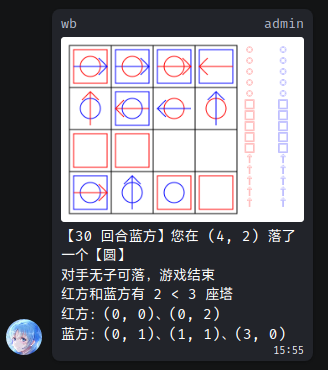
Pyrga 抽象棋
今日人品
许可证
GPL
 ForkKILLET