

 Foliotek
Output Image is always PNG , croppie not keeping original Format
Hello ,
Im trying to integrate Croppie inside a simple WebApp ( HTML/php + js / css) and here is how is my code looks like :
`document.addEventListener('DOMContentLoaded', function() { var extension = "1212121"; $image_crop = $('#image_demo').croppie({ enableExif: true, viewport: { width: 1180, height: 600, type: 'rectangle' //circle }, boundary: { width: 1280, height: 800 }, }); $('.house_img').each(function() { var id = $(this).attr("id");
    $('#' + id + '').on('change click', function() {
		extension = $(this).val().split('.').pop();
        var reader = new FileReader();
        reader.onload = function(event) {

            $image_crop.croppie('bind', {
                url: event.target.result,
            }).then(function() {
                console.log(extension);
            });

        }
        reader.readAsDataURL(this.files[0]);
        $('#uploadimageModal').modal('show');

    });

})
    $('.crop_image').click(function() {
					var GetCropper = $(".crop_image")[0]['attributes']['data-selected'].nodeValue;
					$image_crop.croppie('result',{
						type: 'canvas',
						size: 'original',
						format : 'jpg',
						quality: 0.5,
					}).then(function(response){
					$.ajax({
						url:"./queries/upload.php",
						type: "POST",
						dataType: 'json',
						data:{"image": response},
						success:function(data)
							{
								$('#uploadimageModal').modal('hide');
								image_placing = $('#uploaded_image').find('img');
								image_placing.each(function(){
										if($(this).attr('data-reading') == GetCropper )
										{

											$(this).attr('src','../images/uploads/'+encodeURI("%")+'temp'+encodeURI("%")+'/'+data['image']+'');
											$(this).next().val(data['image'].split('.').slice(0, -1).join('.').concat('.'+data['filetype']));
										}
								})

							}
						});
				})

            $('#uploadimageModal').modal('show');

    })
});`
The problem is that the croppie is converting my Image Always into PNG even if i choose JPEG it dosen't work at all , and not reducing the quality is there something wrong on my Code ? thank you

@xiisaiki
from: https://foliotek.github.io/Croppie/
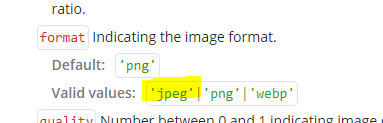
from your code
$image_crop.croppie('result',{
   type: 'canvas',
   size: 'original',
   format : 'jpg',
   quality: 0.5,
})
jpg isn't a valid format.
try changing it from jpg to jpeg

Hello dear @alsmpd
i did it but it dosen't seem to save the original format of image
i would like to have all format for example input if it was png output should be png if it was JPG it should output JPG take a look to my new Code
` var extension = "" // empty on start; $('.house_img').each(function() { var id = $(this).attr("id");
    $('#' + id + '').on('change click', function() {
		extension = $(this).val().split('.').pop(); // put the extension of each file selected to crop
        var reader = new FileReader();
        reader.onload = function(event) {

            $image_crop.croppie('bind', {
                url: event.target.result,
            }).then(function() {
                console.log(extension);
            });

        }
        reader.readAsDataURL(this.files[0]);
        $('#uploadimageModal').modal('show');

    });

})
$('.crop_image').click(function() { var GetCropper = $(".crop_image")[0]['attributes']['data-selected'].nodeValue; $image_crop.croppie('result',{ type: 'canvas', size: 'original', format : ''+extension+'', quality: 0.5, }).then(function(response){ $.ajax({ url:"./queries/upload.php", type: "POST", dataType: 'json', data:{"image": response}, success:function(data) { $('#uploadimageModal').modal('hide'); image_placing = $('#uploaded_image').find('img'); image_placing.each(function(){ if($(this).attr('data-reading') == GetCropper ) {
											$(this).attr('src','../images/uploads/'+encodeURI("%")+'temp'+encodeURI("%")+'/'+data['image']+'');
											$(this).next().val(data['image'].split('.').slice(0, -1).join('.').concat('.'+data['filetype']));
										}
								})

							}
						});
				})

            $('#uploadimageModal').modal('show');

    })`
I Tryed to to add retrieve the real extension and put it into variable but it dosen't work at all
@xiisaiki did you manage to fix this problem ? We also want Croppie to keep the same output !

I also have this problem, even changing the format to 'jpeg', the image always 'png'.
$uploadCrop = $('#upload-site').croppie({
	format: 'jpeg',
	quality: 0.5,
	viewport: {
		width: 300,
		height: 225
	},
	boundary: {
		width: 390,
		height: 320
	}
});

Sorry, wrong place declared... solved
$('.upload-site-result').on('click', function (ev) {
	$uploadCrop.croppie('result', {
		type: 'canvas',
		size: 'viewport',
		format: 'jpeg',
		quality: 0.9,
	}).then(function (img) {
...
If you want to keep the image format then you should just add extra logic to check what is the extension of the file that user picked, and then tweak the value of croppie's result format based on that. Keep in mind that croppie can only output jpeg, png, and webp format though, at the time of my writing. (so it's not possible to let GIF stay GIF).
