

 FlaUI
FlaUI
Invoke Checkbox
Describe the bug Not invoking checkbox as needed
Code snippets I have tried quite a bit of code for this, exhausted all the toggles, checks, etc...
            cb.Focus();

            var togglePattern = cb.Patterns.Invoke.Pattern;
            togglePattern.Invoke();
Screenshots
here is the inspection
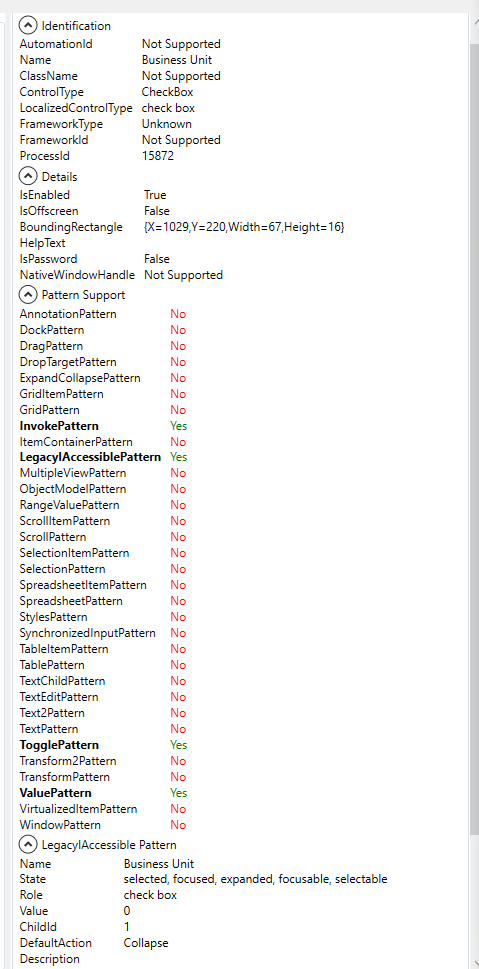

Hi, I am facing the same/similar issue for my WPF application. (I want to switch from Teststack.White to FlaUI.)
So far I found out it is possible to set the value of the checkbox via
- checkbox.Patterns.Toggle.Pattern.Toggle();
- checkbox.ToggleState = ToggleState.On;
- checkbox.IsChecked = true;
- checkbox.Click();
to unset a value:
- checkbox.Patterns.Toggle.Pattern.Toggle();
- checkbox.ToggleState = ToggleState.Off;
- checkbox.IsChecked = false;
- checkbox.Click();
the problem is, that the checkbox is bound to a WPF command and that all but the click method won't invoke that command. So far so good, but the click() method is constantly failing to invoke the select/unselect when the checkbox has no focus/another element like combox is "open" (e.g. comboBox.Select(2)). => I workaround this issue by send an Focus() prior to click()
If you have the same issue, it would be nice, if at least the click() method would do a focus() internally before invoking the actually click()?
