

 Feu-Secret
migrate.js not cleaning out original presets
It appears that migrate.js doesn't clear out the original line keyed with "tokenmagic.presets" whenever a migration takes place, causing old installs of Token Magic FX to have many repeating lines of "tokenmagic.presets" for each version a user has updated to. This still "works", as the lines are loaded in order from settings.db, but dirties up settings.db files.
Discovered this when a user on The Forge had installed Token Magic FX, and got an old version of "tokenmagic.presets" in a world that was never "migrated" (it appeared to be ~3.0.x version of the "tokenmagic.presets" line).

Additionally, it appears that this behavior is worse on a fresh install, as it will perform ALL data migrations (one after the other).
Confirmed, brand new world, ONLY Token Magic FX enabled, this is the Token Magic part of settings.db:
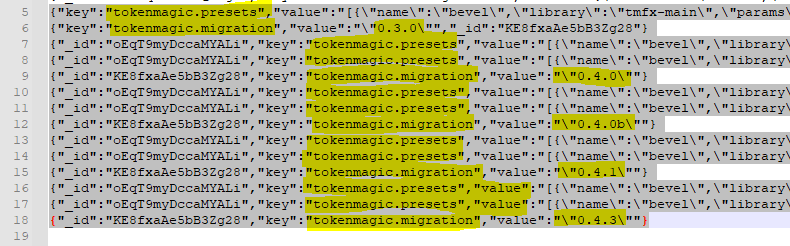
It appears that:
- original
tokenmagic.presetsandtokenmagic-migrationwritten (by migration.js?) - 0.4.0/0.4.0b/0.4.1/0.4.3 migrations ALL applied
It appears that the migrations (except for the first one?) all get the LAST tokenmagic.presets, write that into settings.db, THEN writes the new one in. Confirmed with Diff.
Issue in migration (in part) appears to be in this (and the other) parts of code for migration:
async function updatePresetsV043() {
    // Gets the CURRENT presets value
    var presets = game.settings.get("tokenmagic", "presets");

    if (!(presets == null)) {
        log('Migration 0.4.3 - Launching presets data migration...');

        try {
            // write the CURRENT presets back in again
            await game.settings.set("tokenmagic", "presets", presets);
            log('Migration 0.4.3 - updating template presets...');
            // write in the NEW presets?
            await Magic.importPresetLibraryFromPath("/modules/tokenmagic/import/TMFX-update-presets-v043.json", { overwrite: true });
            await game.settings.set("tokenmagic", "migration", DataVersion.V043);
            log('Migration 0.4.3 - Migration successful!');
        } catch (e) {
            error('Migration 0.4.3 - Migration failed.');
            error(e);
        }
    }
}
Old entries in .db files are completely normal. That's just how the database (NeDB) works. You can read more about it here.
Migration on a fresh install seem to be intended, because it adds a bunch of presets. Some presets are only in the migration files but not in the default presets. It don't this causes any problems at the moment.
The migration version isn't part of the presets (it's part of the world), and it's not included in the exported file. Tokenmagic just assumes it gets the most recent version when you import presets. So if you import an older file, it won't migrate those presets. A workaround to force the migration would be to run game.settings.set("tokenmagic", "migration", VERSION) where VERSION is equal to the migration version the imported file was created with, e.g. "0.3.0", and then reload. If you don't know the correct version, try setting VERSION to ""; this should work, but it could override some modified presets though.

Old entries in .db files are completely normal. That's just how the database (NeDB) works. You can read more about it here.
Migration on a fresh install seem to be intended, because it adds a bunch of presets. Some presets are only in the migration files but not in the default presets. It don't this causes any problems at the moment.
The migration version isn't part of the presets (it's part of the world), and it's not included in the exported file. Tokenmagic just assumes it gets the most recent version when you import presets. So if you import an older file, it won't migrate those presets. A workaround to force the migration would be to run
game.settings.set("tokenmagic", "migration", VERSION)whereVERSIONis equal to the migration version the imported file was created with, e.g."0.3.0", and then reload. If you don't know the correct version, try settingVERSIONto""; this should work, but it could override some modified presets though.
That still doesn't solve the issue of a brand new world getting every single Migration applied to it on initial module enablement. That's at best inefficient.
The migration code starts with the 0.3.0 default presets and upgrades those to the newest version step by step in each new world. It's not really inefficient since it's just a one-time thing.
The migration code starts with the 0.3.0 default presets and upgrades those to the newest version step by step in each new world. It's not really inefficient since it's just a one-time thing.
I'll differ with you there, but it makes sense. What I saw was a FoundryVTT user who got only the presets, and no migration info, and then never got the newer presets.
@Aeristoka , thanks for your comments 😉 The migration submodule will be rewritten. I cannot give visibility at the moment.
