

 FastReports
SQLite queries using json1 extension cause errors in Designer
Hello, I'm working with a SQLite data source and would like to use the json1 extension in my queries. I'm having trouble getting Designer to accept these queries. It gives this error:
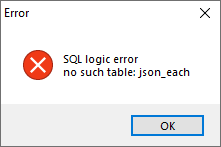
It seems that it's just a matter of the designer not knowing about the extension.
The queries work in a sqlite browsing tool, and they also work in FastReport if I add this call to LoadExtension before rendering:
SQLiteDataConnection conn = new SQLiteDataConnection();
conn.ConnectionString = connectionString;
conn.GetConnection().LoadExtension("sqlite3_json_init"); // Added this line
report.Dictionary.Connections.Add(conn);
report.Prepare();
Is there a way to make sqlite extensions work in the designer? Maybe with a property on each data source to specify which extensions to load?
Edit: To be clear, my hope is to run json queries with a SQLite data source in the query builder of Designer.exe. A simple example of such a query would be:
select json_extract('{"a":1, "b": "test"}', '$.b')
with result
test

The connection within the .frx, in this context, serves only to design the report.
For it to be rendered from within the application, in this context pass only the string connection.
Eg:
var report = new Report();
report.Load("MyReportFile.frx"));
report.Dictionary.Connections[0].ConnectionString = "MyStringConnectionAccordingToMyRepository ";
report.Prepare();

Hi Jefté, thank you for responding. I'm getting the error when entering a query into Query Wizard like below. I'm using the community version of Designer.exe, downloaded from here. I know the query is valid for this sqlite database because I am able to run it against the database directly, as long as the json1 extension has been loaded. But my guess is that the designer does not know about json1. Do you know if it would be possible to update the designer so that it can handle this query and others like it?

@ProsserCJ Now I understand the problem... I thought it worked on the designer, but not on dotnet.
I've worked with querys using commands in PL / SQL and T-Sql, and they work normally, but I never worked with SQLite using fastreport.
I can't evaluate just looking at the query, but have you thought about putting the rule in the application. That is, map the objects within your DB column and deserialize, this can even allow you to use another method to render.
@jeftegoesdev it might be possible to put the rule in the application, though I like to query with SQL. We have a working report that uses a postgres backend, where we extract values from json with queries similar to the above. We're trying to switch to SQLite to make it easier to install.
It's difficult to design the report without being able to edit the queries or see a preview. I think a fix might involve a call to LoadExtension() when the connection is initialized in the designer, but I'm not sure.
Thank you for your help.
