
fancywm

fancywm copied to clipboard
 FancyWM
FancyWM started crashing
Describe the bug
Internal.Cryptography.CryptoThrowHelper+WindowsCryptographicException: The data is invalid.
   at System.Security.Cryptography.ProtectedData.ProtectOrUnprotect(Byte[] inputData, Byte[] optionalEntropy, DataProtectionScope scope, Boolean protect)
   at System.Security.Cryptography.ProtectedData.Unprotect(Byte[] encryptedData, Byte[] optionalEntropy, DataProtectionScope scope)
   at FancyWM.Analytics.LicenseManager.GetUtcTimeOfLastCheckAsync()
   at FancyWM.MainWindow.DoLicenseCheck()
   at FancyWM.MainWindow.OnLoaded(Object sender, RoutedEventArgs e)
   at System.Threading.Tasks.Task.<>c.<ThrowAsync>b__128_0(Object state)
   at System.Windows.Threading.ExceptionWrapper.InternalRealCall(Delegate callback, Object args, Int32 numArgs)
   at System.Windows.Threading.ExceptionWrapper.TryCatchWhen(Object source, Delegate callback, Object args, Int32 numArgs, Delegate catchHandler)
   at System.Windows.Threading.DispatcherOperation.InvokeImpl()
   at MS.Internal.CulturePreservingExecutionContext.CallbackWrapper(Object obj)
   at System.Threading.ExecutionContext.RunInternal(ExecutionContext executionContext, ContextCallback callback, Object state)
--- End of stack trace from previous location ---
   at MS.Internal.CulturePreservingExecutionContext.Run(CulturePreservingExecutionContext executionContext, ContextCallback callback, Object state)
   at System.Windows.Threading.DispatcherOperation.Invoke()
   at System.Windows.Threading.Dispatcher.ProcessQueue()
   at System.Windows.Threading.Dispatcher.WndProcHook(IntPtr hwnd, Int32 msg, IntPtr wParam, IntPtr lParam, Boolean& handled)
   at MS.Win32.HwndWrapper.WndProc(IntPtr hwnd, Int32 msg, IntPtr wParam, IntPtr lParam, Boolean& handled)
   at MS.Win32.HwndSubclass.DispatcherCallbackOperation(Object o)
   at System.Windows.Threading.ExceptionWrapper.InternalRealCall(Delegate callback, Object args, Int32 numArgs)
   at System.Windows.Threading.ExceptionWrapper.TryCatchWhen(Object source, Delegate callback, Object args, Int32 numArgs, Delegate catchHandler)
   at System.Windows.Threading.Dispatcher.LegacyInvokeImpl(DispatcherPriority priority, TimeSpan timeout, Delegate method, Object args, Int32 numArgs)
   at MS.Win32.HwndSubclass.SubclassWndProc(IntPtr hwnd, Int32 msg, IntPtr wParam, IntPtr lParam)
   at MS.Win32.UnsafeNativeMethods.DispatchMessage(MSG& msg)
   at System.Windows.Threading.Dispatcher.PushFrameImpl(DispatcherFrame frame)
   at System.Windows.Threading.Dispatcher.PushFrame(DispatcherFrame frame)
   at System.Windows.Threading.Dispatcher.Run()
   at System.Windows.Application.RunDispatcher(Object ignore)
   at System.Windows.Application.RunInternal(Window window)
   at System.Windows.Application.Run()
   at FancyWM.Startup.Main(String[] args)
To Reproduce Steps to reproduce the behavior:
- Try to start FancyWM
- See error
Screenshots
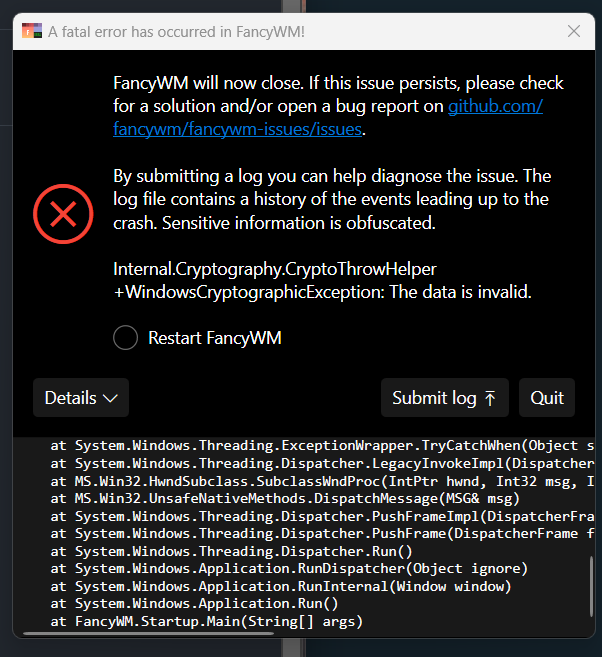
Desktop (please complete the following information): Edition Windows 11 Pro Version 22H2 Installed on 03.10.2022 OS build 22621.755 Experience Windows Feature Experience Pack 1000.22636.1000.0
Additional context There were some windows updates recently.


This issue is stale because it has been open for 14 days with no activity.
![github-actions[bot] avatar](https://avatars.githubusercontent.com/in/15368?v=4 "Published by a pub.dev verified publisher")
This issue was closed because it has been inactive for 14 days since being marked as stale.