

 Fadingvision
Nginx笔记
NGINX笔记
Nginx配置文件结构
Core Contexts:
  Global/Main Context
    Events Context
    HTTP Context
      Upstream Context
      Server Context
        Location Context
    Mail Context
全局变量:
- $host: 请信息中的Host,如果请求中没有Host行,则等于设置的服务器名
- $request_method: 客户端请求类型,如GET、POST
- $remote_addr: 客户端的IP地址
- $args: 请求中的参数
- $content_length: 请求头中的Content-length字段
- $http_user_agen: 客户端agent信息
- $http_cookie: 客户端cookie信息
- $remote_port: 客户端的端口
- $server_protocol: 请求使用的协议,如HTTP/1.0、·HTTP/1.1`
- $server_addr服务器地址
- $server_name: 服务器名称
- $server_port: 服务器的端口号
main: nginx的全局配置,对全局生效。
常用指令:
- include: 用于引入其他的配置文件
- error_log file [level]: 用于指定日志打印的文件位置和日志级别
error_log /var/log/nginx/error.log warn;
- pid file: 用于指定存储主进程的进程id的文件;
# shell命令也可以用于查看nginx进程 ps -ax | grep nginx
pid /var/run/nginx.pid;
- worker_processes number | auto: 用于指定子进程的数量,auto默认为CPU核心的数量;
events: 配置影响nginx服务器或与用户的网络连接。
常用指令:
- worker_connections 8000: 指定一个子进程能够打开的最大的并发连接数量。
服务的最大连接数 = worker_connections * worker_processes;
http: 可以嵌套多个server,配置代理,缓存,日志定义等绝大多数功能和第三方模块的配置。
常用指令:
-
server_tokens off; 表明是否展示response header中的Server字段中的
nginx版本号信息。 -
log_format main '$remote_addr - $remote_user [$time_local] "$request" ' '$status $body_bytes_sent "$http_referer" ' '"$http_user_agent" "$http_x_forwarded_for"'; 标明日志文件的记录格式和信息(main为该格式的名称)。
-
access_log /var/log/nginx/access.log main; 表明记录访问本服务的日志位置和采用的格式名称。
-
keepalive_timeout 20s; 允许每条连接保持闲置的时间,意味着:一个http产生的tcp连接在传送完最后一个响应后,还需要hold住keepalive_timeout秒后,才开始关闭这个连接。一般来说更长的时间更好,特别是对于需要进行加密传输的ssl连接来说,但是更长的时间也意味者连接会保持很长的时间,长时间的tcp连接容易导致系统资源无效占用,如果此时有新的大量连接进来,那么就可能导致连接数过大导致nginx崩溃。
-
sendfile on/off; 指定是否使用sendfile系统调用来传输文件,sendfile系统调用在两个文件描述符之间直接传递数据(完全在内核中操作),从而避免了数据在内核缓冲区和用户缓冲区之间的拷贝,操作效率很高,被称之为零拷贝。
-
map string $variable {...};
map 的主要作用是创建自定义变量,通过使用 nginx 的内置变量,去匹配某些特定规则,如果匹配成功则设置某个值给自定义变量。 而这个自定义变量又可以作于他用。
  # Add X-XSS-Protection for HTML documents.
  # h5bp/security/x-xss-protection.conf
  map $sent_http_content_type $x_xss_protection {
    #         (1)    (2)
    text/html "1; mode=block";
  }

  # Add X-Frame-Options for HTML documents.
  # h5bp/security/x-frame-options.conf
  map $sent_http_content_type $x_frame_options {
    text/html DENY;
  }

  # Add Content-Security-Policy for HTML documents.
  # h5bp/security/content-security-policy.conf
  map $sent_http_content_type "script-src 'self'; object-src 'self'" {
    text/html "script-src 'self'; object-src 'self'";
  }

  # Add Referrer-Policy for HTML documents.
  # h5bp/security/referrer-policy.conf.conf
  map $sent_http_content_type $referrer_policy {
    text/html "no-referrer-when-downgrade";
  }

  # Add X-UA-Compatible for HTML documents.
  # h5bp/internet_explorer/x-ua-compatible.conf
  map $sent_http_content_type $x_ua_compatible {
    text/html "IE=edge";
  }

  # Add Access-Control-Allow-Origin.
  # h5bp/cross-origin/requests.conf
  map $sent_http_content_type $cors {
    # Images
    image/bmp     "*";
    image/gif     "*";
    image/jpeg    "*";
    image/png     "*";
    image/svg+xml "*";
    image/webp    "*";
    image/x-icon  "*";

    # Web fonts
    font/collection               "*";
    application/vnd.ms-fontobject "*";
    font/eot                      "*";
    font/opentype                 "*";
    font/otf                      "*";
    application/x-font-ttf        "*";
    font/ttf                      "*";
    application/font-woff         "*";
    application/x-font-woff       "*";
    font/woff                     "*";
    application/font-woff2        "*";
    font/woff2                    "*";
  }
上面的设置了一些自定义的变量,这些变量会根据发送的content-type来设置对应的变量值。
server:配置虚拟主机的相关参数,一个http中可以有多个server, NGINX可以通过listen和server_name来决定使用哪个server来响应你的请求。
常用指令:
# http
server {
  listen [::]:80 default_server deferred;
  listen 80 default_server deferred;

  server_name _;

  # return 301 https://$host$request_uri;
  # 而且返回了一个nginx特有的,非http标准的返回码444,它可以用来关闭连接。
  return 444;
}
-
root /var/www/example.com/public; 设置静态文件请求的根路径
-
listen: 设置虚拟主机的IP地址和端口
- IP地址端口连写
- 单独的IP地址,端口默认80
- 单独的端口, 默认为0.0.0.0
- none, 默认为0.0.0.0:80
-
server_name: 设置虚拟主机的名称
常见的几种server_name的写法:
server {
    listen [::]:80;
    listen 80;
    server_name example.com;
    ...
}
server {
    listen 80;
    server_name ~^(www|host1).*\.example\.com$;
    ...
}
server {
    listen 80;
    server_name ~^(subdomain|set|www|host1).*\.example\.com$;
    ...
}
server {
    listen 80;
    server_name  ~^(?<user>.+)\.example\.net$;
    ...
}
nginx将会按照下面的原则顺序匹配server_name属性:
- 首先尝试找到请求头部中的
Host字段的值与server_name完全匹配的server block; - 匹配以首通配符开头的server_name
- 匹配以尾通配符结尾的server_name
- 第一个匹配到的用正则表达式描述的server_name(在名字前用~符号表示)
- 如果上述都没有匹配到, nginx选择default_server标识 或者第一个server block作为请求匹配block.
关于选择 www 或非 www URL 作为域名
在一个 HTTP 网址中,在初始 http:// 或 https:// 后的第一个子字符串称为域。它是文档所在的服务器的名称。
一个服务器不一定是一个独立的物理机:几台服务器可以驻留在同一台物理机器上,或者一台服务器可以通过几台机器进行处理,协作处理并响应或负载均衡它们之间的请求。关键点在于语义上一个域名代表一个单独的服务器。
server {
  listen [::]:80;
  listen 80;

  server_name www.example.com;
  # 如果您选择使用非 www 网址为规范类型,你的所有 www 网址都应该被重定向到对应的非 www 网址上。
  return 301 $scheme://example.com$request_uri;
}

server {
  # listen [::]:80 accept_filter=httpready; # for FreeBSD
  # listen 80 accept_filter=httpready; # for FreeBSD
  listen [::]:80;
  listen 80;

  # The host name to respond to
  server_name example.com;

  # Path for static files
  root /var/www/example.com/public;

  # Custom error pages
  include h5bp/errors/custom_errors.conf;

  # Include the basic h5bp config set
  include h5bp/basic.conf;
}
location:配置请求的路由,以及各种页面的处理情况。nginx将会用url来匹配对应的location块,从而选择怎样去处理你的请求。
location optional_modifier location_match {
	...directives
}
optional_modifier:
-
=: 完全匹配 -
~大小写敏感的正则匹配 -
~*: 大小写不敏感的正则匹配 -
^~: 非正则匹配 -
none: 用request url来进行普通的前缀匹配
常用指令:
- index
index index.$geo.html index.0.html /index.html;
autoindex on | off;
- try_files
root /var/www/main;
try_files $uri $uri.html $uri/ /fallback/index.html;
- rewrite
rewrite ^/rewriteme/(.*)$ /$1 last;
一个以/rewriteme/hello的请求会被重定向为/hello的请求,此时location会被重新搜索
- error_page
error_page 404             /404.html;
error_page 500 502 503 504 /50x.html;
upstream:配置上游的服务(例如nodejs, php, java服务)具体地址,负载均衡配置不可或缺的部分。
http {
    upstream myapp1 {
        server srv1.example.com weight=2;
        server srv2.example.com weight=1;
    }

    server {
        listen 80;

        location / {
            proxy_pass http://myapp1;
        }
    }
}

upstream指令定义了一个被代理的服务器的列表,NGINX将会使用负载均衡来决定将请求发送到被代理的服务器上, 权重越大的服务就会被分配越多的连接。
Nginx如何处理一个请求
server {
    listen      192.168.1.1:80;
    server_name example.org www.example.org;
    ...
}

server {
    listen      192.168.1.1:80;
    server_name example.net www.example.net;
    ...
}

server {
    listen      192.168.1.2:80;
    server_name example.com www.example.com;
    ...
}
nginx首先测试请求的IP地址和端口是否匹配某个server配置块中的listen指令配置。接着nginx继续测试请求的Host头是否匹配这个server块中的某个server_name的值。如果主机名没有找到,nginx将把这个请求交给默认虚拟主机处理。例如,一个从192.168.1.1:80端口收到的访问www.example.com的请求将被监听192.168.1.1:80端口的默认虚拟主机处理,本例中就是第一个服务器,因为这个端口上没有定义名为www.example.com的虚拟主机。
默认服务器是监听端口的属性,所以不同的监听端口可以设置不同的默认服务器:
server {
    listen      192.168.1.1:80;
    server_name example.org www.example.org;
    ...
}

server {
    listen      192.168.1.1:80 default_server;
    server_name example.net www.example.net;
    ...
}

server {
    listen      192.168.1.2:80 default_server;
    server_name example.com www.example.com;
    ...
}
HTTPS/HTTP2
此部分的功能由ngx_http_ssl_module模块提供。
server {
  # listen [::]:443 ssl http2 accept_filter=dataready;  # for FreeBSD
  # listen 443 ssl http2 accept_filter=dataready;  # for FreeBSD
  listen [::]:443 ssl http2;
  listen 443 ssl http2;

  # The host name to respond to
  server_name example.com;

  include h5bp/ssl/ssl_engine.conf;
  include h5bp/ssl/certificate_files.conf;
  include h5bp/ssl/policy_intermediate.conf;
}
- ssl_engine
server {
  ssl_session_cache shared:SSL:10m;
  ssl_session_timeout 24h;

  keepalive_timeout 300s;

  ssl_session_tickets off;
  ssl_prefer_server_ciphers on;
}
ssl_session_cache 用于通过缓存SSL的session参数10分钟来减少昂贵的ssl握手,通过开启ssl_session缓存,我们告诉客户端去重用已经存在的session key来进行ssl连接。
1M 的缓存可以保持4000个session, 所以可以开启40000个缓存。
keepalive_timeout 增加连接的活跃时间来减少不必要的重复握手。 ssl_prefer_server_ciphers 指定在使用SSLv3和TLS协议时,服务器密码应优先于客户端密码
- certificate_files
server {
  ssl_certificate /etc/nginx/certs/default.crt;
  ssl_certificate_key /etc/nginx/certs/default.key;
}
ssl_certificate 指定当前虚拟主机所使用的证书文件,会被发送到每个与该服务的客户端,
ssl_certificate_key是私匙,应该被存在一个读写权限控制的文件之中,同时可以被nginx master进程读取。
关于HTTPS/2
公钥是所有人都能获取到的钥匙,私钥则是服务器私自保存的钥匙。非对称加密算法中公钥加密的内容只能用私钥解密,私钥加密的内容则只有公钥才能解密。
客户端利用ssl握手得到的公钥用非对称加密算法加密出一个对称密钥给服务端,服务端用她的私钥读取对称密钥,然后就用这个对称密钥来做对称加密双方的消息。
为了防止公钥在传送过程中被调包,所以引入数字证书。TLS 的身份认证是通过证书信任链完成的,浏览器从站点证书开始递归校验父证书,直至出现信任的根证书(根证书列表一般内置于操作系统,浏览器自己维护)。站点证书是在 TLS 握手阶段,由服务端发送的。
HTTPS通信流程:
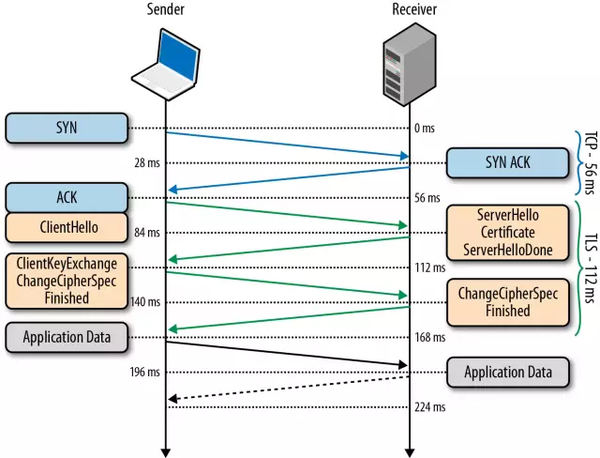
- 客户端发送Client Hello报文开始SSL通信,报文中包含SSL版本、可用算法列表、密钥长度等。
- 服务器支持SSL通信时,会以Server Hello报文作为应答,报文中同样包括SSL版本以及加密算法配置,也就是协商加解密算法。
- 服务端将自己的证书下发给客户端,让客户端验证自己的身份,发送Certificate报文,也就是将上述配置的ssl_certificate发送给客户端。
- 客户端发送Client Key Exchange报文,使用3中的证书公钥加密Pre-master secret随机密码串,后续就以这个密码来做对称加密进行通信。
- 服务器使用私钥解密成功后返回一个响应提示SSL通信环境已经搭建好了。然后就是常规的http c/s通信。
- policy_intermediate
server {
  ssl_protocols TLSv1.2;
  ssl_ciphers EECDH+CHACHA20:EECDH+AES;
}
ssl_protocols 和 ssl_ciphers 用于限制TLS(传输层安全协议)指定版本和指定加密算法的链接。
HTTP/1.x 客户端需要使用多个连接才能实现并发和缩短延迟;HTTP/1.x 不会压缩请求和响应标头,从而导致不必要的网络流量;HTTP/1.x 不支持有效的资源优先级,致使底层 TCP 连接的利用率低下; 因此与 HTTP/1.1 相比,HTTP/2 的主要变化在于性能提升。HTTP 方法、状态代码、URI 和标头字段等核心概念一如往常。因此升级到HTTP2并不需要网站管理者做额外的处理。
- 多路复用,减少tcp的连接
- 压缩标头,
- 服务端推送
安全
add_header 用于在http状态码非20x 或者 30x的时候向http response header添加字段,如果用了always参数,则会无视状态码。
$variables 为map定义的变量,根据content-type值变化。
http {
  # Content-Security-Policy减少跨站脚本和内容注入的攻击风险,只允许本站的脚本和其他资源运行加载
  add_header Content-Security-Policy "script-src 'self'; object-src 'self'" always;

  # No Referrer When Downgrade:仅当发生协议降级(如 HTTPS 页面引入 HTTP 资源,从 HTTPS 页面跳到 HTTP 等)时不发送 Referrer 信息。这个规则是现在大部分浏览器默认所采用的;
  add_header Referrer-Policy $referrer_policy always;

  # 它告诉浏览器所有的子域只能通过HTTPS访问当前资源,而不是HTTP
  add_header Strict-Transport-Security "max-age=16070400; includeSubDomains" always;

  # X-Content-Type-Options 响应首部相当于一个提示标志,被服务器用来提示客户端一定要遵循在 Content-Type 首部中对  MIME 类型 的设定,而不能对其进行修改。这就禁用了客户端的 MIME 类型嗅探行为
  add_header X-Content-Type-Options nosniff always;

  #  X-Frame-Options HTTP 响应头是用来给浏览器指示允许一个页面可否在 <frame>, <iframe> 或者 <object> 中展现的标记。DENY 表示该页面不允许在 frame 中展示,即便是在相同域名的页面中嵌套也不允许。该header可用于防止点击劫持
  add_header X-Frame-Options $x_frame_options always;

  #  X-XSS-Protection 响应头是Internet Explorer,Chrome和Safari的一个功能,当检测到跨站脚本攻击 (XSS)时,浏览器将停止加载页面。
  # 1;mode=block: 启用XSS过滤。 如果检测到攻击,浏览器将不会清除页面,而是阻止页面加载。
  add_header X-XSS-Protection $x_xss_protection always;
}

http {
  # 表明是否展示response header中的Server字段中的`nginx`版本号信息。
  server_tokens off;
}

server {
  # 防止敏感文件信息的暴露
  location ~* (?:#.*#|\.(?:bak|conf|dist|fla|in[ci]|log|orig|psd|sh|sql|sw[op])|~)$ {
    deny all;
  }
}
跨域CORS
跨域资源共享标准新增了一组 HTTP 首部字段,允许服务器声明哪些源站通过浏览器有权限访问哪些资源。另外,规范要求,对那些可能对服务器数据产生副作用的 HTTP 请求方法(特别是 GET 以外的 HTTP 请求,或者搭配某些 MIME 类型的 POST 请求),浏览器必须首先使用 OPTIONS 方法发起一个预检请求(preflight request),从而获知服务端是否允许该跨域请求。服务器确认允许之后,才发起实际的 HTTP 请求。在预检请求的返回中,服务器端也可以通知客户端,是否需要携带身份凭证(包括 Cookies 和 HTTP 认证相关数据)。"预检请求“的使用,可以避免跨域请求对服务器的用户数据产生未预期的影响。
其他CORSheader的含义:
Access-Control-Allow-Methods: POST, GET, OPTIONS Access-Control-Allow-Headers: X-PINGOTHER, Content-Type Access-Control-Max-Age: 86400 Access-Control-Allow-Credentials: true
首部字段 Access-Control-Allow-Methods 表明服务器允许客户端使用 POST, GET 和 OPTIONS 方法发起请求。该字段与 HTTP/1.1 Allow: response header 类似,但仅限于在需要访问控制的场景中使用。
首部字段 Access-Control-Allow-Headers 表明服务器允许请求中携带字段 X-PINGOTHER 与 Content-Type。与 Access-Control-Allow-Methods 一样,Access-Control-Allow-Headers 的值为逗号分割的列表。
最后,首部字段 Access-Control-Max-Age 表明该响应的有效时间为 86400 秒,也就是 24 小时。在有效时间内,浏览器无须为同一请求再次发起预检请求。请注意,浏览器自身维护了一个最大有效时间,如果该首部字段的值超过了最大有效时间,将不会生效。
Access-Control-Allow-Credentials表示是否允许客户端发送cookie等身份认证信息,表示如果服务端的响应中缺失 Access-Control-Allow-Credentials: true信息,则浏览器不会将响应内容返回给请求的发起者。
http {
  # 所有的图片和字体文件允许跨域访问
  map $sent_http_content_type $cors {
    # Images
    image/bmp     "*";
    image/gif     "*";
    image/jpeg    "*";
    image/png     "*";
    image/svg+xml "*";
    image/webp    "*";
    image/x-icon  "*";

    # Web fonts
    font/collection               "*";
    application/vnd.ms-fontobject "*";
    font/eot                      "*";
    font/opentype                 "*";
    font/otf                      "*";
    application/x-font-ttf        "*";
    font/ttf                      "*";
    application/font-woff         "*";
    application/x-font-woff       "*";
    font/woff                     "*";
    application/font-woff2        "*";
    font/woff2                    "*";
  }

  add_header Access-Control-Allow-Origin $cors;
}

#
# Wide-open CORS config for nginx
#
location / {
  if ($request_method = 'OPTIONS') {
    add_header 'Access-Control-Allow-Origin' '*';
    add_header 'Access-Control-Allow-Methods' 'GET, POST, OPTIONS';
    #
    # Custom headers and headers various browsers *should* be OK with but aren't
    #
    add_header 'Access-Control-Allow-Headers' 'DNT,User-Agent,X-Requested-With,If-Modified-Since,Cache-Control,Content-Type,Range';
    #
    # Tell client that this pre-flight info is valid for 20 days
    #
    add_header 'Access-Control-Max-Age' 1728000;
    add_header 'Content-Type' 'text/plain; charset=utf-8';
    add_header 'Content-Length' 0;
    return 204;
  }
  if ($request_method = 'POST') {
    add_header 'Access-Control-Allow-Origin' '*';
    add_header 'Access-Control-Allow-Methods' 'GET, POST, OPTIONS';
    add_header 'Access-Control-Allow-Headers' 'DNT,User-Agent,X-Requested-With,If-Modified-Since,Cache-Control,Content-Type,Range';
    add_header 'Access-Control-Expose-Headers' 'Content-Length,Content-Range';
  }
  if ($request_method = 'GET') {
    add_header 'Access-Control-Allow-Origin' '*';
    add_header 'Access-Control-Allow-Methods' 'GET, POST, OPTIONS';
    add_header 'Access-Control-Allow-Headers' 'DNT,User-Agent,X-Requested-With,If-Modified-Since,Cache-Control,Content-Type,Range';
    add_header 'Access-Control-Expose-Headers' 'Content-Length,Content-Range';
  }
}
代理
server {
  listen       80;
  server_name  fe.server.com;
  location /remoteapp {
    proxy_set_header   Host             $host:$server_port;
    proxy_set_header   X-Real-IP        $remote_addr;
    proxy_set_header   X-Forwarded-For  $proxy_add_x_forwarded_for;
    proxy_pass http://remoteAPIServer/;
  }

  location /api/v1/ {
    proxy_pass https://remoteAPIServer/api/v1/;
    proxy_http_version 1.1;
    proxy_set_header Upgrade $http_upgrade;
    proxy_set_header Connection 'upgrade';
    proxy_set_header Host $host;
    proxy_cache_bypass $http_upgrade;
    proxy_redirect http:// https://;
  }
}
proxy_pass将会把你的请求发送到对应的被代理的服务器上。 proxy_set_header: 设置发送到服务器上的额外header. proxy_redirect: 代理重定向,将服务器上的重定向修改为https之后返回给客户端。
websocket 代理
http {
  map $http_upgrade $connection_upgrade {
      default upgrade;
      '' close;
  }
  # real websocket server
  upstream websocket {
      server 192.168.100.10:8010;
  }
  server {
      listen 8020;
      location / {
          proxy_pass http://websocket;
          proxy_http_version 1.1;
          # enable NGINX to properly handle the WebSocket protocol.
          proxy_set_header Upgrade $http_upgrade;
          proxy_set_header Connection $connection_upgrade;
      }
  }
}
压缩
# 开启gzip压缩
gzip on;

# 压缩级别 (1-9).
# 5 is a perfect compromise between size and CPU usage, offering about
# 75% reduction for most ASCII files (almost identical to level 9).
# Default: 1
gzip_comp_level 5;

# Don't compress anything that's already small and unlikely to shrink much
# if at all (the default is 20 bytes, which is bad as that usually leads to
# larger files after gzipping).
# 最小的可压缩数据,默认是20,通常会压缩出更大的数据,所以限制为256
# Default: 20
gzip_min_length 256;

# Compress data even for clients that are connecting to us via proxies,
# identified by the "Via" header (required for CloudFront).
# Default: off
gzip_proxied any;

# Tell proxies to cache both the gzipped and regular version of a resource
# whenever the client's Accept-Encoding capabilities header varies;
# Avoids the issue where a non-gzip capable client (which is extremely rare
# today) would display gibberish if their proxy gave them the gzipped version.
# Default: off
gzip_vary on;

# 压缩的数据类型。
# text/html is always compressed by gzip module.
# Default: text/html
gzip_types
  application/atom+xml
  application/javascript
  application/json
  application/ld+json
  application/manifest+json
  application/rss+xml
  application/geo+json
  application/vnd.ms-fontobject
  application/x-web-app-manifest+json
  application/xhtml+xml
  application/xml
  application/rdf+xml
  font/otf
  application/wasm
  image/bmp
  image/svg+xml
  text/cache-manifest
  text/css
  text/javascript
  text/plain
  text/markdown
  text/vcard
  text/calendar
  text/vnd.rim.location.xloc
  text/vtt
  text/x-component
  text/x-cross-domain-policy;
缓存
map $sent_http_content_type $expires {
  default                               1M;

  # CSS
  text/css                              1y;

  # Data interchange
  application/atom+xml                  1h;
  application/rdf+xml                   1h;
  application/rss+xml                   1h;

  application/json                      0;
  application/ld+json                   0;
  application/schema+json               0;
  application/geo+json                  0;
  application/xml                       0;
  text/calendar                         0;
  text/xml                              0;

  # Favicon (cannot be renamed!) and cursor images
  image/vnd.microsoft.icon              1w;
  image/x-icon                          1w;

  # HTML
  text/html                             0;

  # JavaScript
  application/javascript                1y;
  application/x-javascript              1y;
  text/javascript                       1y;

  # Manifest files
  application/manifest+json             1w;
  application/x-web-app-manifest+json   0;
  text/cache-manifest                   0;


  # Markdown
  text/markdown                         0;

  # Media files
  audio/ogg                             1M;
  image/bmp                             1M;
  image/gif                             1M;
  image/jpeg                            1M;
  image/png                             1M;
  image/svg+xml                         1M;
  image/webp                            1M;
  video/mp4                             1M;
  video/ogg                             1M;
  video/webm                            1M;

  # WebAssembly
  application/wasm                      1y;

  # Web fonts
  font/collection                       1M;
  application/vnd.ms-fontobject         1M;
  font/eot                              1M;
  font/opentype                         1M;
  font/otf                              1M;
  application/x-font-ttf                1M;
  font/ttf                              1M;
  application/font-woff                 1M;
  application/x-font-woff               1M;
  font/woff                             1M;
  application/font-woff2                1M;
  font/woff2                            1M;

  # Other
  text/x-cross-domain-policy            1w;
}

expires $expires;
expires 用于开启或禁止Expires和Cache-Control响应头,且只能在http状态码为200, 201 (1.3.10), 204, 206, 301, 302, 303, 304, 307 (1.1.16, 1.0.13), or 308 (1.13.0)时生效,参数可以为正数或者负数。
header中Expires的值是由指定的时间和当前时间相加得到。 Cache-Control的值取决于指定的时间,如果时间为负,则cache-control被设置为no-cache,如果为0或者正数,则设置为max-age为该时间。
常用的其它时间单位
ms # 毫秒 s # 秒 m # 分钟 h # 小时 d # 天 w # 星期 M # 月(30d) y # 年(365d)
日志
常用的日志用access_log, error_log.
可以定义不同的日志格式为不同的日志类型使用:
# Default main log format from nginx repository:
log_format main
                '$remote_addr - $remote_user [$time_local] "$request" '
                '$status $body_bytes_sent "$http_referer" '
                '"$http_user_agent" "$http_x_forwarded_for"';

# Extended main log format:
log_format main-level-0
                '$remote_addr - $remote_user [$time_local] '
                '"$request_method $scheme://$host$request_uri '
                '$server_protocol" $status $body_bytes_sent '
                '"$http_referer" "$http_user_agent" '
                '$request_time';

# Debug log formats:
log_format debug-level-0
                '$remote_addr - $remote_user [$time_local] '
                '"$request_method $scheme://$host$request_uri '
                '$server_protocol" $status $body_bytes_sent '
                '$request_id $pid $msec $request_time '
                '$upstream_connect_time $upstream_header_time '
                '$upstream_response_time "$request_filename" '
                '$request_completion';

log_format debug-level-1
                '$remote_addr - $remote_user [$time_local] '
                '"$request_method $scheme://$host$request_uri '
                '$server_protocol" $status $body_bytes_sent '
                '$request_id $pid $msec $request_time '
                '$upstream_connect_time $upstream_header_time '
                '$upstream_response_time "$request_filename" $request_length '
                '$request_completion $connection $connection_requests';

log_format debug-level-2
                '$remote_addr - $remote_user [$time_local] '
                '"$request_method $scheme://$host$request_uri '
                '$server_protocol" $status $body_bytes_sent '
                '$request_id $pid $msec $request_time '
                '$upstream_connect_time $upstream_header_time '
                '$upstream_response_time "$request_filename" $request_length '
                '$request_completion $connection $connection_requests '
                '$server_addr $server_port $remote_addr $remote_port';
最佳实践
- 用include来组织你的配置文件
- 分别监听80和443端口
- 阻止未定义server names的请求连接
# Place it at the beginning of the configuration file to prevent mistakes.
server {

  # Add default_server to your listen directive in the server that you want to act as the default.
  listen 10.240.20.2:443 default_server ssl;

  # We catch invalid domain names, requests without the "Host" header and all others (also due to the above setting).
  server_name _ "" default_server;

  ...

  return 444;

  # We can also serve:
  # location / {

    # static file (error page):
    # root /etc/nginx/error-pages/404;
    # or redirect:
    # return 301 https://badssl.com;

    # return 444;

  # }

}
- 通过map来定义大量的重定向
map $http_user_agent $device_redirect {

  default "desktop";

  ~(?i)ip(hone|od) "mobile";
  ~(?i)android.*(mobile|mini) "mobile";
  ~Mobile.+Firefox "mobile";
  ~^HTC "mobile";
  ~Fennec "mobile";
  ~IEMobile "mobile";
  ~BB10 "mobile";
  ~SymbianOS.*AppleWebKit "mobile";
  ~Opera\sMobi "mobile";

}
# 将来自移动端的请求重定向到移动站点
if ($device_redirect = "mobile") {
  return 301 https://m.domain.com$request_uri;
}
-
尽量在server全局内使用root指令而不是为每个location block分别使用root
-
通过设置ssl_session_cache来减少多次ssl握手带来的额外时间和资源消耗
ssl_session_cache shared:SSL:10m;
ssl_session_timeout 24h;
ssl_session_tickets off;
ssl_buffer_size 1400;
- 用无特权的用户来运行nginx,但需要保证该用户拥有nginx运行所需要的权限,例如读写日志文件。
但是主进程必须由root来启动,因为一般来说只有root用户才能监听小于1024的端口号(例如常用的80或者443端口)
# Edit nginx.conf:
user www-data;

# Set owner and group for root (app, default) directory:
chown -R www-data:www-data /var/www/domain.com
- 保护敏感资源的权限不能被外部的请求随意读取
if ($request_uri ~ "/\.git") {
  return 403;
}

# or
location ~ /\.git {
  deny all;
}

# or
location ~* ^.*(\.(?:git|svn|htaccess))$ {
  return 403;
}

# or all . directories/files excepted .well-known
location ~ /\.(?!well-known\/) {
  deny all;
}
- 隐藏上游服务器的敏感header
proxy_hide_header X-Powered-By;
proxy_hide_header X-AspNetMvc-Version;
proxy_hide_header X-AspNet-Version;
proxy_hide_header X-Drupal-Cache;
- 只允许TSL(1.2+)协议的ssl握手连接。因为ssl协议以及TSL1.0都存在安全漏洞。TSL1.0以及TS1.1协议都会被在2020年从浏览器中移除。
ssl_protocols TLSv1.2;

# For TLS 1.3
ssl_protocols TLSv1.2 TLSv1.3;
工具
reference
https://github.com/trimstray/nginx-quick-reference#online-tools
https://github.com/h5bp/server-configs-nginx
https://github.com/fcambus/nginx-resources
understanding-the-nginx-configuration-file-structure-and-configuration-contexts
What is HTTP/2 – The Ultimate Guide
