
search.nvim
 search.nvim copied to clipboard
 FabianWirth
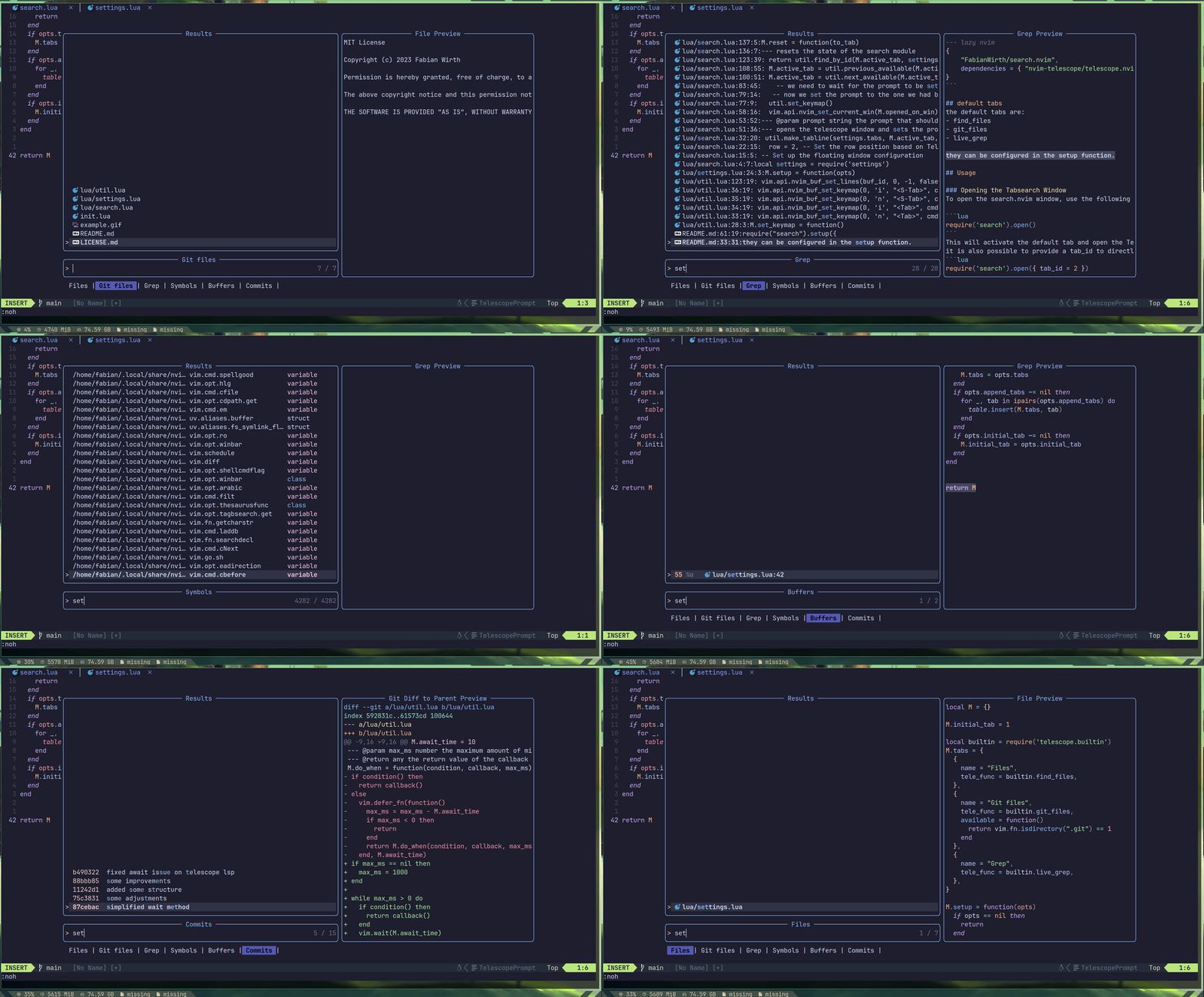
nvim plugin that adds tabs for telescope search
search.nvim
"search.nvim is a Neovim plugin that enhances the functionality of the Telescope plugin by providing a tab-based search experience. It allows you to seamlessly switch between different search modes within the Telescope window using tabs" - ChatGPT
[!WARNING] this plugin is in early development and might have some bugs. You can also expect changes to the configuration api.
Features
- Tab-based Searching: Easily switch between different search modes, each represented by a tab.
- Integration with Telescope: Leverages the power of the Telescope plugin for versatile searching.
- Customizable Tabs: Configure the available tabs according to your preferences. (coming soon)
- keybindings for switching tabs: switch tabs by configurable keys
Installation
Install search.nvim using your preferred plugin manager. For example:
--- lazy nvim
{
    "FabianWirth/search.nvim",
    dependencies = { "nvim-telescope/telescope.nvim" }
}
default tabs
the default tabs are:
- find_files
- git_files
- live_grep
they can be configured in the setup function.
Usage
Opening the Tabsearch Window
To open the search.nvim window, use the following command:
require('search').open()
This will activate the default tab and open the Telescope window with the specified layout. it is also possible to provide a tab_id or tab_name to directly activate a specific tab (id takes precedence over name). Any tab collections defined can also be accessed via the collection key.
require('search').open({ tab_id = 2 })
require('search').open({ tab_name = 'Grep' }) -- if multiple tabs are named the same, the first is selected
require('search').open({ collection = 'git' }) -- Open the 'git' collection of pickers
Switching Tabs
Navigate between tabs using the <Tab> and <S-Tab> keys in normal and insert modes. This allows you to switch between different search modes conveniently.
Customizing Tabs
You can customize the available tabs by modifying the tabs table in the plugin configuration. Each tab should be defined as a Lua table with the following properties:
- name: Display name of the tab.
- tele_func: The Telescope function associated with the tab.
- available (optional): A function to determine if the tab is currently available based on certain conditions. For example:
local builtin = require('telescope.builtin')
require("search").setup({
  mappings = { -- optional: configure the mappings for switching tabs (will be set in normal and insert mode(!))
    next = "<Tab>",
    prev = "<S-Tab>"
  },
  append_tabs = { -- append_tabs will add the provided tabs to the default ones
    {
      "Commits", -- or name = "Commits"
      builtin.git_commits, -- or tele_func = require('telescope.builtin').git_commits
      available = function() -- optional
        return vim.fn.isdirectory(".git") == 1
      end
    }
  },
  -- its also possible to overwrite the default tabs using the tabs key instead of append_tabs
  tabs = {
    {
      "Files",
      function(opts)
        opts = opts or {}
        if vim.fn.isdirectory(".git") == 1 then
          builtin.git_files(opts)
        else
          builtin.find_files(opts)
        end
      end
    }
  },
})
Customizing key bindings
Simple rebind, will bind the the keys in both normal mode and insert mode.
  mappings = {
    next = "<Tab>",
    prev = "<S-Tab>"
  }
You can also bind keys in specific modes by supplying a list of key-mode pairs. The following would bind H and L to previous and next in normal mode in addition to binding tab and shift+tab like in the example above.
  mappings = {
    next = { { "L", "n" }, { "<Tab>", "n" }, { "<Tab>", "i" } },
    prev = { { "H", "n" }, { "<S-Tab>", "n" }, { "<S-Tab>", "i" } }
  }
Tab Collections
If you want to group certain pickers together into separate search windows you can use the collections keyword:
local builtin = require('telescope.builtin')
require("search").setup({
  initial_tab = 1,
  tabs = { ... }, -- As shown above
  collections = {
    -- Here the "git" collection is defined. It follows the same configuraton layout as tabs.
    git = {
      initial_tab = 1, -- Git branches
      tabs = {
        { name = "Branches", tele_func = builtin.git_branches },
        { name = "Commits", tele_func = builtin.git_commits },
        { name = "Stashes", tele_func = builtin.git_stash },
      }
    }
  }
})
known issues
- pickers with more-than-average loading time (like lsp related, or http sending pickers) can feel a bit off, since the UI will wait for them to be ready.
- heavily custom configured telescope settings (like in many nvim distros) might lead to unexpected errors, please open an issue if you encounter any.
- A window with no available pickers can cause neovim to hang.
License
This plugin is licensed under the MIT License. See the LICENSE file for details.
Happy searching with search.nvim! 🚀
Metadata
Owner
 FabianWirth
Metadata
nvim plugin that adds tabs for telescope search