

 Expensify
Share extension is not opening the app when I have shared some content - IOS
Hello, I have created an RN project with this template, I was able to implement the share extension in Android and IOS, but in IOS when I try to share an URL from a website instead of open the app the share extension is opening the browser with this URL in my local machine, I have checked that groups are right in the IOS capabilities, and I think that the info.plist and appDelegate.m is correct because the share extension appears when I try to share content.
any idea?

I am experiencing a similiar problem. I have followed the instructions and it is working on android. I can see my app in the Share Menu. But when I click on my app then it only opens the main page of my app and inserts the shared data. It doesn't open the custom screen which it should since I followed all the instructions.
Even worse on iOS, I can see my app in the Share menu but when I click on my app nothing happens and no data is passed to my app either.

@crystalii I'm facing the same issue on ios, no data is passed to my app. Not getting the callback from the listener

Hello, I have created an RN project with this template, I was able to implement the share extension in Android and IOS, but in IOS when I try to share an URL from a website instead of open the app the share extension is opening the browser with this URL in my local machine, I have checked that groups are right in the IOS capabilities, and I think that the info.plist and appDelegate.m is correct because the share extension appears when I try to share content.
any idea?
I'm having the same issue. Android works fine but on iOS share function opens a shared link on my local machine.

Fixed by deleting initial ShareViewController.swift from ShareExtension folder, and copying a new ShareViewController.swift file from node-modules/react-native-share-menu/ios/ShareViewController.swift.
That step has been explained in the docs, but I missed it previously.

Fixed by deleting initial
ShareViewController.swiftfrom ShareExtension folder, and copying a newShareViewController.swiftfile fromnode-modules/react-native-share-menu/ios/ShareViewController.swift.That step has been explained in the docs, but I missed it previously.
did you get the next error when you implemented the ShareViewController?
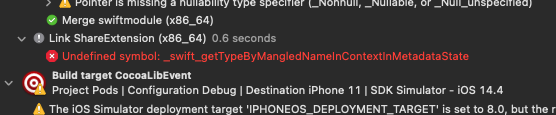
did you get the next error when you implemented the ShareViewController?
Nope. After that, everything worked well. Perhaps you should check this issue, it could be related.
For the moment I wasn't able to build successfully in IOS, I have tried to import ShareViewController from react-native-share-menu, and also I have tried with a custom empty ShareViewController but I have the same problem related to the previous comment. Ping @caiosba in case that know what could happens
Okay I have fixed the problem on my part. I created a new project by npx react-native init, and followed the instructions carefully. I can now share on my iPhone and I also receive the custom share menu view.
@crystalii can you help me check what's problem that i'm missing in config? Now i can share file and show custom share view. But when i press "continue in app" it bring me to my app but i'm not get any data in function ShareMenu.addNewShareListener) or ShareMenu.getInitialShare.
