
PSWriteHTML

PSWriteHTML copied to clipboard
 EvotecIT
Question: New-tableheader --> cell-border-style
Hello,
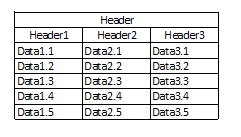
is it possible to set a cell-border-style in new-tableheader? The same what you can do in excel? Then it is little bit easier to see which cells are belongs together. At the moment I set a background color to show this.
Here an example from excel what i mean


Here's some new functionality in 0.0.130. But it's not exactly what you wanted, but maybe sufficient.
$Table = Get-Process | Select-Object -First 3
New-HTML -ShowHTML -HtmlData {
    New-HTMLTable -DataTable $table -HideButtons {
        New-HTMLTableStyle -FontFamily 'Calibri' -BackgroundColor Yellow -TextColor Aquamarine -TextAlign center -Type RowOdd
        New-HTMLTableStyle -BackgroundColor Red -TextColor Aquamarine -Type Button
        New-HTMLTableStyle -FontFamily 'Calibri' -BackgroundColor DarkSlateGray -TextColor Aquamarine -TextAlign center -Type RowEven
        New-HTMLTableStyle -FontFamily 'Calibri' -BackgroundColor DarkSlateGray -TextColor Aquamarine -TextAlign center -Type Row
        New-HTMLTableStyle -FontFamily 'Calibri' -BackgroundColor DarkSlateGray -TextColor Aquamarine -TextAlign center -Type Header
        New-HTMLTableStyle -FontFamily 'Calibri' -BackgroundColor Orange -TextColor Aquamarine -TextAlign center -Type Footer
        New-HTMLTableStyle -FontFamily 'Calibri' -BackgroundColor Orange -TextColor Aquamarine -TextAlign center -Type RowSelectedEven
        New-HTMLTableStyle -FontFamily 'Calibri' -BackgroundColor Green -TextColor Aquamarine -TextAlign center -Type RowSelectedOdd
        New-HTMLTableStyle -FontFamily 'Calibri' -BackgroundColor Yellow -TextColor Aquamarine -TextAlign center -Type RowHover
        New-HTMLTableStyle -FontFamily 'Calibri' -BackgroundColor Red -TextColor Aquamarine -TextAlign center -Type RowHoverSelected
        New-HTMLTableStyle -Type Header -BorderLeftStyle dashed -BorderLeftColor Red -BorderLeftWidthSize 1px
        New-HTMLTableStyle -Type Footer -BorderLeftStyle dotted -BorderLeftColor Red -BorderleftWidthSize 1px
        New-HTMLTableStyle -Type Footer -BorderTopStyle none -BorderTopColor Red -BorderTopWidthSize 5px -BorderBottomColor Yellow -BorderBottomStyle solid
        New-HTMLTableStyle -Type Footer -BorderTopStyle none -BorderTopColor Red -BorderTopWidthSize 5px -BorderBottomColor Yellow -BorderBottomStyle solid
        New-HTMLTableStyle -Type Footer -BorderTopStyle none -BorderTopColor Red -BorderTopWidthSize 5px -BorderBottomColor Yellow -BorderBottomStyle none
    } -DisablePaging
} -FilePath $PSScriptRoot\Example7_TableStyle.html -Online
It should now work fine with the new version. I've also added multiple other customization options.
Wow, goooood job. Looks good for the first tries. 3 problems what i see at the moment.
- i made a new-htmltablestyle in new-htmltable but is is applied to all tables (here i tried to apply it only on the second table)
- -borderbottomstyle seems to be not visible correctly, when before the real table starts
- border right is set for column 1, border left is set for column 2. in the middle you have the double size then
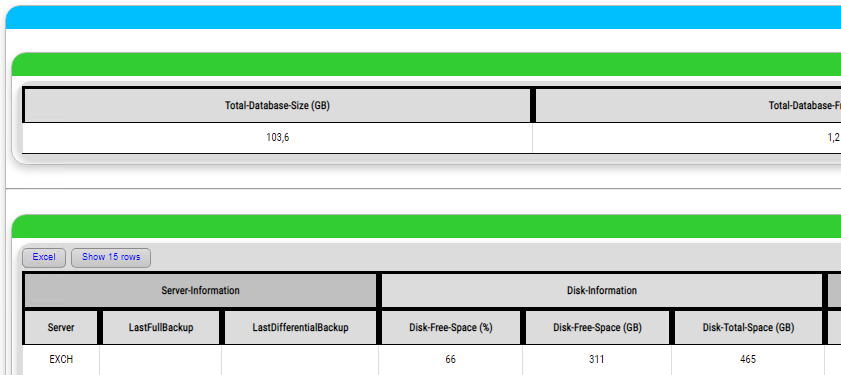
i still playing around a little