

 EsotericSoftware
Exceptions
Hi, thanks for creating this helpful utility. I too find it unacceptable that the proprietary software does not fully function for Windows 10. The volume control of this app works as intended, but the brightness is never set properly. I'm getting these two errors in the console whilst in debug mode.
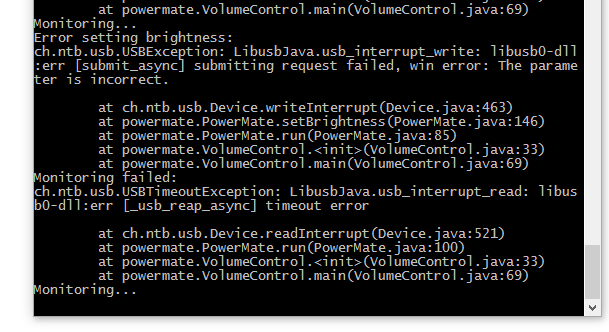

I'm not sure what that error is about, sorry. Both USB and PowerMate are pretty terrible. All I can say is that it was working with my knob and software config, so the writeInterrupt call should be correct:
https://github.com/EsotericSoftware/powermate/blob/master/src/powermate/PowerMate.java#L146
Are you sure you are using the libusb-win32 driver via Zadig? Described here:
https://github.com/EsotericSoftware/powermate#installation
I've since given up on the PowerMate knob, now I use a Zoom UAC-2, which is a nice looking DAC that has both a big system volume knob and a small headphones volume knob. I don't use the two instrument inputs.

Thanks for your response! I am indeed using the libusb-win32 driver (I wouldn't presume rotation control functions without it). I'm curious where you found the documentation for interfacing with the Powermate USB knob. The only reference I can find online is the open source (but unofficial) Linux drivers written in C.
It's been a while, I honestly can't remember. You might check here: http://thammer.net/?p=374
To directly control the LED brightness, you can use the WriteReport method of the HidDevice class. Like this:
byte[] data = new byte[2];
data[0] = 0;
data[1] = (byte)brightness;
HidReport report = new HidReport(2, new HidDeviceData(data,    HidDeviceData.ReadStatus.Success));
device.WriteReport(report);
If that is similar to what I'm doing, you could try adding a 0:
dev.writeInterrupt(2, new byte[] {0, (byte)(0xff * brightness)}, 1, brightnessTimeout, false);
I figured out that there might be two versions of the PowerMate, the newer (version 2), is what I have. I managed to scoop up some documentation online, and got the following code to work:
public void setBrightness (int brightness) {
		if (dev == null) return;
		if (brightness < 0 || brightness > 255) {
			throw new IllegalArgumentException("Illegal brightness: " + brightness);
		}

		try {
			dev.controlMsg(
					// Request type
					USB.REQ_TYPE_DIR_HOST_TO_DEVICE
					| USB.REQ_TYPE_RECIP_INTERFACE
					| USB.REQ_TYPE_TYPE_VENDOR,

					// Request
					0x01,

					// Value = command type
					0x0001,

					// Index = brightness
					brightness,

					// Data (dummy buffer)
					new byte[0],

					// Length
					0,

					// Timeout (ms)
					BRIGHTNESS_TIMEOUT,

					// Reopen on timeout
					true);
		} catch (USBTimeoutException ex) {
			return;
		} catch (USBException ex) {
			// TODO: This seems to always throw, disable for now
			//LOGGER.log(Level.SEVERE, "Error setting brightness", ex);
		}

		this.brightness = brightness;
This still throws exceptions (as can be seen above), but the brightness is set correctly.
I still have one more question before closing this. What do you use to build this project into an executable? I have installed ResourceHacker and JSmooth already. I think I just need to build the project.yaml file now.
Thanks for your help!
Good find! If you want to make a PR so it works with both PowerMate versions, I'd merge it.
I build it using Scar: https://github.com/EsotericSoftware/scar It's a trivial build though and could be done with Gradle or whatever.