
pkgi
 pkgi copied to clipboard
 ErikPshat
A PlayStation 3 package download tool
PKGi PS3 RUS MOD



PKGi PS3 это порт для PlayStation 3 от PSVita pkgi.
Хоумбрю приложение pkgi-ps3 позволяет загружать и устанавливать файлы .pkg прямо на вашу PS3.
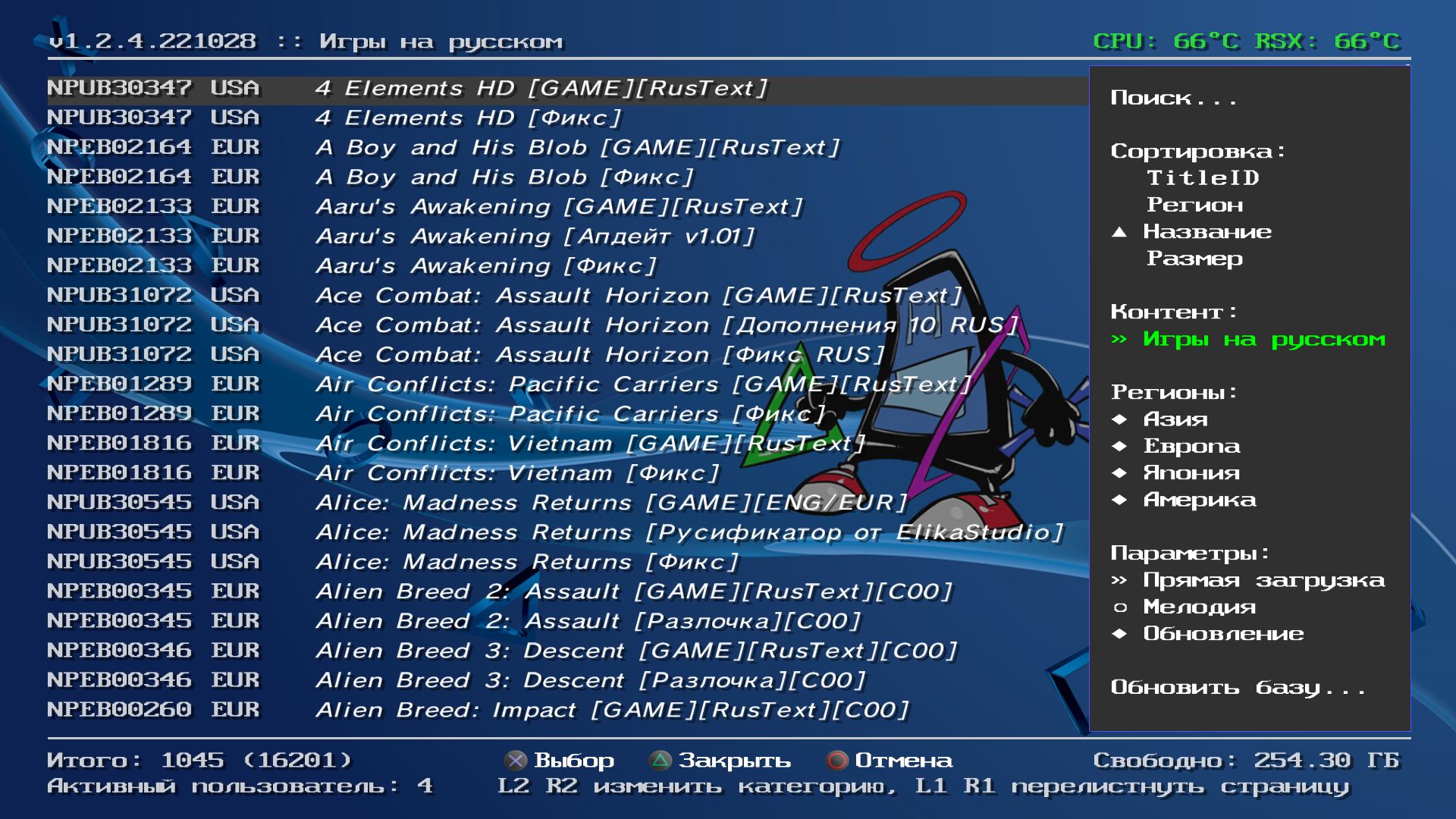
Комментарии, идеи, предложения? Вы можете отписаться мне всегда в теме на форуме.
Особенности
- лёгок в использовании список доступных загрузок, включая поиск, фильтрацию и сортировку.
- автономный: ПК не требуется, все происходит прямо на PS3.
- автоматические загрузки: просто выберите элемент, и он будет загружен приложением на ваш жесткий диск (
прямая загрузка) или поставлен в очередь (фоновая загрузка) с помощью внутреннего диспетчера загрузки. - возобновляет прерванные загрузки: вы можете остановить загрузку в любое время, переключать приложения и вернуться позже, чтобы возобновить загрузку.
- активация контента: приложение может генерировать файлы
.rifдля загруженного контента (система должна быть активирована)
Примечания:
- постановка в очередь загрузка нескольких игр поддерживается только при использовании режима
фоновая загрузка. - фоновые задачи загрузки появится только после перезагрузки PS3.
Скачать
Получить последнюю версию здесь.
Журнал изменений
Смотрите последние изменения здесь.
Инструкция по установке
Вам необходимо создать файл pkgi.txt в каталоге /dev_hdd0/game/NP00PKGI3/USRDIR, содержащий элементы, доступные для установки.
Формат текстовой базы данных настраивается пользователем. Проверьте эту секцию, чтобы узнать, как определить свой собственный формат базы данных.
Несколько баз данных
Вы можете загружать дополнительные файлы базы данных:
pkgi_apps.txtpkgi_avatars.txtpkgi_cheats.txtpkgi_demos.txtpkgi_dlcs.txtpkgi_games.txtpkgi_minis.txtpkgi_ps1.txtpkgi_ps2.txtpkgi_russian.txtpkgi_themes.txtpkgi_tunings.txt
Элементы каждого из этих файлов будут автоматически классифицированы по типу содержимого файла. Примечание: Приложение предполагает, что каждый файл базы данных имеет один и тот же формат, как определено в dbformat.txt.
Online DB update
Вы можете обновить и синхронизировать онлайн-базу данных, добавив БД URL-адреса в файл config.txt по пути /dev_hdd0/game/NP00PKGI3/USRDIR.
Для примера:
url http://www.mysite.com/mylist.csv
url_tunings http://www.myapp.com/tunings.csv
url_emulators http://www.example.com/emulators.csv
При настройках в данном примере выше:
pkgi.txtбудет обновлён изmylist.csvpkgi_tunings.txtбудет обновлён изtunings.csvpkgi_emulators.txtбудет обновлён изemulators.csv
Когда вы откроете приложение в следующий раз, у вас будет дополнительный пункт меню  под названием Обновить. Когда вы выберете его, локальные базы данных будут синхронизированы с определенными URL-адресами.
DB formats
The application needs a text database that contains the items available for installation, and it must follow the default format definition, or have a custom format definition file.
Default DB format
The default database file format uses a very simple CSV format where each line means one item in the list:
contentid,type,name,description,rap,url,size,checksum
where:
| Column | Description |
|---|---|
contentid |
is the full content id of the item, for example: UP0000-NPXX99999_00-0000112223333000. |
type |
is a number for the item's content type. See the table below for details. (set it to 0 if unknown) |
name |
is a string for the item's name. |
description |
is a string for the item's description. |
rap |
the 16 hex bytes for a RAP file, if needed by the item (.rap files will be created on /dev_hdd0/exdata). Leave empty to skip the .rap file. |
url |
is the HTTP/HTTPS/FTP/FTPS URL where to download the .pkg file. |
size |
is the size in bytes of the .pkg file, or 0 if unknown. |
checksum |
is a SHA256 digest of the .pkg file (as 32 hex bytes) to make sure the file is not tampered with. Leave empty to skip the check. |
Note: name and description cannot contain newlines or commas.
Sample DB file
An example pkgi.txt file following the contentid,type,name,description,rap,url,size,checksum format:
EP0000-NP9999999_00-0AB00A00FR000000,0,My PKG Test,A description of my pkg,dac109e963294de6cd6f6faf3f045fe9,http://192.168.1.1/html/mypackage.pkg,2715513,afb545c6e71bd95f77994ab4a659efbb8df32208f601214156ad89b1922e73c3
UP0001-NP00PKGI3_00-0000000000000000,0,PKGi PS3 v0.1.0,,,http://bucanero.heliohost.org/pkgi.pkg,284848,3dc8de2ed94c0f9efeafa81df9b7d58f8c169e2875133d6d2649a7d477c1ae13
Content types
| Type value | Content type |
|---|---|
| 0 | Все |
| 1 | Игры из регионов |
| 2 | Игры на русском |
| 3 | Игры PS2 для PS3 |
| 4 | Игры PS1 для PS3 |
| 5 | miniS для PS3 |
| 6 | Дополнения DLC |
| 7 | Темы оформления |
| 8 | Аватары |
| 9 | Демо |
| 10 | Приложения |
| 11 | Тюнинг |
| 12 | Читы к играм |
| 13 | Обновления |
User-defined DB format
To use a custom database format, you need to create a dbformat.txt file, and save it on /dev_hdd0/game/NP00PKGI3/USRDIR.
The dbformat.txt definition file is a 2-line text file:
- Line 1: the custom delimiter character (e.g.:
;,,,|, etc.) - Line 2: the column names for every column in the custom database, delimited by the proper delimiter defined in line 1
Note: For the columns to be properly recognized, use the column tag names defined in the table above.
All the columns are optional. Your database might have more (or less) columns, so any unrecognized column will be skipped.
Example
Example dbformat.txt, for a database using semi-colon (;) as separator:
;
name;TITLE ID;REGION;description;AUTHOR;TYPE;url;rap;size
Result: only the name,description,url,rap,size fields will be used.
Example
Example dbformat.txt, for a database using character pipe (|) as separator:
|
REGION|TITLE|name|url|rap|contentid|DATE|PKG FILENAME|size|checksum
Result: only the name,url,rap,contentid,size,checksum fields will be used.
Usage
Using the application is simple and straight-forward:
- Move UP/DOWN to select the item you want to download, and press
 .
. - To see the item's details, press
 .
. - To sort/filter/search press .
It will open the context menu. Press again to confirm the new settings, or press
 to cancel any changes.
 - Press left or right trigger buttons L1/R1 to move pages up or down.
- Press L2/R2 trigger buttons to switch between categories.
Notes
- RAP data: if the item has
.rapdata, the file will be saved in the/dev_hdd0/exdata/folder.
Q&A
-
Where to get a
rapstring?You can use a tool like RIF2RAP to generate a
.rapfrom your existing.riffiles. Then you can use a tool likehexdumpto get the hex byte string. -
Where to get
.pkglinks?You can use PSDLE to find
.pkgURLs for the games you own. Then either use the original URL, or host the file on your own web server. -
Where to remove interrupted/failed downloads to free up disk space?
Check the
/dev_hdd0/tmp/pkgifolder - each download will be in a separate.pkgfile by its title id. Simply delete the file and start again. -
Download speed is too slow!
Optimization is still pending. If
directdownload is slow, you can usebackground downloadmode to download files using the internal PS3 Download Manager.
Credits
- Bucanero: Project developer
- mmozeiko: PS Vita pkgi
Building
You need to have installed:
- PS3 toolchain
- PSL1GHT SDK
- Tiny3D library
- YA2D library (an extended version from my repo)
- PolarSSL library (v1.3.9)
- libcurl library (v7.64.1)
- MikMod library
- Mini18n library
- dbglogger library (only required for debug logging)
Run make to create a release build. After that, run make pkg to create a .pkg install file.
You can also set the environment variable PS3LOAD=tcp:x.x.x.x to the PS3's IP address;
that will allow you to use make run and send pkgi-ps3.self directly to the PS3LoadX listener.
Debugging
To enable debug logging, build PKGi PS3 with make DEBUGLOG=1. The application will send debug messages to
UDP multicast address 239.255.0.100:30000. To receive them you can use socat on your PC:
$ socat udp4-recv:30000,ip-add-membership=239.255.0.100:0.0.0.0 -
License
pkgi-ps3 is released under the MIT License.
 ErikPshat