

 Epicalable
Consider trying the PySimpleGUI UserSettings API calls for your JSON access
Last October a new set of calls was added to PySimpleGUI.... the UserSettings APIs.
https://pysimplegui.readthedocs.io/en/latest/#user-settings-api
As more information is saved by PySimpleGUI programs, including the global settings used by PySimpleGUI itself, it was clear that users, including the PySimpleGUI project, could benefit from a simplified interface to JSON files.
You'll find it's used in a number of demo programs now and I use it a lot in my own programs.
With these APIs, you don't need to worry about doing loads and saves of the JSON file. The API calls will do that for you.
This simplified access enables you to load defaults straight into your layout.
For example, I used the class-based interface to them to load a list of white-listed users using these 2 lines of code.
First is simply creating the UserSetting object.
config_settings = sg.UserSettings(LOCAL_CONFIG)
Then in my layout, I have this Multiline element:
[sg.Multiline( '\n'.join(config_settings.get('whitelist', [''])), s=(80,10), k='-WHITELIST-')]
It created a Multiline element like this this in my window:

If you want to save something into one of these settings files, it's this line of code:
config_settings['whitelist'] = values['-WHITELIST-'].rstrip().split('\n')
I get the value from the Multiline element, strip to remove whitespace, then split using '\n' to get a list of users.
Because I'm using the class-interface to the UserSettings in this example, I can change and save an item in the JSON as if the object is a dictionary.
I dunno... maybe it'll save you a bit of coding.
For simple programs where there's only 1 settings file that I'm using, I use the function-interface rather than the class-interface.
Nice job on this repo! Keep on building stuff!!

Thank you for your contribution I shall learn from the docs and look into integrating it into my repo

Quite welcome. It seems like it may help you save some code, but I didn't study your code enough to truly know. You'll have to be the final judge of that. Something to be said for code that's in place and working like your code is now. Maybe it's not worth the change on this project, but rather may be a good thing to look at for the next one.

I just realized from your readme that you're running an older PySimpleGUI version that does not have the User Settings APIs in it. You'll need to move to a newer version.
The last few releases have been particularly good as the graph anywhere functionality had a nice improvement, etc. There should be little risk to your project to move to a newer version.
4.35.0 appears to be the minimal version number needed for the User Settings API.
Hi, i was wondering if it is possible to add more chat options to the json? and if so how?. i tried to but it just kept saying I'm evolving. just was curious, i am new to coding if you can't tell lol and wanted to know if it was possible. I looked at the code and (as far as i could tell) there was no like i am a cultured man in the code not counting the json. i am not trying to like really mess with it just wanted to add more chat options. i know this was made a while ago, but any help would be very appreciated. thank you.

I'm not sure about adding options. But you could potentially mix the json access. It would be unusual, but it's possible I suppose if you wanted to leave the existing code. I've not looked at your code to be sure, but in theory a program that reads and writes json should work with PySimpleGUI's UserSettings.
The way I typically use them is that I do not specify a filename nor location for the json file. PySimpleGUI will automatically place it in the system folder typically used for settings. I end up just using the settings straight away. PySimpleGUI deals with the reading and writing of the file for you. The only operations you need to perform are to the individual settings themselves.
Yesterday I wrote a program that has a settings window and a settings file.
This is that window.
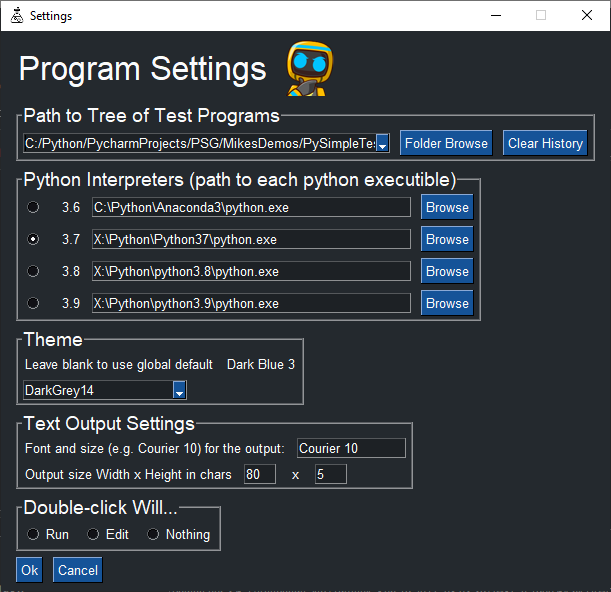
Looking only at the theme setting, this is the line in the layout for the Combo: sg.Combo(['']+sg.theme_list(),sg.user_settings_get_entry('-theme-', ''), readonly=True, k='-THEME-')
The user setting is the second parameter which is the default value. This call sg.user_settings_get_entry('-theme-', '') reads a setting called '-theme-'. In the json file, there will be an entry with the key named '-theme-'. The call reads that key. If it's not in the file, then the value '' is returned (the second parm of the call).
The way the settings APIs are designed is that they are meant to look like Python dictionaries. With a dictionary, you call a get method that returns the value, or if the value isn't in the dictionary, a default is returned. User Settings are used like a Python dictionary.... you can get and set and that's basically all there is. When the setting window closes (if the OK button clicked), then the value chosen for the theme is stored in the json file by calling the set method:
sg.user_settings_set_entry('-theme-', values['-THEME-'])
There are a number of Demo Programs and there is a section in the documentation about this feature. It's not important that you switch. It is mentioned so you know it's there for future projects if it's not good for this one.
No big deal to use or not use them. Just keep making stuff... that's the important part

NOT AN ISSUE I was wondering if for a future update you could add, like a "image reader?" in the Jarintents. like you can put a photo in it and it appears in on GUI box? if that is possible. and maybe in a future update, you could add wolfram alpha. really nice job.
I don't understand the specific request. If you've got an enhancement request that you think fits PySimpleGUI, you're welcome to open an enhancement request issue HTTP://Issues.PySimpleGUI.org or use the GUI built into PySimpleGUI to open one.
You can easily display an image in a PySimpleGUI GUI. I don't know anything about wolfram alpha.