

 EasyRPG
"Show Text" in parallel-common events ignores faceset and draws over it if an autorun-ce is also running.
Happens only with text in common events, not with map events.
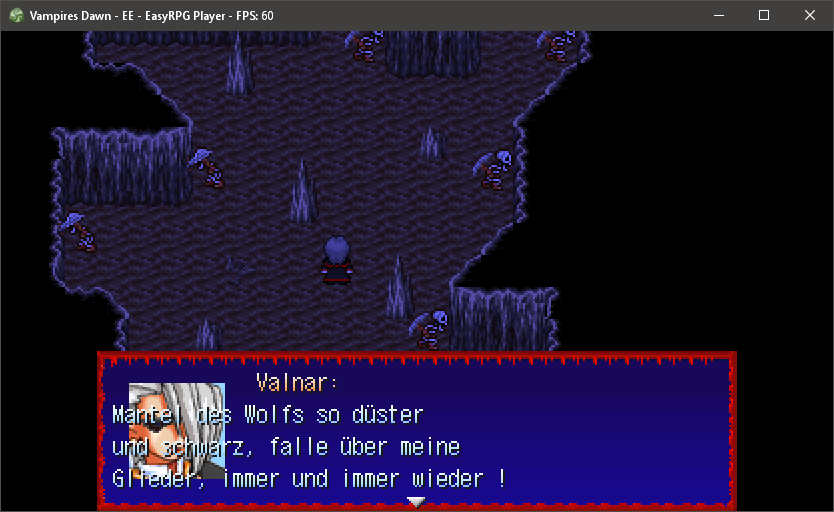
Tested it in 16:9 and 4:3, happens in both screen modes
EDIT: Noticed, that the first line of text (the name) aligns itself next to the faceset, only the following lines ignore it

can you upload a savegame?
I don't think the observation "is a common event" is the only problem here. Likely some race condition with some other event. There is no logic difference in handling of messages from CEs

Did some more tests. Seems my modded game is the issue. When I use the same savegame in a unmodded version it works.
But there is a difference between rpg_rt and player.exe in those broken common event messages: The messages that look broken in player.exe don't show the faceset in rpg_rt at all (even tough a face is set in the event) and the text incl. the colored name is aligned left.
This could be the same as #2432 where cherry documents a weird face clearing bug in parallel processes
Yes, its the same as the above mentioned issue.
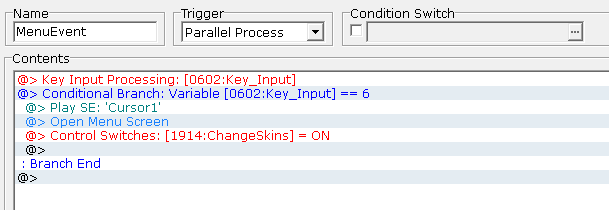 In my modded version I implemented a manual menu call, so after it is closed I can check for changed equipped items and change the charset skins of the hero and his followers. It's not the menu call but the "ChangeSkins=ON" Switch, which starts an Autorun-Event.
When I put a "Wait: 0.0s" in front of the "Parallel Process"-Common Event that calls the Messagebox it fixes the problem.
Very Likely related to this:
I have a rare timing issue in my game "Urban Purrrge", where the text indentation is suddenly reset, so that the text is drawn over the face graphic:
But in the vast majority of cases this prints normally:
Not a common event in this case, but a parallel process running on the map. To clarify: This message command is actually called by a parallel process, not by the foreground interpreter or an player action. The event for the sheep is set to register Player Touch events & the actual processing of "Decision Logic" is handled by a parallel process that periodically checks the key input & -when the decision key is pressed-, executes the 2nd event page of certain events that might be in front of the player...
EDIT: I updated my code, so that the CallEvent command is pushed to the foreground interpreter. So this will be fixed in an updated version of the game.
