EasyRPG
Maniac's Loop doesn't work properly
Tested under continuous build for Windows.
I'm not sure if the operation is correct or if it's my mistake, in any case I'll open a ticket and explain it in detail:
Event in parallel processing with a while loop whose condition is that the variable nº 1, is 1 or more for it to be processed. I understand that when it is not fulfilled, this loop "auto-breaks".
I am establishing a subtraction of 1 inside the loop itself. As soon as the value is 0 or less, it does not break the loop. For the sake of clarity, here is an example project. Everything important is in the event in the top-left corner.
Thank you.

Update; it seems to be the normal behaviour of the new types of Loops, if I alter the behaviour of the loop variable FROM the loop itself, it doesn't work as I expect, to make it work I need infinite loop + conditional branch.
The loops
- N times
- Count Up
- Count Down
obtain the value when the loop starts and do not reevaluate it.
If you want that the value is evaluated every time you must use:
- While
- Do while (like while but executes at least once)
Then code like this will work:
SetVariable V[1] = 3
Loop While V[1] > 0
  SetVariable V[1] = V[1] - 1
Repeat Loop
This loop will run 3 times.

Just checked your code.
You are already doing this. Yeah this looks like a bug :sweat_smile:
Thank you.
The behaviour is the same in RPG_RT and Player is running it the same. I just thought it was weird that I couldn't alter the loop variable itself. Maybe it's a direct bug in Maniacs.
The problem is that Maniac Patch support is not enabled in the Player.
For this you need a file called "accord.dll" in the game directory. The file can be empty.
(Sorry for that bad detection logic, we will need something better...)
When the file is in then the While-Loop works as expected.
But now the roulette rotation is broken :thinking:
Maybe our angle implementation is wrong but as far as I know the angle is in degree and obtained with the following formula:
Angle 1 / Angle 2. For your Show Picture you do stuff like 342 / 162 which is ~2.
Can't get your game to launch with Maniac Patch so cannot check if our code is wrong here.
Edit: Works after repatching: Is broken in the same way.
So what you want is Angle 2 being 0 or 1 (when 0 it uses 1) and an Angle 1 of 0 - 360.
To make the rotation work you could use this code for Common Event 2 (RutetaGiro)
@> Control Variables: V[0006] = V[0004:Gajo]
@> Control Variables: V[0006] *= 15
@> Show Picture: 1, ruleta, (110, 120), 100%, 0%, M6, B0, RGBS(100,100,100,100)
@> Call Event: Common[0005:Tiempo]
The Angle for the Picture is:
Angle 1: Variable 6 Angle 2: Constant 1
Thank you Ghabry.
In EasyRPG Editor, for the constants of the angles maybe you could get a visual positioner, I just comment this and I don't mess more the part of Player with Editor. 😅
Finally I think there is no bug here, your implementation is correct. Everything must have been generated because in the project, as @Ghabry pointed out, there is no Maniacs .dll.
I don't know why it hasn't been generated, that's the real mystery. I don't know if it's because I created the project with the normal 2k3 and updated it to Maniacs or if it's a one-off bug.
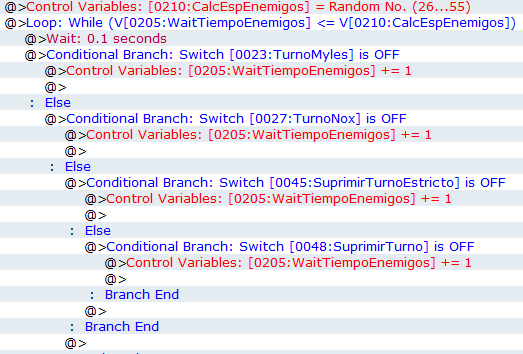
In another project I'm using the new loops and making comparisons between variables and here EasyRPG is interpreting it well: