

 EXERLOG
UI behavior with multiple workouts logged for the same day
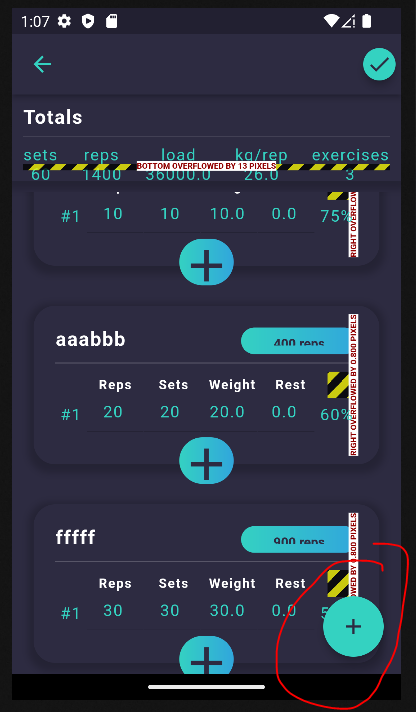
Problem: When multiple workouts are logged for the same day, there is no indication on the day (or the subsequent page when the day is clicked) that there is more than one workout logged. It appears that the subsequent page (set_widget) only displays that last workout information.
Should each workout on the same day be displayed on the same page, one after the other?
Should the Totals data at the top be a grand total of all workouts?

There is a (+) button at the bottom right, allowing to add additional workouts for the same day.
The problem raised in the previous comment is when a new workout is started on the same day when there's already a previously logged workaround.
The solution should probably be to check and load previous workouts for the same day when a new workout is started?
@ckelwin Is calendar working for you? After adding a work out if you go back to calendar page and click on the date, does it take you anywhere? If not, then what are we supposed to do with calendar?
CC: @KalleHallden

Yeah this is something I haven't gotten around to. But I think a good way would be that if there are multiple workouts for the same day on the calendar and it is clicked then a popup window could appear showing a list of only the workout names, if a name exists, otherwise it can show just the workout date or something. I'm not sure about the best way, I feel like taking the user to a workout page with all the workouts after each other in full view might be a bit unclear. Let me know what you think

@dinurymomshad that sounds like a bug to me or something that hasn't been set up properly by me. When I've tested the app previously that use case has worked. So I'm not sure if I've broken something since or if it's just an edge case. Either way it will need to be fixed. Would you mind creating an issue with the label bug and describing the error a bit more?
Trying to understand the terminologies. Clicking on a day from the calendar brings us to the screen shown in my screenshot above. In that example, I created 3 workouts (?) (second and third named aaabbb and fffff). Imagine this is one session in the morning at the gym and someone is doing 3 different exercises. In the evening, he goes again and does 2 other workouts, D and E.
How would you want to visualize 'this day'?
- there were 2 gym sessions
- first session had 3 workouts/exercises
- second session had 2
Originally, I was thinking the screen that appears after clicking on a day represents the list of workouts that was logged for that day. Which is why I suggested to then show all 5 workouts for that day on the same screen (only workouts of the same day, not combining from other days). If we need to split them into two (?) then there needs to be an intermediate step/screen.
@ckelwin yeah this is actually a case that I haven't thought about before you mentioned it. So I don't have a great answer or plan for how to display this in a useful and efficient way for the user.
I'm thinking that if there are more workouts than one on a particular day then we may need the intermediate step/screen always. if workouts_on_day > 1: show a list like this
- name A 9:22AM
- name B 5:30PM
Something like that so that the user can then choose which one of the workouts of that day that they want to look at. And there could also be an option to "view all" where the user would see all the workouts for that day on the same page. Maybe separated with a line and time of workout or something like that
----------- 5:30 PM ------------
This issue has been automatically marked as stale because it has not had recent activity. It will be closed if no further activity occurs. Thank you for your contributions.
![stale[bot] avatar](https://avatars.githubusercontent.com/in/1724?v=4 "Published by a pub.dev verified publisher")